ComfyUI Workflows
Browse real AI workflows from Flux, SDXL, Pony, ControlNet, video generation and commercial AI creators.
Seamless video join (loop) with Wan 2.1 VACE
Workflow for seamlessly joining two video clips or for making loop from a single video clip

Wan2.1 Upscaler + FrameGen
My 4steps workflow without promt. I use it for scaling and generating frames in video on my rx 6800xt graphics card.Scaling and generating frames for a 33-frame video takes between ~160 and ~480 seconds depending on resolution after the models are fully loaded. The models are small so it doesn't take long.It's not as fast, but it provides good quality.All required models download:Kijai-Wan2.1-T2V-1.3BCausVid 13B loraumt5_xxl_fp8_e4m3fn_scaledWan_2.1_vaeFor v2.0 download any upscale model you like from here upscalersRequired custom nodes:ComfyUI-KJnodesVideoHelperSuiteComfiUI-Frame-Interpolation
DITTO — ultra-simple video redraw with one-click Ghibli and multiple nested styles
🎥 YouTube Video TutorialWant to know what this workflow actually does and how to start fast?This video explains what the tool is, how to launch the workflow instantly, and shares my core design logic — no local setup, no complicated environment. Everything starts directly on RunningHub, so you can experience it in action first.👉 YouTube Tutorial:https://youtu.be/EgWlkQq2fgMBefore you begin, I recommend watching the video thoroughly — getting the full context helps you understand the tool faster and avoid common detours.⚙️ RunningHub WorkflowTry the workflow online right now — no installation required.👉 Workflow:https://www.runninghub.ai/post/1980577959260147714/?inviteCode=rh-v1111If the results meet your expectations, you can later deploy it locally for customization.🎁 Fan Benefits:Register to get 1000 points + daily login 100 points — enjoy 4090 performance and 48 GB super power!📺 Bilibili Updates (Mainland China & Asia-Pacific)If you’re in the Asia-Pacific region, you can watch the video below to see the workflow demonstration and creative breakdown.📺 Bilibili Video:https://www.bilibili.com/video/BV1JTsazNEWE/☕ Support Me on Ko-fiIf you find my content helpful and want to support future creations, you can buy me a coffee ☕.Every bit of support helps me keep creating — just like a spark that can ignite a blazing flame.👉 Ko-fi:https://ko-fi.com/aiksk💼 Business ContactFor collaboration or inquiries, please contact aiksk95 on WeChat.🎥 YouTube 视频教程想了解这个工作流到底是怎样的工具,以及如何快速启动?视频主要介绍 工具定位、快速启动方法 和 我的构筑思路。我们会直接在 RunningHub 上进行演示,让你第一时间看到实际效果。👉 YouTube 教程:https://youtu.be/EgWlkQq2fgM开始前建议尽量完整地观看视频 —— 把握整体思路会更快上手,也能少走常见弯路。⚙️ 在线体验工作流现在就可以在线体验,无需安装。👉 工作流:https://www.runninghub.ai/post/1980577959260147714/?inviteCode=rh-v1111打开上方链接即可直接运行该工作流,实时查看生成效果。如果觉得效果理想,你也可以在本地进行自定义部署。🎁 粉丝福利:注册即送 1000 积分,每日登录 100 积分,畅玩 4090 体验 48 G 超级性能!📺 Bilibili 更新(中国大陆及南亚太地区)如果你在中国大陆或南亚太地区,可以通过下方视频查看该工作流的实测效果与构思讲解。📺 B站视频:https://www.bilibili.com/video/BV1JTsazNEWE/我会在 夸克网盘 持续更新模型资源:👉 https://pan.quark.cn/s/20c6f6f8d87b这些资源主要面向本地用户,方便进行创作与学习。
Flash VSR video super-resolution
🎥 YouTube Video TutorialWant to know what this workflow actually does and how to start fast?This video explains what the tool is, how to launch the workflow instantly, and shares my core design logic — no local setup, no complicated environment. Everything starts directly on RunningHub, so you can experience it in action first.👉 YouTube Tutorial:https://youtu.be/4MXsqE1uYL4Before you begin, I recommend watching the video thoroughly — getting the full context helps you understand the tool faster and avoid common detours.⚙️ RunningHub WorkflowTry the workflow online right now — no installation required.👉 Workflow:https://www.runninghub.ai/post/1979451793736372225/?inviteCode=rh-v1111If the results meet your expectations, you can later deploy it locally for customization.🎁 Fan Benefits:Register to get 1000 points + daily login 100 points — enjoy 4090 performance and 48 GB super power!📺 Bilibili Updates (Mainland China & Asia-Pacific)If you’re in the Asia-Pacific region, you can watch the video below to see the workflow demonstration and creative breakdown.📺 Bilibili Video:https://www.bilibili.com/video/BV1RoWxzkEoc/☕ Support Me on Ko-fiIf you find my content helpful and want to support future creations, you can buy me a coffee ☕.Every bit of support helps me keep creating — just like a spark that can ignite a blazing flame.👉 Ko-fi:https://ko-fi.com/aiksk💼 Business ContactFor collaboration or inquiries, please contact aiksk95 on WeChat.🎥 YouTube 视频教程想了解这个工作流到底是怎样的工具,以及如何快速启动?视频主要介绍 工具定位、快速启动方法 和 我的构筑思路。我们会直接在 RunningHub 上进行演示,让你第一时间看到实际效果。👉 YouTube 教程:https://youtu.be/4MXsqE1uYL4开始前建议尽量完整地观看视频 —— 把握整体思路会更快上手,也能少走常见弯路。⚙️ 在线体验工作流现在就可以在线体验,无需安装。👉 工作流:https://www.runninghub.ai/post/1979451793736372225/?inviteCode=rh-v1111打开上方链接即可直接运行该工作流,实时查看生成效果。如果觉得效果理想,你也可以在本地进行自定义部署。🎁 粉丝福利:注册即送 1000 积分,每日登录 100 积分,畅玩 4090 体验 48 G 超级性能!📺 Bilibili 更新(中国大陆及南亚太地区)如果你在中国大陆或南亚太地区,可以通过下方视频查看该工作流的实测效果与构思讲解。📺 B站视频:https://www.bilibili.com/video/BV1RoWxzkEoc/我会在 夸克网盘 持续更新模型资源:👉 https://pan.quark.cn/s/20c6f6f8d87b这些资源主要面向本地用户,方便进行创作与学习。
EchoShot – Cross-Shot Consistency
🎥 YouTube Video TutorialWant to know what this workflow actually does and how to start fast?This video explains what the tool is, how to launch the workflow instantly, and shares my core design logic — no local setup, no complicated environment.Everything starts directly on RunningHub, so you can experience it in action first.👉 YouTube Tutorial: https://youtu.be/iCRIV5un1REBefore you begin, I recommend watching the video thoroughly — getting the full context helps you understand the tool faster and avoid common detours.⚙️ RunningHub WorkflowTry the workflow online right now — no installation required.👉 Workflow: https://www.runninghub.ai/post/1949779565657899010/?inviteCode=rh-v1111If the results meet your expectations, you can later deploy it locally for customization.🎁 Fan Benefits:Register to get 1000 points + daily login 100 points — enjoy 4090 performance and 48 GB super power!📺 Bilibili Updates (Mainland China & Asia-Pacific)If you’re in the Asia-Pacific region, you can watch the video below to see the workflow demonstration and creative breakdown.📺 Bilibili Video: https://www.bilibili.com/video/BV1hw8EzfEvL/☕ Support Me on Ko-fiIf you find my content helpful and want to support future creations, you can buy me a coffee ☕.Every bit of support helps me keep creating — just like a spark that can ignite a blazing flame.👉 Ko-fi: https://ko-fi.com/aiksk💼 Business ContactFor collaboration or inquiries, please contact aiksk95 on WeChat.🎥 YouTube 视频教程想了解这个工作流到底是怎样的工具,以及如何快速启动?视频主要介绍 工具定位、快速启动方法 和 我的构筑思路。我们会直接在 RunningHub 上进行演示,让你第一时间看到实际效果。👉 YouTube 教程: https://youtu.be/iCRIV5un1RE开始前建议尽量完整地观看视频 —— 把握整体思路会更快上手,也能少走常见弯路。⚙️ 在线体验工作流现在就可以在线体验,无需安装。👉 工作流: https://www.runninghub.ai/post/1949779565657899010/?inviteCode=rh-v1111打开上方链接即可直接运行该工作流,实时查看生成效果。如果觉得效果理想,你也可以在本地进行自定义部署。🎁 粉丝福利:注册即送 1000 积分,每日登录 100 积分,畅玩 4090 体验 48 G 超级性能!📺 Bilibili 更新(中国大陆及南亚太地区)如果你在中国大陆或南亚太地区,可以通过下方视频查看该工作流的实测效果与构思讲解。📺 B站视频: https://www.bilibili.com/video/BV1hw8EzfEvL/我会在 夸克网盘 持续更新模型资源:👉 https://pan.quark.cn/s/20c6f6f8d87b这些资源主要面向本地用户,方便进行创作与学习。
Video Upscale - WAN-VACE & SeedVR2
🎥 YouTube Video TutorialWant to know what this workflow actually does and how to start fast?This video explains what the tool is, how to launch the workflow instantly, and shares my core design logic — no local setup, no complicated environment.Everything starts directly on RunningHub, so you can experience it in action first.👉 YouTube Tutorial: https://youtu.be/ZpUzE7oNElkBefore you begin, I recommend watching the video thoroughly — getting the full context helps you understand the tool faster and avoid common detours.⚙️ RunningHub WorkflowTry the workflow online right now — no installation required.👉 Workflow: https://www.runninghub.ai/post/1943461331997499394/?inviteCode=rh-v1111If the results meet your expectations, you can later deploy it locally for customization.🎁 Fan Benefits:Register to get 1000 points + daily login 100 points — enjoy 4090 performance and 48 GB super power!📺 Bilibili Updates (Mainland China & Asia-Pacific)If you’re in the Asia-Pacific region, you can watch the video below to see the workflow demonstration and creative breakdown.📺 Bilibili Video: https://www.bilibili.com/video/BV1ubuGzsECW/☕ Support Me on Ko-fiIf you find my content helpful and want to support future creations, you can buy me a coffee ☕.Every bit of support helps me keep creating — just like a spark that can ignite a blazing flame.👉 Ko-fi: https://ko-fi.com/aiksk💼 Business ContactFor collaboration or inquiries, please contact aiksk95 on WeChat.🎥 YouTube 视频教程想了解这个工作流到底是怎样的工具,以及如何快速启动?视频主要介绍 工具定位、快速启动方法 和 我的构筑思路。我们会直接在 RunningHub 上进行演示,让你第一时间看到实际效果。👉 YouTube 教程: https://youtu.be/ZpUzE7oNElk开始前建议尽量完整地观看视频 —— 把握整体思路会更快上手,也能少走常见弯路。⚙️ 在线体验工作流现在就可以在线体验,无需安装。👉 工作流: https://www.runninghub.ai/post/1943461331997499394/?inviteCode=rh-v1111打开上方链接即可直接运行该工作流,实时查看生成效果。如果觉得效果理想,你也可以在本地进行自定义部署。🎁 粉丝福利:注册即送 1000 积分,每日登录 100 积分,畅玩 4090 体验 48 G 超级性能!📺 Bilibili 更新(中国大陆及南亚太地区)如果你在中国大陆或南亚太地区,可以通过下方视频查看该工作流的实测效果与构思讲解。📺 B站视频: https://www.bilibili.com/video/BV1ubuGzsECW/我会在 夸克网盘 持续更新模型资源:👉 https://pan.quark.cn/s/20c6f6f8d87b这些资源主要面向本地用户,方便进行创作与学习。

Unilumos Video Relighting V1

Unilumos+FlashVSR Super-Resolution Video Relighting V1
You can click on the link below and try it out directly. If the effect is good, you can deploy it locallyhttps://www.runninghub.cn/post/1988176085563170817/?inviteCode=rh-v1121Fan benefits, register to get 1000 points, daily login 100 points, play 4090! Experience the super power of 48G!B-site video: https://www.bilibili.com/video/BV1Lzk2BhEvB/Knowledge Planet: https://t.zsxq.com/7F90AGraphic tutorial: https://t.zsxq.com/lNK8vThe workflow is very simple to use, and I have uploaded a tutorial on how to use it on YouTube. You can try it out and follow the tutorial and Civitai's workflow to easily reproduce the results. Thank you. If you have any other questions, please leave a comment in the comment sectionThis tutorial is very important, not watching it will surely lead to a lot of problems! Watch the video tutorial before trying !!!! Very important! Especially a key point at the end!

Unilumos+ Single-Image Background Character Integration + FlashVSR Super-Resolution Video Relighting V1
You can click on the link below and try it out directly. If the effect is good, you can deploy it locallyhttps://www.runninghub.cn/post/1988230649322586114/?inviteCode=rh-v1121Fan benefits, register to get 1000 points, daily login 100 points, play 4090! Experience the super power of 48G!B-site video: https://www.bilibili.com/video/BV1Lzk2BhEvB/Knowledge Planet: https://t.zsxq.com/7F90AGraphic tutorial: https://t.zsxq.com/lNK8vThe workflow is very simple to use, and I have uploaded a tutorial on how to use it on YouTube. You can try it out and follow the tutorial and Civitai's workflow to easily reproduce the results. Thank you. If you have any other questions, please leave a comment in the comment sectionThis tutorial is very important, not watching it will surely lead to a lot of problems! Watch the video tutorial before trying !!!! Very important! Especially a key point at the end!
Friendly FLASHVSR Video Super-Resolution
Welcome to my 💫🔼 Friendly FLASHVSR Super-Resolution✨ Less mess, more magic🆕 FLASHVSR v1.1 support added - enhanced stability + fidelity⚡FLASHVSR is a new single-step 4K video upscaler that restores detail even without increasing resolution. It also works with long videos more than 1 minute length. Topaz Starlight now has a strong competitor! According to the developers, the upscaler can generate in real time on an Nvidia A100. This is all thanks to its unique architecture and a modified Wan 1.3b model.At the same time, it runs quite fast even on low-end graphics cards and offers flexible settings.Video upscaling to 4K works even with 10 GB of video memory! (tested on the 7-second video).📌 6GB of VRAM and 32GB RAM (tested on RTX 4050 Laptop) are sufficient for operation, but the more the better.If you have 16GB+ VRAM use 4x upscale for better qualityFor less than 12GB VRAM 2x upscale recommended for first run, and 2x upscale again after. Finally it will be 4K video. 2x upscale is much lighter even with high resolution input videosFor Low VRAM use mode "tiny" and "tiny long" (for long videos). You can use "full" mode with better quality but it's slower. You can switch on "tiled vae" for decrease VRAM peaks📌 Detailed tips and links in the workflow✨ Workflow features:User-friendly interface with detailed tooltips and links to everything you need to use the upscalerAbility to downscale the source video to reduce system loadAbility to upscale long videos (longer than 1 min)Post-processing: interpolation, adding grain, brightness, contrast control, stylization, and much moreFLASHVSR requires Triton and SageAttention installed. It's also important to install requirements.txt from the node folder🤗🙏🏼 Thanks to OpenImagingLab group and lihaoyun6Original repo — GitHub
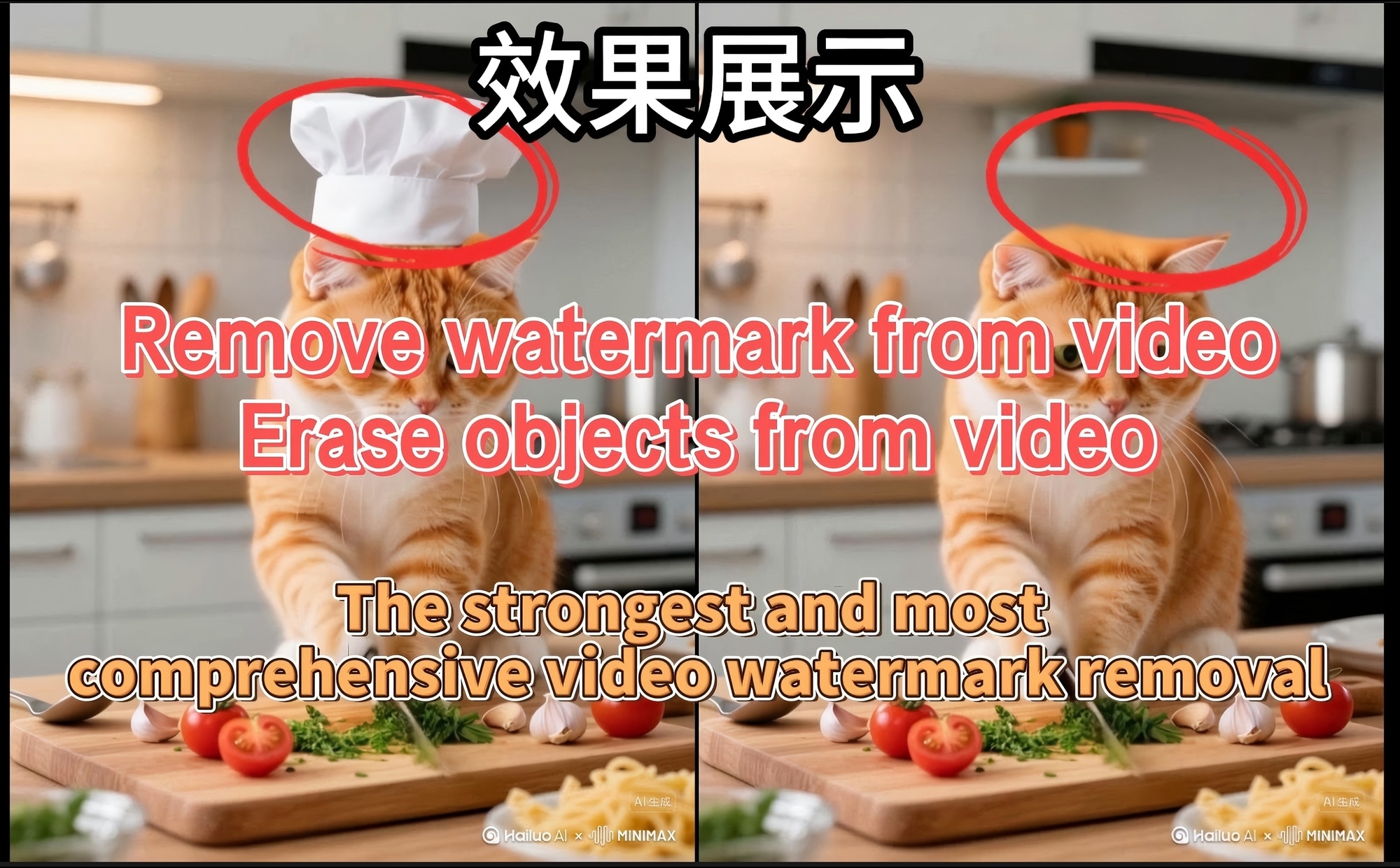
Comprehensive Video Watermark Removal - minimax Version, Video Erasure, Online Supported超全视频去水印-minimax版本 视频抹除 支持在线
b站教程:https://www.bilibili.com/video/BV13JnAzfEAn/?share_source=copy_web&vd_source=f8c8decb9715b31a9cfbcc00cad15d03YouTube tutorial: YouTube 教程:超全视频去水印-minimax版本 视频抹除Comprehensive Video Watermark Removal - minimax Version, Video Erasure体验地址/Experience address:工作流:超全视频去水印-minimax版本 视频抹除体验地址:https://www.runninghub.ai/post/1983201987569328129/?inviteCode=rh-v1067直接在这里👆 直接在这里👆晨羽云云端:https://www.chenyu.cn/console/login?invitationCode=D1V4LX 30送10的算力券:3D6JS4 我的镜像,最强视频镜像,实时更新全自用流不含糊. https://www.chenyu.cn/console/newShare?uuid=513170f43528441e97a0e3011aac19bd

(Full-Power Edition) FlashVSR+Smthem Edition Video Blur to HD V1+
You can click on the link below and try it out directly. If the effect is good, you can deploy it locallyhttps://www.runninghub.cn/post/1980931638844674050/?inviteCode=rh-v1121Fan benefits, register to get 1000 points, daily login 100 points, play 4090! Experience the super power of 48G!B-site video: https://www.bilibili.com/video/BV1KPsLzAEdW/Knowledge Planet: https://t.zsxq.com/7F90AGraphic tutorial: https://t.zsxq.com/lNK8vThe workflow is very simple to use, and I have uploaded a tutorial on how to use it on YouTube. You can try it out and follow the tutorial and Civitai's workflow to easily reproduce the results. Thank you. If you have any other questions, please leave a comment in the comment sectionThis tutorial is very important, not watching it will surely lead to a lot of problems! Watch the video tutorial before trying !!!! Very important! Especially a key point at the end!

FlashVSR+Ultra+Fast Video Blur to HD V1
You can click on the link below and try it out directly. If the effect is good, you can deploy it locallyhttps://www.runninghub.cn/post/1980931464533557250/?inviteCode=rh-v1121Fan benefits, register to get 1000 points, daily login 100 points, play 4090! Experience the super power of 48G!B-site video: https://www.bilibili.com/video/BV1KPsLzAEdW/Knowledge Planet: https://t.zsxq.com/7F90AGraphic tutorial: https://t.zsxq.com/lNK8vThe workflow is very simple to use, and I have uploaded a tutorial on how to use it on YouTube. You can try it out and follow the tutorial and Civitai's workflow to easily reproduce the results. Thank you. If you have any other questions, please leave a comment in the comment sectionThis tutorial is very important, not watching it will surely lead to a lot of problems! Watch the video tutorial before trying !!!! Very important! Especially a key point at the end!

(KJ Edition) Wan+Flash VSR Video Blur to HD V1
You can click on the link below and try it out directly. If the effect is good, you can deploy it locallyhttps://www.runninghub.cn/post/1980932757046083586/?inviteCode=rh-v1121Fan benefits, register to get 1000 points, daily login 100 points, play 4090! Experience the super power of 48G!B-site video: https://www.bilibili.com/video/BV1KPsLzAEdW/Knowledge Planet: https://t.zsxq.com/7F90AGraphic tutorial: https://t.zsxq.com/lNK8vThe workflow is very simple to use, and I have uploaded a tutorial on how to use it on YouTube. You can try it out and follow the tutorial and Civitai's workflow to easily reproduce the results. Thank you. If you have any other questions, please leave a comment in the comment sectionThis tutorial is very important, not watching it will surely lead to a lot of problems! Watch the video tutorial before trying !!!! Very important! Especially a key point at the end!

EchoShot 1.3B Multi-Camera Vincennes Video
B-site video: https://www.bilibili.com/video/BV1Sj8izGEXs/Knowledge Planet: https://t.zsxq.com/7F90AGraphic tutorial: https://t.zsxq.com/lNK8vThe workflow is very simple to use, and I have uploaded a tutorial on how to use it on YouTube. You can try it out and follow the tutorial and Civitai's workflow to easily reproduce the results. Thank you. If you have any other questions, please leave a comment in the comment sectionThis tutorial is very important, not watching it will surely lead to a lot of problems! Watch the video tutorial before trying !!!! Very important! Especially a key point at the end!
Vace control depth/openpose/canny/splines/extend
Just some example workflows of how to use vace to control your generations. works on 6gb vram. And sometimes control fail which is to be expected.Has some simple workflows for video control with depth/cannY7openposeVideo extension and spline controlIf you don't want to use the prompt caching replace it with standard clip and prompt encode nodes.Also made a video that probably badly explains thingsThink this was where i got the model from:https://huggingface.co/lym00/Wan2.1-T2V-1.3B-Self-Forcing-VACE-Addon-Experiment/tree/main
Img To Video and new video effect - Glitch Nodes
Img To Video and new video effect - Glitch Nodes
Video object removal workflow
Video object and watermark removal workflow
MinimaxRemover+Qwen2.5VL Everything Image Eraser
B-site video: https://www.bilibili.com/video/BV1dWcpeUE4v/Knowledge Planet: https://t.zsxq.com/7F90AGraphic tutorial: https://t.zsxq.com/lNK8vThe workflow is very simple to use, and I have uploaded a tutorial on how to use it on YouTube. You can try it out and follow the tutorial and Civitai's workflow to easily reproduce the results. Thank you. If you have any other questions, please leave a comment in the comment sectionThis tutorial is very important, not watching it will surely lead to a lot of problems! Watch the video tutorial before trying !!!! Very important! Especially a key point at the end!
MinimaxRemover+Qwen2.5VL Everything Video Removal
B-site video: https://www.bilibili.com/video/BV1dWcpeUE4v/Knowledge Planet: https://t.zsxq.com/7F90AGraphic tutorial: https://t.zsxq.com/lNK8vThe workflow is very simple to use, and I have uploaded a tutorial on how to use it on YouTube. You can try it out and follow the tutorial and Civitai's workflow to easily reproduce the results. Thank you. If you have any other questions, please leave a comment in the comment sectionThis tutorial is very important, not watching it will surely lead to a lot of problems! Watch the video tutorial before trying !!!! Very important! Especially a key point at the end!
Self Forcing Simple WAN I2V, V2V & T2V Workflow
Simple WAN T2V Workflow for Self ForcingSelf Forcing trains autoregressive video diffusion models by simulating the inference process during training, performing autoregressive rollout with KV caching. It resolves the train-test distribution mismatch and enables real-time, streaming video generation on a single RTX 4090 while matching the quality of state-of-the-art diffusion models.Update (i2v):To use Vace, you will need to use a different checkpoint: https://huggingface.co/lym00/Wan2.1-T2V-1.3B-Self-Forcing-VACE/blob/main/Wan2.1-T2V-1.3B-Self-Forcing-DMD-VACE-FP16.safetensorsDownload self_forcing_dmd.pt from https://huggingface.co/gdhe17/Self-Forcing/tree/main/checkpoints and use it as the t2v checkpoint.Project website: https://self-forcing.github.io/

Super acceleration! Self Forcing image generation video 81 frames per minute KJ version
B-site video: https://www.bilibili.com/video/BV1dWcpeUE4v/Knowledge Planet: https://t.zsxq.com/7F90AGraphic tutorial: https://t.zsxq.com/lNK8vThe workflow is very simple to use, and I have uploaded a tutorial on how to use it on YouTube. You can try it out and follow the tutorial and Civitai's workflow to easily reproduce the results. Thank you. If you have any other questions, please leave a comment in the comment sectionThis tutorial is very important, not watching it will surely lead to a lot of problems! Watch the video tutorial before trying !!!! Very important! Especially a key point at the end!

Self Forcing Optimization Consistent Image Generation Video V1 (Official Node Version)
B-site video: https://www.bilibili.com/video/BV1dWcpeUE4v/Knowledge Planet: https://t.zsxq.com/7F90AGraphic tutorial: https://t.zsxq.com/lNK8vThe workflow is very simple to use, and I have uploaded a tutorial on how to use it on YouTube. You can try it out and follow the tutorial and Civitai's workflow to easily reproduce the results. Thank you. If you have any other questions, please leave a comment in the comment sectionThis tutorial is very important, not watching it will surely lead to a lot of problems! Watch the video tutorial before trying !!!! Very important! Especially a key point at the end!
Simple Self-Forcing Wan1.3B+Vace workflow
This is a very simple workflow to run Self-Forcing Wan 1.3B + Vace, it only uses a single custom node, which everyone making videos should have: Kosinkadink/ComfyUI-VideoHelperSuite. Everything else is pure comfy core.You'll need to download the model of your choice from here lym00/Wan2.1-T2V-1.3B-Self-Forcing-VACE · Hugging Face, and put it inside your /path/to/models/diffusion_models folder. This workflow can be used as a very good start for experimenting. You can refer to this [2503.07598] VACE: All-in-One Video Creation and Editing for how to use Vace. You don't need to read the paper of course, the information you are interested in is mostly at the top of page 7, which I reproduce in the following:Basically, in the WanVaceToVideo node, you have 3 optional inputs: control_video, control_masks, and reference_image.control_video and control_masks are a little bit misleading. You don't have to provide a full video. You can in fact provide a variety of things to obtain various effects. For example:if you provide a single image, it's basically more or less equivalent to image2video.if you provide a sequence of images separated by empty images: img1, black, black, black, img2, black, black, black, img3, etc... then it's equivalent to interpolating all these img, filling the blacks. A special case of this one to make it clear is if you have img1, black, black, ..., black, img2, then it's equivalent to start_img, end_img to video.control_masks control where Wan should paint. Basically if wherever the mask is 1, the original image will be kept. So you can for example pad and/or mask an input image, like this:and use that image and mask as control_video and control_mask, and you'll basically do a image2video inpaint and outpaint.If you input a video in control_video, then you can control where the changes should happen in the same way, using control_mask. You'll need to set one mask per frame in the video.if you input an image preprocessed with openpose or a depthmap, you can finely control the movement in the video output.reference_image node is basically an image that you feed to Wan+Vace that serves as a reference point. For example, if you put the image of someone's face here, there's a good chance you'll get a video with that person's face.
WAN WORKFLOWS
This workflow demonstrates audio reactive pose control of WAN2.1 + VACETutorial and workflow belowWe use my nodes to control WestNeighbor's pose nodes, so be sure to give him stars on github