ComfyUI Workflows
Browse real AI workflows from Flux, SDXL, Pony, ControlNet, video generation and commercial AI creators.

Rebels PiD (low vram)
PiD reformulates the latent-to-pixel decoder as a conditional pixel-space diffusion model, unifying decoding and upsampling into a single generative module. It denoises directly in high-resolution pixel space and produces a super-resolved image in one pass. This repository hosts the released decoder checkpoints, plus the encoder/decoder ("VAE") weights they depend on.WARNING: the distilled Flux Klein 4b and 9b workflows are experimental, they dont always provide the best results due to the distillation forcing too much detail in the pixel diffusion process. it can sometimes create artifacting as well. both BASE models for Klein handle PiD VERY well though!To install the ComfyUI-PiD custom node and utilize its automated model downloader, follow these steps specifically tailored for the ComfyUI Windows Portable environment.1. Custom Node InstallationDo not just drag and drop files. For a portable installation, you must use Git to ensure the node's internal structure and submodules remain intact.Navigate to your ComfyUI_windows_portable root folder.Open a terminal (CMD) in this folder.Navigate to your custom_nodes directory:DOScd ComfyUI\custom_nodes Clone the repository:DOSgit clone https://github.com/Merserk/ComfyUI-PiD Return to the root folder:DOScd ..\.. Install the required dependencies using the embedded Python:DOS.\python_embeded\python.exe -m pip install -r .\ComfyUI\custom_nodes\ComfyUI-PiD\requirements.txt LINK TO Z-Image Base Model Files:https://civitai.com/models/2342907/rebels-z-image-base2. Using the Auto-Download FeatureThe PiD nodes are designed to pull models automatically upon the first execution of a prompt.Restart ComfyUI completely.Load a workflow that utilizes the PiD Decode or PiD Prepare nodes.Ensure the auto_download parameter is set to True in the node properties.Queue your prompt.Monitor the Terminal: Watch the CMD window. You will see HTTP requests appearing as the node validates and begins downloading the required weights from Hugging Face.3. Troubleshooting "Stalls"Because there is no progress bar, a silent CMD window can look like a stall. However, if the download actually hangs (no new INFO lines for 5+ minutes):Kill the Process: Close the CMD window completely to force the download attempt to terminate.Restart ComfyUI: Open the terminal and restart ComfyUI to clear the failed request from your GPU/Network cache.Disable Auto-Download: Before queuing again, go into the PiD Decode node settings and set auto_download to False.Verify/Retry: With auto_download set to False, the node will skip the network request and attempt to load existing files. If you suspect the download partially finished before stalling, check ComfyUI\custom_nodes\ComfyUI-PiD\vendor\PiD\checkpoints to see if a folder has been created. If it is empty or incomplete, remove that partial folder before trying the download again.Pro-Tip: If the auto-downloader consistently fails, it is usually due to network timeouts on large files. If this happens, you must perform a manual download once to place the .pth file into the vendor directory as described in the repository's documentation. Once the file exists locally, you can keep auto_download set to False permanently.

Flux Klein 4B/9B Multiple Angles
Flux 2 Klein multi angle reference sheet workflow for ComfyUI.This workflow is mainly made for character sheets. You can give it a single input image, and it will try to generate multiple consistent views of the same subject, such as front three quarter, side profile, rear view, rear three quarter, high angle, low angle, and a close detail view.The prompt format is written to preserve the same identity, face, outfit, pose, expression, proportions, colors, materials, and overall design while changing only the camera angle. Although I made it mainly for characters, the prompts are generic enough to test with props, vehicles, creatures, objects, or other visual assets.The workflow uses mostly native ComfyUI nodes. The only non native part, as far as I remember, is the GGUF loader.I tested this only with the Flux 2 Klein 4B Q4 GGUF model because I currently have access to only 4 GB VRAM. For this kind of low VRAM 4B setup, the results are acceptable and useful for rough reference blocking. It is not a perfect character turnaround workflow, and rear views or small costume details may still need cleanup.The 9B variant should give better consistency, cleaner faces, improved clothing continuity, and stronger rear view inference.Useful for AI video planning, character continuity, inpainting reference, first frame last frame workflows, and quick visual development from a single image.

Flux 2 Klein Edit - Four Image Editing
Easy to use Flux 2 Klein Image Editing Subgraph with up to four image inputs! Useful for single image modifications, combining multiple images into a new image, or disable all images to use as Flux 2 Klein Text-to-Image generator too.All your image editing workflows in one simple to use Subgraph. With the right prompting you can:Change styles of your image (realistic, anime, dystopian, cartoon, etc.)Add, remove, or edit elements in the image (remove unwanted people, change clothes, change hair, add someone to a photo, etc.)Create new images based on your reference images (3D figurines, model sheets, scene changes, etc.)Much more.A Subgraph workflow I made to make using Flux 2 Klein easy for myself, similar to my Qwen Edit 2511. Information / Instructions are included with the workflow.With the models used this runs well locally on my NVIDIA GeForce RTX 4070 with 12 GB VRAM.BASIC USAGELoad your primary image in Load Image 1.Images 2, 3, and 4 are optional.Subgraph values:image#_enable: true if using that image, else false (image ignored).override_image_size: false to use Image 1 size. true will use the override_width and override_height size, adjusted by aspect_ratio.aspect_ratio: 'original' for the same aspect as Image 1. 'fixed' to use the override_width/height values. Otherwise use the aspect selected.The first prompt is Positive and the second is Negative (CFG must NOT be 1 to use Negative prompt).steps: 4 is the default. 8 is good. The model is pretty fast so you can even use 50 without a long gen time.Other values are per usual usage.If you're not familiar with editing you can request changes to items or styles of the image, insert one image element into another, or create whole new images using the characters or items in the reference image(s).If you disable all four images it will work fine as a text2image model as well.

klein anime 2 realistic photo workflow
Online experience address:https://www.runninghub.ai/post/2034642998985760769?inviteCode=rh-v1217register to get 1000 points, you can use it to generate 70+ images, daily login to get 100 points, you can enjoy the 4090 with 48g vram.This workflow utilizes Klein to convert anime-style images into realistic human portraits, followed by the use of Z Image Base to perform high-definition facial redrawing for enhanced results.Usage Instructions:1. Upload your original image.2. Enter a prompt providing a brief description of the subject's ethnicity (Western or Asian), age (young or middle-aged), and gender (male or female). For example: "A young beauty from ancient China," "A middle-aged Western man," etc.3. Simply run the workflow.

Klein_4b Essentials
Note: If you have ANY issues with nodes not downloading, read the notes or reach out. There's nothing that special about any of them that aren't core modules.⛔⚠️🛑✋ Read the notes completly before using. Most common install and node problems are listed in the directionsInstagram: https://www.instagram.com/synth.studio.models/Buy me a☕ https://ko-fi.com/lonecatoneThis represents many of hours of work. If you enjoy it, please 👍like, 💬 comment , and feel free to ⚡tip 😉也有中文说明Ver 2.0Just a cleanup update after Comfy went and broke a lot of nodesUpdated metadata saverupdated Optical RealismUpdated Post Production SuiteReorganized. Features:Qwen advanced prompt assistI2I for character consistency or inpaintingQwen Prompt enhancerSeedVR2 upscalerPost Production Suite for image fine tuning📷Optical realism.也有中文说明

ComfyUI beginner friendly Flux.2 Klein Consistent Character Dataset Builder (With Prompt Saver) Workflow by Sarcastic TOFU
This is a very simple, beginner-friendly, fast ComfyUI workflow based on Flux.2 Klein 4B model (4B or 9B) that quickly and consistently builds character datasets. It works with straightforward, natural-language text instructions to generate your desired character dataset from just a single reference image, enabling you to train a LoRA later. Unlike other consistent character dataset builders that use SDXL or Flux, this workflow involves no lengthy processes. Flux.2 Klein is excellent on its own at preserving and reusing character details from a reference image, allowing you to generate multiple outputs in quick succession. This is an adaptation of my earlier similar Consistent Character Dataset Builder Workflows based on QWEN Image Edit & Kontext, but with much improved speed and quality.I used a Flux.2 Klein 9B Q2 Model that works well with my 8GB VRAM AMD GPU (or even with any system with only 6GB VRAM). But is you have better GPU you can simply swap the model with full unquantized Flux.2 Klein 4B or 9B model or on the other side if you have a significantly weaker GPU ( with only 2GB or 4GB VRAM ) you can find other low grade hardware supported GGUF models from here ( Unsloth's HuggingFace repo for Flux.2 Klein 4B GGUF models - https://huggingface.co/unsloth/FLUX.2-klein-4B-GGUF/tree/main ) and other mathing resources.This workflow also helps you to save your Consistent Character Dataset Generation Data into a human readable .txt file. This will automatically get and write your metadata to the .txt file. You will find all the saved prompt files that it generated with the images inside the Archive (.Zip) that has the workflow. Look for "Dataset Example" folder. Also with the Image Saver Simple node used you may embed the workflow itself with each saved image or save the image and workflow for your work separately. In this way a readable .txt file for each run of this workflow will be generated (matching Automatic1111 / EasyDiffusion's .txt outputs).If you run this workflow with your own prompts and your own reference Image you will find your own Consistent Character Dataset saved inside ComfyUI's default output folder ( or on the custom output saving path you may have set earlier ) within a subfolder with name of your character. ( in my case for example I used "Redhead" as first name and "Reid" as last name for my fictional character so it saved the dataset inside a folder with name Redhead_Reid ). I also provided a simple bulk dataset filename fixer python script so your datset will have simpler file names like 01.jpeg, 01.txt for first generation , 02.jpeg, 02.txt for second generation and so on.. By default this workflow saves 10 images with 10 matching prompts but you can decrease the number (say only 6 images and matching prompts) or increase the number (say you want 15 images and matching prompts). I think 10 is an optimal number.You need a Hugging Face account to download your necessary files for this workflow (Details are mentioned below). Make sure you install GGUF addon for ComfyUI using ComfyUI manager or any other missing nodes you may have and place the correct files in correct places. Also check out my other workflows for SD 1.5 + SDXL 1.0, Pony, WAN 2.1, WAN 2.2, MagicWAN Image v2, QWEN, HunyuanImage-2.1, HiDream, KREA, Chroma, AuraFlow, NoobAI, Illustrious, Lumina2, Z-Image Turbo, Flux.2 Klein (4B & 9B), Flux.1 Dev and Kandinsky Image 5 Lite (T2I & I2I) models. Feel free to toss some yellow Buzz on stuffs you like.How to use this -#1. Just select your desired Flux.2 Klein GGUF model files (or swap them with full model files) first and now#2. now select your input character reference image and set the character's first and last name#3. Now set common Image Dimensions for your dataset (a brief guideline of this is in Workflow's note section)#4. on next step enter your image editing instructions - Batch character prompts like "subject seen from" and "Make this person" followed by other details.#5. after this select image sampling methods, CFG, steps etc. settings (this part is tricky, if you want you can just have the values as it is)#6. finally press the run button to generate. That's it..** I have given multiple .txt files with prompts in the zip file containing this workflow to help you fast pace your dataset building process - one for character poses, one for sfw character prompts, one for nsfw character prompts and one for the selected set of 10 prompts used in this workflow. You can mix and match them but remember if you want to use a set of prompts you have to follow these 3 rules - #1. keep your each prompt short, #2. end each prompt with a dot (.) so don't use dot on the middle of a prompt and #3. Start your new prompt on the very next line, don't keep a line empty.Enjoy!Required Files==================Flux.2 Klein 9B Models ( If you are using 6GB or 8GB VRAM GPU )-+++++++++++++++++++++++++++++++++++++++++++++++++++++++++++++++### Download Link for Flux.2 Klein 9B GGUF Models--------------------------------------------------Only for this workflow I used Flux.2 Klein 9B Q2 GGUF Model (lowest Quant for 9B), but usually I useGet the Q2 Model from here (One used in this workflow that helped me reduce system power usage) -https://huggingface.co/unsloth/FLUX.2-klein-9B-GGUF/resolve/main/flux-2-klein-9b-Q2_K.ggufGet the Q4 Model from here (One used in my all other Flux.2 Klein 9B workflows, it offers better performance & results ) -https://huggingface.co/unsloth/FLUX.2-klein-9B-GGUF/resolve/main/flux-2-klein-9b-Q4_K_M.gguf### Download Link for Flux.2 Klein 9B Text Encoder---------------------------------------------------https://huggingface.co/Comfy-Org/flux2-klein-9B/resolve/main/split_files/text_encoders/qwen_3_8b_fp8mixed.safetensorsFlux.2 Klein Common VAE Model -++++++++++++++++++++++++++++++### Download Link for Flux.2 Klein VAE (Workes on both 4B and 9B)------------------------------------------------------------------https://huggingface.co/Comfy-Org/flux2-dev/resolve/main/split_files/vae/flux2-vae.safetensorsAlso consider using these 4B Model files (even GGUF Text Encoders) if you are using on a significantly weaker GPU ( with only 2GB or 4GB VRAM ) ---Flux.2 Klein 4B Models -+++++++++++++++++++++++++### Download Link for Flux.2 Klein 4B GGUF Model-------------------------------------------------This is for 4GB VRAM -https://huggingface.co/unsloth/FLUX.2-klein-4B-GGUF/resolve/main/flux-2-klein-4b-Q4_K_S.ggufThis is for 2GB VRAM -https://huggingface.co/unsloth/FLUX.2-klein-4B-GGUF/resolve/main/flux-2-klein-4b-Q2_K.gguf### Download Link for Flux.2 Klein 4B Text Encoder---------------------------------------------------I used this one on my Flux.2 Klein 4B workflows, it may work for you for 4B model. Note that 4B text encoder will not work well with 9B models and 9B text encoder will not work well with 4B models and on some low end systems you may even have to find out GGUF text encoder replacement for this one -https://huggingface.co/Comfy-Org/flux2-klein-4B/resolve/main/split_files/text_encoders/qwen_3_4b.safetensors

Klein_4b Wildcard Workflow (depracated)
This model has been redone for Klein_9b and will no longer be updated. The Klein_9b model is here:https://civitai.com/models/2529010/klein9b-wildcard-workflowNote: If you have ANY issues with nodes not downloading, read the notes or reach out. There's nothing that special about any of them that aren't core modules.⛔⚠️🛑✋ Read the notes completly before using. Most common install and node problems are listed in the directionsA complete user and troubleshooting guide inclusing a list of common error messages can be found here https://civitai.com/articles/24678/how-to-use-my-workflows-a-comprehensive-breakdownWildcard workflow:Designed to be used with or without character LorasPrompt generationInstructions on how to easily create yor own wildcards and random promptsLora Loader for enhancementsSeperate Lora loader for CharacterI2I for character facesSeed VR2 Upscaler to get 4k on low VRAMEssential Post Production SuiteFull tutorial available.Instagram: https://www.instagram.com/synth.studio.models/Buy me a☕ https://ko-fi.com/lonecatoneThis represents countless of hours of work. If you enjoy it, please 👍like, 💬 comment , and feel free to ⚡tip 😉Note: If you have ANY issues with nodes not downloading, read the notes or reach out. There's nothing that special about any of them that aren't core modules.⛔⚠️🛑✋ Read the notes completly before using. Most common install and node problems are listed in the directionsA complete user and troubleshooting guide inclusing a list of common error messages can be found here https://civitai.com/articles/24678/how-to-use-my-workflows-a-comprehensive-breakdownV2.0Doubled the random prompt generatorAdded random power Lora Loader stacksAdded diffusion model randomizersAdded Scheduler & Sampler randomizersMassive increase in wildcard databaseMassive increase in prompt databaseWildcard workflow:Designed to be used with or without character LorasPrompt generationInstructions on how to easily create yor own wildcards and random promptsLora Loader for enhancementsSeperate Lora loader for CharacterSeed variance enhancerUltimate Upscaler for prescaling and hi res fixSeed VR2 Upscaler to get 4k on low VRAMEssential Post Production SuiteFull tutorial available.Instagram: https://www.instagram.com/synth.studio.models/Buy me a☕ https://ko-fi.com/lonecatoneThis represents many of hours of work. If you enjoy it, please 👍like, 💬 comment , and feel free to ⚡tip 😉

batch watermark removel 批量去水印flux2Klein
This batch of watermark removal does not affect the original picture quality.this workflow can also be used in removing other objects批量去水印不影响原图画质,也可以用于去除其他物品如果图片短边是64倍数,这两个参数需要调节至与图片短边一致,如果图片短边不是64倍数,调节至最接近图片短边的64倍数If the shorter side of the image is a multiple of 64, these 2 parameters need to be adjusted to be consistent with the shorter side of the image. If the shorter side of the image is not a multiple of 64, adjust it to the nearest multiple of 64 that is closest to the shorter side of the image.

Fast inpaint with cropping (Flux Klein 4b, 9b, etc)
Basic inpaint workflow with nodes for cropping the input image. Instead of pushing the entire image into the VRAM, it only puts 512x512 there (or more if the mask is large). Klein 4b does this in seconds, instead of tens of seconds. On the 9b model the speed increase is also noticeable.If desired, it can be used on any other model (Qwen, ZiT).

Simple FLUX 2 Klein Inpainting Workflow
Simple Flux 2 Klein Inpaint WorkflowPurposeMake easier the inpainting for rookies like me.How it WorksImage: Upload your photo to the Load Image node.Mask: Paint the area you want to modify using the mask editor.Prompt: Enter the description of the new detail in the CLIP Text Encode node.Generate: Click "Queue Prompt" to run the inpainting process.Required ModelsAll download links are already embedded within the workflow for your convenience.Flux Model (Klein 4B): DownloadText Encoder (Qwen 3 4B): DownloadFlux VAE: DownloadCreditsCreator: Workflow developed by Rio.Civitai Profile: View Profile⠀If you think there is anything that can be done or implemented in a better way, I would be happy to hear it because I am learning too.

Ai Influencer DATASET maker for Consistent Character
BEST One-Click Consistent Character Dataset Creator for AI Influencer Workflow With NSFW Support- Official Discord: https://discord.gg/RnUHPzTkXHSample Generation Result of this workflow (60 Images): https://dri.me/KJbcva5r7PZQCiLvpbiq1qRyp7qIMf- View all the generated Image along with the reference image to get an idea of how the final result will look like.- On this example out of 60 Images I got 3 broken images and 57 Images were perfectly fine to use for LoRA training.Author: Coolstrad Version: Latest (as of February 2026) Purpose: This workflow simplifies the creation of high-quality, consistent character datasets for AI influencers using ComfyUI. It's designed for ease of use, allowing you to generate organized image sets with minimal input. Perfect for training LoRAs or building AI-generated content pipelines.## OverviewThis is a streamlined, one-click tool for generating consistent character datasets. Upload a reference image, provide a character name, and run the workflow. It handles everything from image generation to organization, outputting results directly into a dedicated folder. The workflow supports both SFW and NSFW outputs, making it versatile for various AI influencer projects. It leverages advanced models like Flux, Qwen, and SDXL to ensure high fidelity and consistency.## Key Features- One-Click Simplicity: No complex setup—just upload, name, and run.- Consistent Results: Maintains character likeness across generated images, with minor variations based on input quality.- NSFW Support: Capable of producing adult-themed datasets automatically.- Organized Output: All images are saved in ComfyUI/output/datasets/<character_name> for easy access and management.- Performance: Processing time depends on your hardware; optimized for standard setups.- LoRA Compatibility: Datasets produced are suitable for training LoRAs with acceptable quality.## Usage Instructions1. Install Dependencies: Ensure ComfyUI is installed and configured.2. Download Models: See the "Required Models" section below and place them in the appropriate directories.3. Run the Workflow: - Upload your reference character image. - Enter the character's name. - Hit "Run" and wait for completion.4. Output Location: Find your dataset in ComfyUI/output/datasets/<character_name>.5. Tips: For best results, use high-quality reference images. NSFW results are automatically done.## Community and SupportJoin our growing Discord community for AI influencer workflows, general AI image/video generation tips, exclusive workflows, and direct support.- Discord Server: [Join Here](https://discord.gg/RnUHPzTkXH) A vibrant space for insights, troubleshooting, and collaboration. If you encounter any issues running this workflow, hop in—I'll personally help you out!## Notes and Limitations- Face Consistency: The workflow excels at maintaining character features, but slight deviations may occur depending on the initial image quality. These are usually subtle and not noticeable in final outputs.- LoRA Training: Datasets generated here produce LoRAs of solid quality—test and iterate as needed.- Hardware Requirements: Works on most setups, but for Qwen models, choose the variant based on your VRAM (e.g., lower-bit versions for limited memory).- Ethical Use: Always respect guidelines for AI-generated content, especially NSFW.## Required ModelsDownload and install these models into your ComfyUI directories as specified. Links point to official sources.### Flux-Related Models- Flux Model: [Download](https://huggingface.co/Comfy-Org/vae-text-encorder-for-flux-klein-4b/resolve/main/split_files/diffusion_models/flux-2-klein-4b.safetensors) ComfyUI/models/diffusion_models/- Text Encoder: [Download](https://huggingface.co/Comfy-Org/vae-text-encorder-for-flux-klein-4b/resolve/main/split_files/text_encoders/qwen_3_4b.safetensors) ComfyUI/models/text_encoders/- VAE: [Download](https://huggingface.co/Comfy-Org/vae-text-encorder-for-flux-klein-4b/resolve/main/split_files/vae/flux2-vae.safetensors) ComfyUI/models/vae/### Qwen-Related Models- Qwen (Select based on memory): [Download Options](https://huggingface.co/unsloth/Qwen-Image-Edit-2511-GGUF/tree/main) ComfyUI/models/unet/- Qwen LoRA: [Download](https://huggingface.co/lightx2v/Qwen-Image-Edit-2511-Lightning/resolve/main/Qwen-Image-Edit-2511-Lightning-4steps-V1.0-bf16.safetensors) ComfyUI/models/loras/- Qwen Text Encoder: [Download](https://huggingface.co/Comfy-Org/Qwen-Image_ComfyUI/resolve/main/split_files/text_encoders/qwen_2.5_vl_7b_fp8_scaled.safetensors) ComfyUI/models/text_encoders/- Qwen VAE: [Download](https://huggingface.co/Comfy-Org/Qwen-Image_ComfyUI/resolve/main/split_files/vae/qwen_image_vae.safetensors) ComfyUI/models/vae/### SDXL Model- Recommended SDXL Porn Model (or any compatible SDXL): [Download](https://civitai.com/models/82543?modelVersionId=2043971) ComfyUI/models/checkpoints/### Ultralytics ModelsDownload both and place in ComfyUI/models/ultralytics/bbox/ folder.- Female Breast Detection: https://huggingface.co/ashllay/YOLO_Models/resolve/e07b01219ff1807e1885015f439d788b038f49bd/bbox/female-breast-v4.0-fantasy.pt- Female Body Detection: https://civitai.com/models/1816953?modelVersionId=2056142Credits- Original Creator: This workflow was developed solely by CoolstradFor updates, feedback, or custom requests, reach out via Discord. Happy creating! 🚀V2.0 MASSIVE UPDATE✨ Consistent Character Dataset WorkflowThis workflow helps you create a dataset for consistent character generation.It is fully modular — if you need more than 16 images, simply duplicate the image group and paste as many times as you want.➡️ Just remember to add/adjust your prompts for each new group!📌 How to Use This WorkflowLoad the face you want to replicate.Run the workflow normally.After the Qwen generation finishes:Check the note attached to the right side of the Qwen samplers.You must enable the Z-Image samplers group.Press the Run button again.🎉 Once everything completes, you'll find all generated images inside your output folder.This is the reference face image that I have used, the final results are attached on this versions post.V1.0Using this ComfyUI Workflow you can generate base dataset for your consistent character. This is generated with [Z-Image-Turbo] Model. You need to add a face prompt and all the other things will be done by the workflow.

ComfyUI beginner friendly Flux.2 Klein 4B ALL-in-One Text-to-Image Workflow with Easy Prompt Saver by Sarcastic TOFU
This workflow helps you to save your Text to Image Generation Data into a human readable .txt file. This will automatically get and write your metadata to the .txt file. This is modified version of my earlier published Flux.2 Klein 4B GGUF Text-to-Image Workflow, this uses a neat Flux.2 Klein 4B ALL-in-One safetensor model to swap out the GGUF model but still can perform well on 8GB VRAM GPU (the publisher that published this also have a smaller AIO safetensor version that may run 4 to 6GB VRAM machines if you wanna try, also they published a AIO version aimed for 16 GB VRAM machines). If you know how to modify workflows you can also implement this human readable easy prompt saver trick to other workflows as well (not limited to just Flux.2 Klein). You will find all the saved prompt files that it generated with the images inside the Archive (.Zip) that has the workflow. Also with the Image Saver Simple node used you may embed the metadata with workflow itself or save the workflow for your work seperately.The Flux.2 Klein 4B and 9B models are a new family of high-speed AI image generators that use a "rectified flow" architecture to unify image generation and professional-grade editing into a single, compact package. These models are significantly faster than older versions because they use "step-distillation," which allows them to create high-quality images in just 4 steps—achieving sub-second speeds on modern hardware—rather than the dozens of steps required by previous models. The 4B variant is released under a permissive Apache 2.0 License for both personal and commercial use, while the more powerful 9B variant uses a Non-Commercial License intended for research and personal projects. Both models support 11 native aspect ratios ranging from 1:1 square to 21:9 ultrawide and 9:21 vertical, and they can produce sharp images up to 4 megapixels (such as 2048x2048). To make them even more accessible, there are Q (Quantized) models like the FP8 (8-bit) and NVFP4 (4-bit) versions, which reduce the "brain size" of the model to save memory; specifically, the FP8 version is about 1.6x faster and uses 40% less VRAM, while the NVFP4 version is up to 2.7x faster and uses 55% less VRAM. Because of these optimizations, the 4B model can run on systems with as little as 8GB to 12GB of VRAM and can even operate (with the lowest Flux.2 Klein 4B Q2 or Q3 GGUFs) on very low grade 6GB, 4GB, 2GB VRAM GPUs or even on modern integrated graphics (iGPUs) from the latest laptop or mini PC chips.You can download your necessary AIO model and LORA used from CivitAI (Details are mentioned below). Make sure you have latest enough ComfyUI installation that supports Flux.2 Klein and install any necessary nodes for for this workflow using ComfyUI manager and place the correct files (AIO model, LORAs etc) in correct places. Also check out my other workflows for SD 1.5 + SDXL 1.0, WAN 2.1, WAN 2.2, MagicWAN Image v2, QWEN, HunyuanImage-2.1, HiDream, KREA, Chroma, AuraFlow, Z-Image Turbo and Flux. Feel free to toss some yellow Buzz on stuffs you like.How to use this -#1. Just select your desired Flux.2 Klein 4B ALL-in-One model first and now#2. set your desired image dimensions to start#3. then input your desired image prompt.#4. select how many images you want (Change the number besides the "Run" button)#5. select image sampling methods, CFG, steps etc. settings#6. finally press the run button to generate. That's it..** LORA usage for this workflow is optional you can use it without any LORAs, use with 1 or 2 or any other number of LORAs, too add new LORAs press the L button on top to lunch LORA Manager on a new tab find your LORA and if you want to use that LORA just click the upward Kite buttonRequired Files==================Flux.2 Klein 4B AIO Model used -### Download Link for Flux.2 Klein 4B ALL-in-One Model-------------------------------------------------------https://civitai.com/models/2327389/flux2-klein-aioLORA used -RebelMidjourney LORA---------------------https://civitai.com/models/2224836?modelVersionId=2612116

ComfyUI beginner friendly Flux.2 Klein 4B GGUF Simple Cloth Swap Workflow by Sarcastic TOFU
This is a very simple ComfyUI beginner friendly Flux.2 Klein 4B GGUF Simple Cloth Swap Workflow that will work with very simple text editing instructions in natural language to swap cloth of your desired target image's subject. With this workflow I demonstrated two scenarios of cloth swapping - #1. in the primary scenario you simply isolate and extract the clothing from clothing reference image (Picture 2) and just swap the clothing of your target image (Picture 1) keeping everything else (lighting, environment, face, pose and background) as it is; this works very well and in #2. not only you extract and swap cloths but you also perform other modifications on the output (lighting, environment, footwear, background and image aspect ratio of output), this has some minor issues (extra digits in feet, sligtly off rendering of footwear) that may need further microediting. I have included prompts and examples for both scenarios. I used a Q8 Model that works well with my 8GB AMD GPU. But is you have better GPU you can simply swap the model with full unquantized Flux.2 Klein 4B model or on the other side if you have a weaker GPU you can find other low grade hardware supported GGUF models from here ( Unsloth's HuggingFace repo for Flux.2 Klein 4B GGUF models - https://huggingface.co/unsloth/FLUX.2-klein-4B-GGUF/tree/main ) and other mathing resources.The Flux.2 Klein 4B and 9B models are a new family of high-speed AI image generators that use a "rectified flow" architecture to unify image generation and professional-grade editing into a single, compact package. These models are significantly faster than older versions because they use "step-distillation," which allows them to create high-quality images in just 4 steps—achieving sub-second speeds on modern hardware—rather than the dozens of steps required by previous models. The 4B variant is released under a permissive Apache 2.0 License for both personal and commercial use, while the more powerful 9B variant uses a Non-Commercial License intended for research and personal projects. Both models support 11 native aspect ratios ranging from 1:1 square to 21:9 ultrawide and 9:21 vertical, and they can produce sharp images up to 4 megapixels (such as 2048x2048). To make them even more accessible, there are Q (Quantized) models like the FP8 (8-bit) and NVFP4 (4-bit) versions, which reduce the "brain size" of the model to save memory; specifically, the FP8 version is about 1.6x faster and uses 40% less VRAM, while the NVFP4 version is up to 2.7x faster and uses 55% less VRAM. Because of these optimizations, the 4B model can run on systems with as little as 8GB to 12GB of VRAM and can even operate (with the lowest Flux.2 Klein 4B Q2 or Q3 GGUFs) on very low grade 6GB, 4GB, 2GB VRAM GPUs or even on modern integrated graphics (iGPUs) from the latest laptop or mini PC chips.You need a Hugging Face account to download your necessary files (Details are mentioned below). Make sure you install GGUF addon for ComfyUI using ComfyUI manager or any other missing nodes you may have and place the correct files in correct places. Also check out my other workflows for SD 1.5 + SDXL 1.0, WAN 2.1, WAN 2.2, MagicWAN Image v2, QWEN, HunyuanImage-2.1, HiDream, KREA, Chroma, AuraFlow, Z-Image Turbo and Flux. Feel free to toss some yellow Buzz on stuffs you like.How to use this -#1. Just select your desired Flux.2 Klein 4B GGUF (or swap it with full model) models first and now#2. now select your images for editing - on the very left target image (Picture 1) & then a clothing reference image on the right (Picture 2)#3. on next step enter your image editing instructions. (be very precise & targeted, like examples given)#4. then select how many output images you want (Change the number besides the "Run" button)#5. after this select image sampling methods, CFG, steps etc. settings (you may wanna stay with defaults)#5. finally press the run button to generate. That's it..** This workflow uses SAM3 (Segment Anything Model 3) model inside the "Isolate Clothing" subgraph to isolate and extract clothing from clothing reference image (Picture 2), on your first run it may take extra 1 & half to 2 minutes to automatically download the SAM3 model if you don't have it already but once it is downloaded on every next executions of this workflow it will work faster.Required Files================Flux.2 Klein 4B Models ------------------------### Download Link for Flux.2 Klein 4B GGUF Model used------------------------------------------------------https://huggingface.co/unsloth/FLUX.2-klein-4B-GGUF/resolve/main/flux-2-klein-4b-Q8_0.gguf### Download Link for Flux.2 Klein 4B Text Encoder used--------------------------------------------------------https://huggingface.co/Comfy-Org/flux2-klein-4B/resolve/main/split_files/text_encoders/qwen_3_4b.safetensors### Download Link for Flux.2 Klein 4B VAE used-----------------------------------------------https://huggingface.co/Comfy-Org/flux2-dev/resolve/main/split_files/vae/flux2-vae.safetensors

Face-Identity Creator
Yes, a new toy. This is a simple workflow for generating new, unique faces. It uses SAM3 to mask specific features (like the nose or mouth) from a source image and then builds a completely different face around those parts. Good for creating character variations or unique identities. Why did I need it? Because Pulid and Reactor weren't satisfying me in this regard. Face ID was creating unrealistic faces. Is this workflow more successful than those? You decide. Sometimes AI when trying to fit the mouth and nose into masked areas, a situation different from the reference ones may arise. IDK. Maybe someone will be inspired and develop it further in the future.How it works: SAM3 Masking: Automatically selects facial features to keep as a reference.Generation: it tries to create a new person using the unmasked parts.Quick Guide:Upload your source image.Use the SAM3 prompts to choose which parts to keep.If you like my work, you can buy me a coffee!☕ https://buymeacoffee.com/ugurdoyduk

ComfyUI beginner friendly Flux.2 Klein 4B GGUF Simple Fast Consistent Character Dataset Builder Workflow by Sarcastic TOFU
This is a very simple, beginner-friendly ComfyUI workflow—based on Flux.2 Klein 4B GGUF—that quickly and consistently builds character datasets. It works with straightforward, natural-language text instructions to generate your desired character dataset from just a single reference image, enabling you to train a LoRA later. Unlike other consistent character dataset builders that use SDXL or Flux, this workflow involves no lengthy processes. Flux.2 Klein is excellent on its own at preserving and reusing character details from a reference image, allowing you to generate multiple outputs in quick succession. This is an adaptation of my earlier similar Consistent Character Dataset Builder Workflows based on QWEN Image Edit & Kontext, but with much improved speed and quality.I used a Q8 Model that works well with my 8GB AMD GPU. But is you have better GPU you can simply swap the model with full unquantized Flux.2 Klein 4B model or on the other side if you have a weaker GPU you can find other low grade hardware supported GGUF models from here ( Unsloth's HuggingFace repo for Flux.2 Klein 4B GGUF models - https://huggingface.co/unsloth/FLUX.2-klein-4B-GGUF/tree/main ) and other mathing resources.The Flux.2 Klein 4B and 9B models are a new family of high-speed AI image generators that use a "rectified flow" architecture to unify image generation and professional-grade editing into a single, compact package. These models are significantly faster than older versions because they use "step-distillation," which allows them to create high-quality images in just 4 steps—achieving sub-second speeds on modern hardware—rather than the dozens of steps required by previous models. The 4B variant is released under a permissive Apache 2.0 License for both personal and commercial use, while the more powerful 9B variant uses a Non-Commercial License intended for research and personal projects. Both models support 11 native aspect ratios ranging from 1:1 square to 21:9 ultrawide and 9:21 vertical, and they can produce sharp images up to 4 megapixels (such as 2048x2048). To make them even more accessible, there are Q (Quantized) models like the FP8 (8-bit) and NVFP4 (4-bit) versions, which reduce the "brain size" of the model to save memory; specifically, the FP8 version is about 1.6x faster and uses 40% less VRAM, while the NVFP4 version is up to 2.7x faster and uses 55% less VRAM. Because of these optimizations, the 4B model can run on systems with as little as 8GB to 12GB of VRAM and can even operate (with the lowest Flux.2 Klein 4B Q2 or Q3 GGUFs) on very low grade 6GB, 4GB, 2GB VRAM GPUs or even on modern integrated graphics (iGPUs) from the latest laptop or mini PC chips.You need a Hugging Face account to download your necessary files (Details are mentioned below). Make sure you install GGUF addon for ComfyUI using ComfyUI manager or any other missing nodes you may have and place the correct files in correct places. Also check out my other workflows for SD 1.5 + SDXL 1.0, WAN 2.1, WAN 2.2, MagicWAN Image v2, QWEN, HunyuanImage-2.1, HiDream, KREA, Chroma, AuraFlow, Z-Image Turbo and Flux. Feel free to toss some yellow Buzz on stuffs you like.How to use this -#1. Just select your desired Flux.2 Klein 4B GGUF (or swap it with full model) models first and now#2. now select your input character reference image and set the character's first and last name#3. Now set common Image Dimensions for your dataset (a brief guideline of this is in Workflow's note section)#4. on next step enter your image editing instructions - Batch character prompts like "subject seen from" and "Make this person" followed by other details. Also add common negative filters or use the existing one provided.#5. after this select image sampling methods, CFG, steps etc. settings (this part is tricky, if you want you can just have the values as it is)#6. finally press the run button to generate. That's it..** I have given multiple .txt files with prompts in the zip file containing this workflow to help you fast pace your dataset building process - one for character poses, one for sfw character prompts, one for nsfw character prompts and one for the selected set of 10 prompts used in this workflow. You can mix and match them but remember if you want to use a set of prompts you have to follow these 3 rules - #1. keep your each prompt short, #2. end each prompt with a dot (.) so don't use dot on the middle of a prompt and #3. Start your new prompt on the very next line, don't keep a line empty.Enjoy!Required Files==================Flux.2 Klein 4B Models ------------------------### Download Link for Flux.2 Klein 4B GGUF Model used------------------------------------------------------https://huggingface.co/unsloth/FLUX.2-klein-4B-GGUF/resolve/main/flux-2-klein-4b-Q8_0.gguf### Download Link for Flux.2 Klein 4B Text Encoder used--------------------------------------------------------https://huggingface.co/Comfy-Org/flux2-klein-4B/resolve/main/split_files/text_encoders/qwen_3_4b.safetensors### Download Link for Flux.2 Klein 4B VAE used-----------------------------------------------https://huggingface.co/Comfy-Org/flux2-dev/resolve/main/split_files/vae/flux2-vae.safetensors

ComfyUI beginner friendly Flux.2 Klein 4B GGUF Simple Flawless Fast Dress Photoshoot Workflow by Sarcastic TOFU
This is a very simple ComfyUI beginner friendly Flux.2 Klein 4B GGUF Simple Flawless Fast Dress Photoshoot Workflow that will work with very simple text editing instructions in natural language to generate your desired Dress Photoshoot out four reference images - Picture 1 is a Face Reference, Picture 2 is the Dress & Footwear Reference (no head visible), Picture 3 is the background of the photoshoot and lastly Picture 4 is the pose reference. The resulting output will closely (but not exactly) match elements from those 4 inputs. See the Prompt_sets.txt file included in the zip file containing the workflow for a general guideline on how to generate the initial inputs if you don't have any inputs and how to combine them in a single output for this workflow. I also included a sample dataset of five images (4 inputs + 1 output) with this for you to have better understanding of this workflow.I used a Q8 Model that works well with my 8GB AMD GPU. But is you have better GPU you can simply swap the model with full unquantized Flux.2 Klein 4B model or on the other side if you have a weaker GPU you can find other low grade hardware supported GGUF models from here ( Unsloth's HuggingFace repo for Flux.2 Klein 4B GGUF models - https://huggingface.co/unsloth/FLUX.2-klein-4B-GGUF/tree/main ) and other mathing resources.The Flux.2 Klein 4B and 9B models are a new family of high-speed AI image generators that use a "rectified flow" architecture to unify image generation and professional-grade editing into a single, compact package. These models are significantly faster than older versions because they use "step-distillation," which allows them to create high-quality images in just 4 steps—achieving sub-second speeds on modern hardware—rather than the dozens of steps required by previous models. The 4B variant is released under a permissive Apache 2.0 License for both personal and commercial use, while the more powerful 9B variant uses a Non-Commercial License intended for research and personal projects. Both models support 11 native aspect ratios ranging from 1:1 square to 21:9 ultrawide and 9:21 vertical, and they can produce sharp images up to 4 megapixels (such as 2048x2048). To make them even more accessible, there are Q (Quantized) models like the FP8 (8-bit) and NVFP4 (4-bit) versions, which reduce the "brain size" of the model to save memory; specifically, the FP8 version is about 1.6x faster and uses 40% less VRAM, while the NVFP4 version is up to 2.7x faster and uses 55% less VRAM. Because of these optimizations, the 4B model can run on systems with as little as 8GB to 12GB of VRAM and can even operate (with the lowest Flux.2 Klein 4B Q2 or Q3 GGUFs) on very low grade 6GB, 4GB, 2GB VRAM GPUs or even on modern integrated graphics (iGPUs) from the latest laptop or mini PC chips.You need a Hugging Face account to download your necessary files (Details are mentioned below). Make sure you install GGUF addon for ComfyUI using ComfyUI manager or any other missing nodes you may have and place the correct files in correct places. Also check out my other workflows for SD 1.5 + SDXL 1.0, WAN 2.1, WAN 2.2, MagicWAN Image v2, QWEN, HunyuanImage-2.1, HiDream, KREA, Chroma, AuraFlow, Z-Image Turbo and Flux. Feel free to toss some yellow Buzz on stuffs you like.How to use this -#1. Just select your desired Flux.2 Klein 4B GGUF (or swap it with full model) models first and now#2. now select your images - Picture 1 for Face, Picture 2 for Dress, Picture 3 for Background and Picture 4 for Pose.#3. on next step enter your image editing instructions.. (see the Prompt_sets.txt file included for a general guideline)#4. then select how many images you want (Change the number besides the "Run" button)#5. after this select image sampling methods, CFG, steps etc. settings (you may wanna stay with defaults)#5. finally press the run button to generate. That's it....The resulting Dress Photoshoot output will very closely (but not exactly) match elements from those 4 inputs. Try to be very precise with your prompt for better results, sometimes even a minor tweak can get you excellent or bad results.Required Files==================Flux.2 Klein 4B Models ------------------------### Download Link for Flux.2 Klein 4B GGUF Model used------------------------------------------------------https://huggingface.co/unsloth/FLUX.2-klein-4B-GGUF/resolve/main/flux-2-klein-4b-Q8_0.gguf### Download Link for Flux.2 Klein 4B Text Encoder used--------------------------------------------------------https://huggingface.co/Comfy-Org/flux2-klein-4B/resolve/main/split_files/text_encoders/qwen_3_4b.safetensors### Download Link for Flux.2 Klein 4B VAE used-----------------------------------------------https://huggingface.co/Comfy-Org/flux2-dev/resolve/main/split_files/vae/flux2-vae.safetensors

ComfyUI beginner friendly Flux.2 Klein 4B GGUF Simple Image Inpainting Outpainting Workflow by Sarcastic TOFU
This is a very simple ComfyUI beginner friendly Flux.2 Klein 4B GGUF Simple Image Inpainting Outpainting Workflow that will work with very simple text editing instructions in natural language to edit your desired target image. You have two options of editing in one workflow - one is just standard selective inpainting without masking and another one is selective inpainting, canvas expansion & outpainting without masking. I have included prompts and examples for both editing options. I used a Q8 Model that works well with my 8GB AMD GPU. But is you have better GPU you can simply swap the model with full unquantized Flux.2 Klein 4B model or on the other side if you have a weaker GPU you can find other low grade hardware supported GGUF models from here ( Unsloth's HuggingFace repo for Flux.2 Klein 4B GGUF models - https://huggingface.co/unsloth/FLUX.2-klein-4B-GGUF/tree/main ) and other mathing resources.The Flux.2 Klein 4B and 9B models are a new family of high-speed AI image generators that use a "rectified flow" architecture to unify image generation and professional-grade editing into a single, compact package. These models are significantly faster than older versions because they use "step-distillation," which allows them to create high-quality images in just 4 steps—achieving sub-second speeds on modern hardware—rather than the dozens of steps required by previous models. The 4B variant is released under a permissive Apache 2.0 License for both personal and commercial use, while the more powerful 9B variant uses a Non-Commercial License intended for research and personal projects. Both models support 11 native aspect ratios ranging from 1:1 square to 21:9 ultrawide and 9:21 vertical, and they can produce sharp images up to 4 megapixels (such as 2048x2048). To make them even more accessible, there are Q (Quantized) models like the FP8 (8-bit) and NVFP4 (4-bit) versions, which reduce the "brain size" of the model to save memory; specifically, the FP8 version is about 1.6x faster and uses 40% less VRAM, while the NVFP4 version is up to 2.7x faster and uses 55% less VRAM. Because of these optimizations, the 4B model can run on systems with as little as 8GB to 12GB of VRAM and can even operate (with the lowest Flux.2 Klein 4B Q2 or Q3 GGUFs) on very low grade 6GB, 4GB, 2GB VRAM GPUs or even on modern integrated graphics (iGPUs) from the latest laptop or mini PC chips.You need a Hugging Face account to download your necessary files (Details are mentioned below). Make sure you install GGUF addon for ComfyUI using ComfyUI manager or any other missing nodes you may have and place the correct files in correct places. Also check out my other workflows for SD 1.5 + SDXL 1.0, WAN 2.1, WAN 2.2, MagicWAN Image v2, QWEN, HunyuanImage-2.1, HiDream, KREA, Chroma, AuraFlow, Z-Image Turbo and Flux. Feel free to toss some yellow Buzz on stuffs you like.How to use this -#1. Just select your desired Flux.2 Klein 4B GGUF (or swap it with full model) models first and now#2. now select your image for editing#3. on next step enter your image editing instructions. (be very precise & targeted, like examples given)#4. then select how many output images you want (Change the number besides the "Run" button)#5. after this select image sampling methods, CFG, steps etc. settings (you may wanna stay with defaults)#5. finally press the run button to generate. That's it..** If you want both selective inpainting, canvas expansion & outpainting without masking then simply bypass the "Empty Flux 2 Latent" node that passes original input images diensions to "SamplerCustomAdvanced" and use the "Empty Flux 2 Latent" node that is in the "Custom Image Dimension (Optional)"Required Files================Flux.2 Klein 4B Models ------------------------### Download Link for Flux.2 Klein 4B GGUF Model used------------------------------------------------------https://huggingface.co/unsloth/FLUX.2-klein-4B-GGUF/resolve/main/flux-2-klein-4b-Q8_0.gguf### Download Link for Flux.2 Klein 4B Text Encoder used--------------------------------------------------------https://huggingface.co/Comfy-Org/flux2-klein-4B/resolve/main/split_files/text_encoders/qwen_3_4b.safetensors### Download Link for Flux.2 Klein 4B VAE used-----------------------------------------------https://huggingface.co/Comfy-Org/flux2-dev/resolve/main/split_files/vae/flux2-vae.safetensors

ComfyUI beginner friendly Flux.2 Klein 4B GGUF Simple Flawless Fast Headswap Workflow by Sarcastic TOFU
This is a very simple ComfyUI beginner friendly Flux.2 Klein 4B GGUF Simple Flawless Fast Headswap Workflow that will work with very simple text editing instructions in natural language to swap head of your desired target image's subject from a reference image. I used a Q8 Model that works well with my 8GB AMD GPU. But is you have better GPU you can simply swap the model with full unquantized Flux.2 Klein 4B model or on the other side if you have a weaker GPU you can find other low grade hardware supported GGUF models from here ( Unsloth's HuggingFace repo for Flux.2 Klein 4B GGUF models - https://huggingface.co/unsloth/FLUX.2-klein-4B-GGUF/tree/main ) and other mathing resources. This workflow uses Best Face Swap (BFS) LORA for Flux.2 Klein 4B from NRDX ( https://civitai.com/user/NRDX )The Flux.2 Klein 4B and 9B models are a new family of high-speed AI image generators that use a "rectified flow" architecture to unify image generation and professional-grade editing into a single, compact package. These models are significantly faster than older versions because they use "step-distillation," which allows them to create high-quality images in just 4 steps—achieving sub-second speeds on modern hardware—rather than the dozens of steps required by previous models. The 4B variant is released under a permissive Apache 2.0 License for both personal and commercial use, while the more powerful 9B variant uses a Non-Commercial License intended for research and personal projects. Both models support 11 native aspect ratios ranging from 1:1 square to 21:9 ultrawide and 9:21 vertical, and they can produce sharp images up to 4 megapixels (such as 2048x2048). To make them even more accessible, there are Q (Quantized) models like the FP8 (8-bit) and NVFP4 (4-bit) versions, which reduce the "brain size" of the model to save memory; specifically, the FP8 version is about 1.6x faster and uses 40% less VRAM, while the NVFP4 version is up to 2.7x faster and uses 55% less VRAM. Because of these optimizations, the 4B model can run on systems with as little as 8GB to 12GB of VRAM and can even operate (with the lowest Flux.2 Klein 4B Q2 or Q3 GGUFs) on very low grade 6GB, 4GB, 2GB VRAM GPUs or even on modern integrated graphics (iGPUs) from the latest laptop or mini PC chips.You need a Hugging Face account to download your necessary files (Details are mentioned below). Make sure you install GGUF addon for ComfyUI using ComfyUI manager or any other missing nodes you may have and place the correct files in correct places. Also check out my other workflows for SD 1.5 + SDXL 1.0, WAN 2.1, WAN 2.2, MagicWAN Image v2, QWEN, HunyuanImage-2.1, HiDream, KREA, Chroma, AuraFlow, Z-Image Turbo and Flux. Feel free to toss some yellow Buzz on stuffs you like.How to use this -#1. Just select your desired Flux.2 Klein 4B GGUF (or swap it with full model) models first and now#2. now select your image(s) - a target image for face swap & a reference face image that you want to see on your output#3. on next step enter your image editing instructions only if you have to.. the default prompt simply does the job#4. then select how many images you want (Change the number besides the "Run" button)#5. after this select image sampling methods, CFG, steps etc. settings (you may wanna stay with defaults)#5. finally press the run button to generate. That's it..This will automatically detect subject's face and hair, put masks over these and only inpaint those portions leaving rest of image as it is.. cloth, background, postures will remain preserved only head will be swapped.Required Files==================Flux.2 Klein 4B Models ------------------------### Download Link for Flux.2 Klein 4B GGUF Model used------------------------------------------------------https://huggingface.co/unsloth/FLUX.2-klein-4B-GGUF/resolve/main/flux-2-klein-4b-Q8_0.gguf### Download Link for Flux.2 Klein 4B Text Encoder used--------------------------------------------------------https://huggingface.co/Comfy-Org/flux2-klein-4B/resolve/main/split_files/text_encoders/qwen_3_4b.safetensors### Download Link for Flux.2 Klein 4B VAE used-----------------------------------------------https://huggingface.co/Comfy-Org/flux2-dev/resolve/main/split_files/vae/flux2-vae.safetensors### Download Link for Best Face Swap (BFS) LORA for Flux.2 Klein 4B from NRDX------------------------------------------------------------------------------https://civitai.com/models/2027766?modelVersionId=2609209

ComfyUI beginner friendly Flux.2 Klein 4B GGUF Text-to-Image Workflow by Sarcastic TOFU
This is a very simple ComfyUI beginner friendly Text-to-Image workflow that will work with a single Flux.2 Klein 4B GGUF model. I used a Q8 Model that works well with my 8GB AMD GPU. But is you have better GPU you can simply swap the model with full unquantized Flux.2 Klein 4B model or on the other side if you have a weaker GPU you can find other low grade hardware supported GGUF models from here ( Unsloth's HuggingFace repo for Flux.2 Klein 4B GGUF models - https://huggingface.co/unsloth/FLUX.2-klein-4B-GGUF/tree/main ) and other mathing resources.The Flux.2 Klein 4B and 9B models are a new family of high-speed AI image generators that use a "rectified flow" architecture to unify image generation and professional-grade editing into a single, compact package. These models are significantly faster than older versions because they use "step-distillation," which allows them to create high-quality images in just 4 steps—achieving sub-second speeds on modern hardware—rather than the dozens of steps required by previous models. The 4B variant is released under a permissive Apache 2.0 License for both personal and commercial use, while the more powerful 9B variant uses a Non-Commercial License intended for research and personal projects. Both models support 11 native aspect ratios ranging from 1:1 square to 21:9 ultrawide and 9:21 vertical, and they can produce sharp images up to 4 megapixels (such as 2048x2048). To make them even more accessible, there are Q (Quantized) models like the FP8 (8-bit) and NVFP4 (4-bit) versions, which reduce the "brain size" of the model to save memory; specifically, the FP8 version is about 1.6x faster and uses 40% less VRAM, while the NVFP4 version is up to 2.7x faster and uses 55% less VRAM. Because of these optimizations, the 4B model can run on systems with as little as 8GB to 12GB of VRAM and can even operate (with the lowest Flux.2 Klein 4B Q2 or Q3 GGUFs) on very low grade 6GB, 4GB, 2GB VRAM GPUs or even on modern integrated graphics (iGPUs) from the latest laptop or mini PC chips.You need a Hugging Face account to download your necessary files (Details are mentioned below). Make sure you install GGUF addon for ComfyUI using ComfyUI manager or any other missing nodes you may have and place the correct files in correct places. Also check out my other workflows for SD 1.5 + SDXL 1.0, WAN 2.1, WAN 2.2, MagicWAN Image v2, QWEN, HunyuanImage-2.1, HiDream, KREA, Chroma, AuraFlow, Z-Image Turbo and Flux. Feel free to toss some yellow Buzz on stuffs you like.How to use this -#1. Just select your desired Flux.2 Klein 4B GGUF (or swap it with full model) models first and now#2. set your desired image dimensions to start#3. then input your positive and negative prompts.#4. select how many images you want (Change the number besides the "Run" button)#5. select image sampling methods, CFG, steps etc. settings#6. finally press the run button to generate. That's it..** LORA usage for this workflow is optional you can use it without any LORAs, use with 1 or 2 or any other number of LORAs, too add new LORAs press the L button on top to lunch LORA Manager on a new tab find your LORA and if you want to use that LORA just click the upward Kite buttonRequired Files==================Flux.2 Klein 4B Models ------------------------### Download Link for Flux.2 Klein 4B GGUF Model used------------------------------------------------------https://huggingface.co/unsloth/FLUX.2-klein-4B-GGUF/resolve/main/flux-2-klein-4b-Q8_0.gguf### Download Link for Flux.2 Klein 4B Text Encoder used--------------------------------------------------------https://huggingface.co/Comfy-Org/flux2-klein-4B/resolve/main/split_files/text_encoders/qwen_3_4b.safetensors### Download Link for Flux.2 Klein 4B VAE used-----------------------------------------------https://huggingface.co/Comfy-Org/flux2-dev/resolve/main/split_files/vae/flux2-vae.safetensorsLORA used ( on the first example image only) -96yottea style for Flux 2 Klein--------------------------------https://civitai.com/models/2318188/96yottea-style-for-flux-2-klein

Flux.2 Klein Image Edit Workflow
ComfyUI Workflow for Flux.2 KleinAny feedback would be appreciated.📂 Required ModelsDiffusion Model: flux2-klein-4b or any of the other versions .../ComfyUI/models/diffusion_models/https://huggingface.co/Comfy-Org/flux2-klein-4B/tree/main/split_files/diffusion_modelsGGUF Variants:https://huggingface.co/unsloth/FLUX.2-klein-4B-GGUF/tree/mainhttps://huggingface.co/unsloth/FLUX.2-klein-9B-GGUF/tree/mainText Encoder: qwen_3__4b or qwen_3__8b .../ComfyUI/models/text_encoders/https://huggingface.co/Comfy-Org/flux2-klein-4B/tree/main/split_files/text_encodershttps://huggingface.co/Comfy-Org/flux2-klein-9B/tree/main/split_files/text_encodersVAE: flux2-vae .../ComfyUI/models/vae/https://huggingface.co/Comfy-Org/flux2-klein-4B/tree/main/split_files/vae🧩 Required Custom Nodes🟩 ComfyUI-Manager (by Comfy-Org)https://github.com/Comfy-Org/ComfyUI-Manager🟩 rgthree-comfy (by rgthree)https://github.com/rgthree/rgthree-comfy🟩 ComfyUI-GGUF (by city96)https://github.com/city96/ComfyUI-GGUF⚙️ Recommended SettingsSteps: 4 (distilled)CFG: 1.0 (distilled)Sampler: EulerExperiment and enjoy!

Inpainting & Outpainting
有关内补和扩图的工作流Workflow about inpainting and Outpaintingv3.1 Klein_inpainting一个提高换脸相似度的工作流。缺点是对底图和参考图有一定要求,优点是比直接参考图片换脸的相似度提高了很多。A workflow for improving the similarity of face swaps. The drawback is that it has certain requirements for the base image and reference image. The advantage is that the similarity to directly using a picture for face alteration has been greatly improved.关于用到的插件:Regarding the plugins used:必需的有:The necessary items are:https://github.com/yolain/ComfyUI-Easy-Sam3https://github.com/erosDiffusion/ComfyUI-enricos-nodes非必需的有:Not necessary items include:https://github.com/chflame163/ComfyUI_LayerStylehttps://github.com/vrgamegirl19/comfyui-vrgamedevgirlhttps://github.com/Windecay/ComfyUI-ReservedVRAMhttps://github.com/jtydhr88/ComfyUI-qwenmultianglev3.0 Klein_inpainting得益于最新的flux.2_Klein,使得重绘和扩图都变得更加的简单高效,尤其是在可以参考其他图片来做重绘时,让重绘变得更加具备确定性,甚至换脸都变得轻而易举。当然目前也有一些缺陷,希望社区很快能出现微调的模型和Lora来完善这个工作过程。Thanks to the latest flux.2_Klein, the processes of redrawing and image expansion have become much simpler and more efficient. Especially when one can refer to other images for redrawing, it makes the redrawing process more deterministic, and even face swapping becomes a breeze.Of course, there are still some flaws at present. We hope that the community will soon have fine-tuned models and Loras to improve this working process.v1.0 Outpainting将fooocus局部重绘和Lama结合起来,得到我目前认为最强的扩图工作流,不需要专门的重绘大模型,通过调整prompt和CFG以及降噪值,来得到简单的原图延伸或者添加新内容的扩图重绘。Combining fooocus partial redraw with Lama, we can get what I think is the strongest expansion workflow so far. We don't need a special inpainting checkpoint. By adjusting the prompt, CFG, and noise reduction values, we can get a simple extension of the original image or add new content to the expansion redraw.v2.0 Inpainting一个主要依赖fooocus inpainting插件的inpainting工作流,实际应用中,inpainting的图像容易出现色彩问题,添加了色彩调整节点来改善这个问题An inpainting workflow that mainly relies on the fooocus inpainting plugin. In practical applications, inpainting images are prone to color problems. A color adjustment node is added to improve this problemv2.2 Inpainting2.0替换了一个关键节点,重绘之后的图片不会出现色彩偏差,简化了工作流,如果需要风格化或者中途修改你的图片色彩,又或者需要利用多模型refine图片,参照上一个版本的inpainting工作流,Replaces a key node, the redrawn image will not appear color deviation, simplifies the workflow, if you need to stylize or modify the color of your image halfway, or need to use multi-model refined images, refer to the previous version of the inpainting workflow,

flux2_klein-i2i_T2i_simple_workflow
flux2_klein-i2i_T2i_workflow(image edit and text to image)A very simple workflow usingComfyUI-PainterFluxImageEdit node.Edit up to 3 images and switch between Text to Image.Note: If you want to specify the image size using images, please use images 2 and 3 to specify the size for "T2i Latant".Bypassing all images results in T2i and brown Latant is enabled.When using image-edit, be sure to enable it from image1Lora LoaderCivitai | Share your modelsRequirementsComfyUI ver. 0.9.2 or higherflux2_kleinModelsflux-2-klein-4b-fp8.safetensorsor other FLUX.2-klein models (Excluding FLUX.2 [dev])FLUX.2 - a black-forest-labs Collectiontext_encodershttps://huggingface.co/Comfy-Org/flux2-klein/resolve/main/split_files/text_encoders/qwen_3_4b.safetensorsVAEhttps://huggingface.co/Comfy-Org/flux2-dev/resolve/main/split_files/vae/flux2-vae.safetensorsUse Custom Nodehttps://github.com/princepainter/Comfyui-PainterFluxImageEdit?tab=readme-ov-file#comfyui-painterfluximageedithttps://github.com/rgthree/rgthree-comfy#----rgthree-comfy--------making-comfyui-more-comfortable----
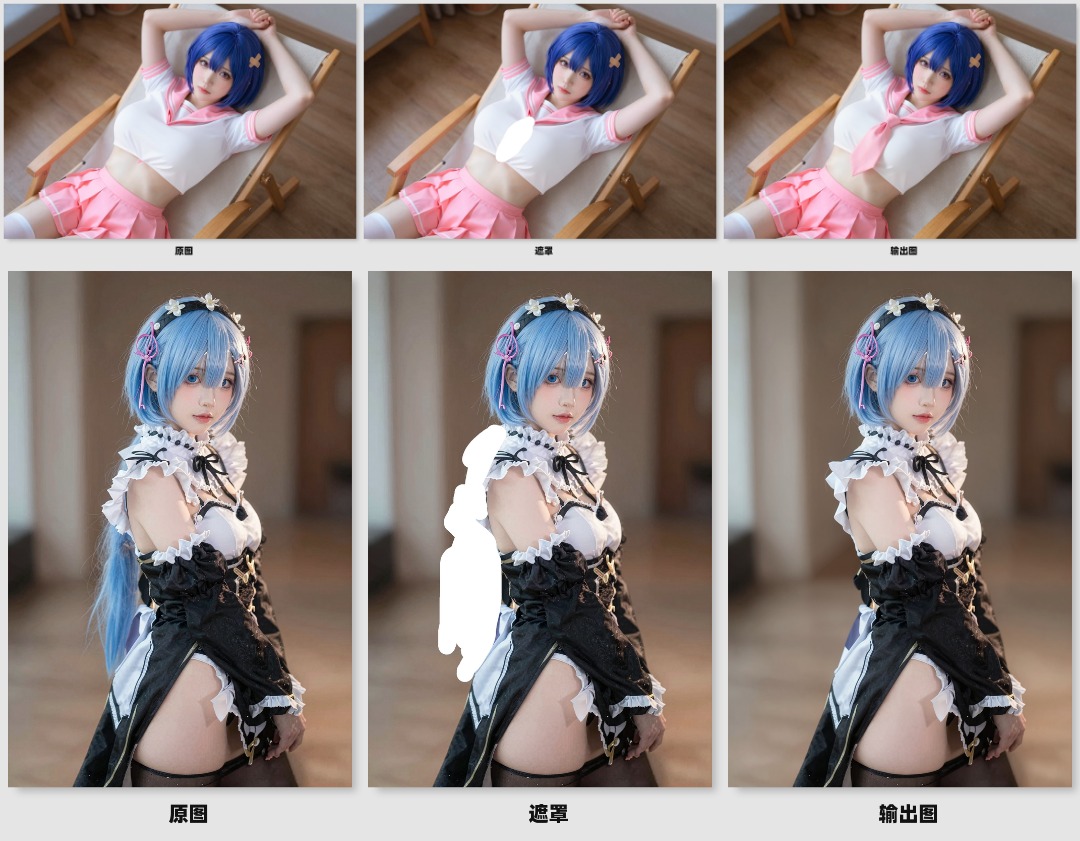
Flux2_Klein_Image Editing & Text Removal (6G VRAM can run it!)
Flux2_Klein_Image Editing & Text Removal (6G VRAM can run it!)More workflow parameter settings, please refer to my settings on rh:https://www.runninghub.ai/post/2011996481158389761/?inviteCode=rh-v1315You can directly click the link above to try it, no need to download the model, click to run the workflow online. If the results are good, you can deploy it to your local environment.Click the link to download the workflow. After registering and binding my invitation code: rh-v1315, you can get an extra 1000 RH coins. You can also get 100 points by logging in daily. It can be used to generate images or videos.I have published a video introduction: