ComfyUI Workflows
Browse real AI workflows from Flux, SDXL, Pony, ControlNet, video generation and commercial AI creators.
LTX2.3 Sulphur Multi Frame Video Gen(NSFW)
A workflow uses the latest LTX2.3 Sulphur and Prompt Relay and First and last multi- frames to generate high-quality videos.Other model details are within the workflow.Try the workflow online for free: https://www.runninghub.ai/post/2051993332863254530Please check the video tutorial before you use this workflow: https://rumble.com/v79ibo0-comfyui-ltx2.3-sulphur-video-generation-detailed-guige.html

LTX2.3 GGUF Simple i2v + Last Frame 16GB/low vram
diff modelhttps://huggingface.co/unsloth/LTX-2.3-GGUF/blob/main/ltx-2.3-22b-dev-Q4_K_M.gguftext enchttps://huggingface.co/Comfy-Org/ltx-2/blob/main/split_files/text_encoders/gemma_3_12B_it_fp4_mixed.safetensorshttps://huggingface.co/Kijai/LTX2.3_comfy/blob/main/text_encoders/ltx-2.3_text_projection_bf16.safetensorsvaehttps://huggingface.co/Kijai/LTX2.3_comfy/blob/main/vae/LTX23_audio_vae_bf16.safetensorshttps://huggingface.co/Kijai/LTX2.3_comfy/blob/main/vae/LTX23_video_vae_bf16.safetensorshttps://github.com/madebyollin/taehv/blob/main/safetensors/taeltx2_3.safetensorslatent upscalerhttps://huggingface.co/Lightricks/LTX-2.3/blob/main/ltx-2.3-spatial-upscaler-x2-1.1.safetensorslora (needed, do not disable)https://huggingface.co/Kijai/LTX2.3_comfy/blob/main/loras/ltx-2.3-22b-distilled-lora-dynamic_fro09_avg_rank_105_bf16.safetensors
LTX2.3 Video Gen with Low VRAM(NSFW)
A workflow uses the latest LTX2.3 Dasiwa to generate high-quality videos with low VRAM and speed. Thanks to the author.https://civitai.red/models/2543443/dasiwa-ltx-23-or-lightspeed-or-safetensorsOther model details are within the workflow.Try the workflow online for free: https://www.runninghub.ai/post/2045438512022949889Please check the video tutorial before you use this workflow: https://rumble.com/v78pszc-comfyui-ltx2.3-dasiwa-video-generationunlimited.html

Triple Depth Mapper for LTXV ControlNet LoRA
This is a work flow. The work flows from a movie (which as you may not know is actually just a shitload of pictures) to another movie. Cept this movie sucks to watch. But you can use it as a source for the appropriate ControlNet models, like LTXV IC Control LoRA (which is why I done made it) or for any other reason, you tard. I don't care.If you do this ahead of time, you don't have to waste resources and/or OOM when cranking out your slop. Prepping your sources usually requires two hands, so maybe wash up first.Just load a video and select the map of your choice.Depth is same as regular depth map, it's just a bunch of them. Read the notes, if I put any in there. It's resource intensive and a bit slow, but the map is just the bee's knees.Pose will give you a funky dancing skeleton. DW Pose NAS is much, much faster than non-NAS.Canny will give you outlines. Super fast.They're all useful for certain things. Depth is good when objects are occluding something behind them, but are far away, for example. DW Pose is helpful because, well that's should be obvious. Canny is good for crazy shapes that need outlines, something to define their shape. There is a small group for pre-encoding a latent as well, in case you want to use is as a guide along with the map. Actually no, ignore that. I put it there to fuck with you. Just use the normal audio, which passes directly through and is saved along with the maps. I.e. do nothing. You don't have to do anything. LTXV is EXTREMELY sensitive to audio if you tickle it in the A-spot - try it out, you will be mazed.Don't forget this part: this is just for making the maps. I did put in some reference nodes to show your stupid brain where to plug in/substitute the saved maps in the actual generation workflow, but you have to connect those dots yourself. Figure it out, eisensteen.I set up two sizes as defaults. The presets can be changed or added to in the auto size group. Change it to whatever you like to use - depth is the only one that really benefits from going really big.When using with LTXV I2V your source image MUST be as close as possible to the source motion map first frame. Composition-wise. You will get very strange stuff happening when they don't- even if you turn the strength way down. So what I do is hop over to one of my T2I workflows that has controlnet and generate a batch from the first frame of my maps. This gives you the best chance of an immediate lock and usually avoids having to drop the nightmare-fuel that is mismatched starts. If you're getting horrifying skin monsters all the time, try doing T2V instead until you have good starting frames.Frame rate is very important here. Make sure that you set the FPS node to match your source. Actually, wait. It's slightly more complicated. If your source is 29.97, you don't want to put that in the FPS node. You would use 30. The VHS loader is NOT forced, if you did force it to treat 29.97 as 30 the count will be messed up. Let it load the native rate and use 30, any discrepancies will be accounted for by the logic - it's usually just one frame +/- Won't be noticable. But if you do it the wrong way it may be, because it might cause duplicate frames or odd dropped ones. So if you're chopping up clips in an editor you don't have to re-encode at a new framerate first, you will just stack errors.The output FRAME COUNT is set up such that it will always conform to LTXV input rules (mod8 +1). It will round down to the nearest allowed frame count for the model.I had a batcher in there for doing folders in both, but I took it out for the moment because, shocker, it's not working.If you put a little effort into preparing your sources properly all of the rest can be automated. Having this done already makes the actual video generation go a LOT faster. Also you can reuse the maps without having to re-map them. Duh.If you don't have custom nodes, please google "why am I complaining about custom nodes? Am I retarded?" Don't listen to an LLM if it tells you that 'you're super smart and you're doing an awesome job - like, pro move bro - you're on the cutting edge!' I guarantee you that it's lying, hallucinating or probably both.If you can't figure out how to use this workflow, sell your computer and go live in a box on the street.

LTX2.3 Upscaler (with added detail)
A simple workflow for using the spatial upscale stage in LTX 2.3 to upscale any video. The LTX2.3 model upscales videos but adds its minor details and variations to the video.V2.0Played around with sigmas for the upscale. Consistency to original video has been improved significantly.No need to bypass individual nodes anymore. Use the Groups bypasser node to enable or disable the generate audio moduleWorks better with prompts describing the video or the audio you wantLoRA dependency is reduced, but will do better with them for specific scenariosV1.0LTX2.3 model adds realism to the video while upscaling with added detailsThe workflow can upscale to 1.5x or 2x, depending on the spatial model used (Download from LTX2.3 Huggingface repo)One of these nodes needs to be bypassed depending on whether the original video has audio - LTXV Audio VAE Encode or LTXV Empty Latent AudioA LoRA might be needed based on the content of the videoA brief description of video for positive prompt or can be left empty
Very low VRAM LTXAV 2.3 I2V workflow. - 4GB
This is the only LTX 2.3 video workflow so far I that I can run on my NVIDIA GeForce RTX 3050 4GB vram GPU and 8GB ram laptop.It's not fast on 4GB and probably much faster on 6GB and 8GB machines.I recommend having these settings in your run_nvidia_gpu.bat file:--windows-standalone-build --lowvram --force-fp16 --use-split-cross-attentionSo change the first line to something like this:.\python_embeded\python.exe -s ComfyUI\main.py --windows-standalone-build --lowvram --force-fp16 --use-split-cross-attentionHere are the filenames and where to Place them. The files can be found on huggingface.C:\AI\ComfyUI_windows_portable\ComfyUI\models\unetltx-2-3-22b-dev-Q4_K_M.ggufC:\AI\ComfyUI_windows_portable\ComfyUI\models\clipgemma_3_12B_it_fp4_mixed.safetensorsltx-2.3_text_projection_bf16.safetensorsC:\AI\ComfyUI_windows_portable\ComfyUI\models\vaeLTX23_video_vae_bf16.safetensorsLTX23_audio_vae_bf16.safetensorsC:\AI\ComfyUI_windows_portable\ComfyUI\models\latent_upscale_modelsltx-2.3-spatial-upscaler-x2-1.0.safetensorsC:\AI\ComfyUI_windows_portable\ComfyUI\models\lorasltx-2.3-22b-distilled-lora-dynamic_fro09_avg_rank_105_bf16.safetensorsIf you change the frame rate, do it on both video and audio so it stays synced.
LTX2.3 I2V First Last Frame (Infinite Intermediate Frames)
A workflow uses the latest LTX2.3 First and last frame and multi key frames to Generate High Quality Videos.Try the workflow online: https://www.runninghub.ai/post/2039218525709017090Model details are within the workflow.Join Discord for updates and error fixing: https://discord.gg/GTBQYDwSuNVideo guide for the workflow:https://rumble.com/v77yfps-ltx2.3-smooth-first-and-last-frame-video-generation-guide.html

LTX 2.3 Audio + Image to Video For Semi-Creative Slop
v1 is set up for audio + image inputsv1.1 is for just audio input (but you can toggle back to i2v easily)One step Audio+Image to Video for LTX-2.3. Based on this great starting point from PixelMuseAI. I've made modifications to suit my particular setup and cleaned it up and locked it down for consistent output. Took me a week to realize that I don't really need the upscale stage with LTX; I'm getting awesome quality with just one stage.So this is a single stage workflow. LTX models are pretty chunky, so I don't know how well this works for dinky GPUs. I run this on my Cray X-MP 4090 with 24GB of VRAM and 128GB of V-less RAM. With all of the default settings here (704x1080, 10 seconds @24fps) the total run time is about 2 minutes. Which is insane. If you have less horsepower you may need to do the gguffy stuff. This is what works for me. Just make sure you put in a flag to reserve some VRAM so you don't get OOM. Whatever that means. I reserve 1 GB. The margin is razor-thin, but enough to let me fly through without getting bogged down in swap purgatory.Anyway, the point of this workflow is to generate your slop such that it matches your input audio. If the slop is sexual, I'd recommend the heretic text encoder and a nsfw LoRA. You may get a huge list of CLIP errors in your terminal if you use an abliterated encoder but you can ignore them, they should not cause any halting errors. I have put in some sliders to control the weights of the optional LoRA loader. They are very important for this process.v1.1 addresses direct t2v with no starting imageIf you want to do straight T2V with the input audio, toggle the bypass on the LTXVImgToVideoInplace node to ON. Put a dummy image into the loader, it can be anything, a tiny white square, whatever. Just set your desired size on the Resize Image v2 node. That's it. With the bypass on, the input will be ignored and you will be full T2V. You can also play with the strength of the inplace (not bypassed of course) if you want to use the input image as a rough guide. Just remember with T2V you must be much more specific and detailed with your prompt. If the output is too blurry, you can throw in the auto LTXV scheduler (the one with a step widget) to replace the manual sigmas on the sampler. Four clicks. No problem. You can do it.There are are plenty of notes in the WF, but mostly it's plug-and-play. The duration you enter into the audio loader node is automatically multiplied by your framerate, +1, to make it conform with LTX rules. You can go much longer, and much higher resolution of course. LTX is just friggin awesome. WAN is feeling kind of dead. And MMAudio is obviated as well. Pair this up with TTS audio suite and/or Ace-Step and you're in business.Final frame saved for non-conditioned continuation. LTX does a remarkable job even without the continuation guidance, if you're feeling lazy. But it is definitely better if you take the time to set it up.If you're a custom node whiner, go ahead and replace what you don't have with some generic crap. But nothing in here has crazy dependencies or is hard to install.*I have two video combines here because something is broken in my VLC install that I can't fix - anything that saves with audio has broken comfy metadata. So I only use VHS for the looping preview, and the create + save is for my output. Either one can be deleted if it is redundant for you.Model links in the WF. The usual LTX stuff. Dev + 304 distill at 0.7 works great for me. The schedule is manually set up for it, if you want to run full, substitute some sexy sigmas.I have found using heretic is necessary to force seriously naughty prompts through. With regular abliterated I tend to get slow motion, or slightly tamed-down adherence. Use fp8 if your main model is fp8.https://huggingface.co/DreamFast/gemma-3-12b-it-heretic/tree/main/comfyuiMy Ace-Step Workflow:https://civitai.com/models/2351803/ace-step-for-your-ear-holes
LTX2.3 TI2V Audio Image Driven Digital Human
A workflow uses the latest LTX2.3 and a Prompt enhance node made by Lora Daddy to generate high-quality digital human videosTry the workflow online: https://www.runninghub.ai/post/2034531390770913281Model details are within the workflow.Join Discord for updates and error fixing: https://discord.gg/GTBQYDwSuNVideo guide for the workflow:https://rumble.com/v77jo9a-comfyui-ltx2.3-ehancement-detailed-guideprompt-and-speed.html
LTX2.3 TI2V Text and Image to Video Speed Up Version (NSFW)
A workflow uses the latest LTX2.3 and a Prompt enhance node made by Lora Daddy to generate high-quality videosTry the workflow online: https://www.runninghub.ai/post/2034470343418580994Model details are within the workflow.Join Discord for updates and error fixing: https://discord.gg/GTBQYDwSuNVideo guide for the workflow:https://rumble.com/v77jo9a-comfyui-ltx2.3-ehancement-detailed-guideprompt-and-speed.html
LTX 2.3 Low VRAM (8GB) + 32G Workflow
Optimized workflow for running LTX 2.3 (22B Distilled) on 8GB VRAM GPUs (e.g., RTX 3070 Laptop), focusing on stability, memory efficiency, and high-quality video/audio output.
LTX-2 Image Audio to Video
This workflow takes an Image and an audio track as input to generate a video.Important NoticeUpdate ComfyUI and KJ Nodes. A lot of the code has been updated in the last few days.Include --reserve-vram 1 in your launch option to avoid OOM.If you have no lipsync, try ensuring that your audio track is in stereo format. fix suggested by @thomasdimitri563 Models to download (LTX2.3)Place in models/diffusion_modelshttps://huggingface.co/Kijai/LTX2.3_comfy/blob/main/diffusion_models/ltx-2.3-22b-dev_transformer_only_fp8_scaled.safetensorsPlace in models/lorashttps://huggingface.co/Lightricks/LTX-2.3/blob/main/ltx-2.3-22b-distilled-lora-384.safetensorsPlace in models/text_encodershttps://huggingface.co/Comfy-Org/ltx-2/resolve/main/split_files/text_encoders/gemma_3_12B_it_fp4_mixed.safetensorshttps://huggingface.co/Kijai/LTX2.3_comfy/blob/main/text_encoders/ltx-2.3_text_projection_bf16.safetensorsPlace in models/vaehttps://huggingface.co/Kijai/LTX2.3_comfy/blob/main/vae/LTX23_audio_vae_bf16.safetensorshttps://huggingface.co/Kijai/LTX2.3_comfy/blob/main/vae/LTX23_video_vae_bf16.safetensorsModels to download (V3)Place in models/diffusion_modelshttps://huggingface.co/Lightricks/LTX-2/resolve/main/ltx-2-19b-distilled-fp8.safetensorsPlace in models/text_encodershttps://huggingface.co/Comfy-Org/ltx-2/resolve/main/split_files/text_encoders/gemma_3_12B_it_fp4_mixed.safetensorsPlace in models/lorashttps://huggingface.co/Lightricks/LTX-2-19b-IC-LoRA-Detailer/resolve/main/ltx-2-19b-ic-lora-detailer.safetensorshttps://huggingface.co/Lightricks/LTX-2-19b-LoRA-Camera-Control-Static/resolve/main/ltx-2-19b-lora-camera-control-static.safetensors
LTX 0.9.8 MAX QUALITY: Latent Upscaling & Tiled Sampling PRO Workflow (ComfyUI Tutorial)
FAST AI Video Generation (LTX 0.9.8 GGUF) on ComfyUI | Beginner Friendly Tutorial
Refer to the video for how to use the workflow
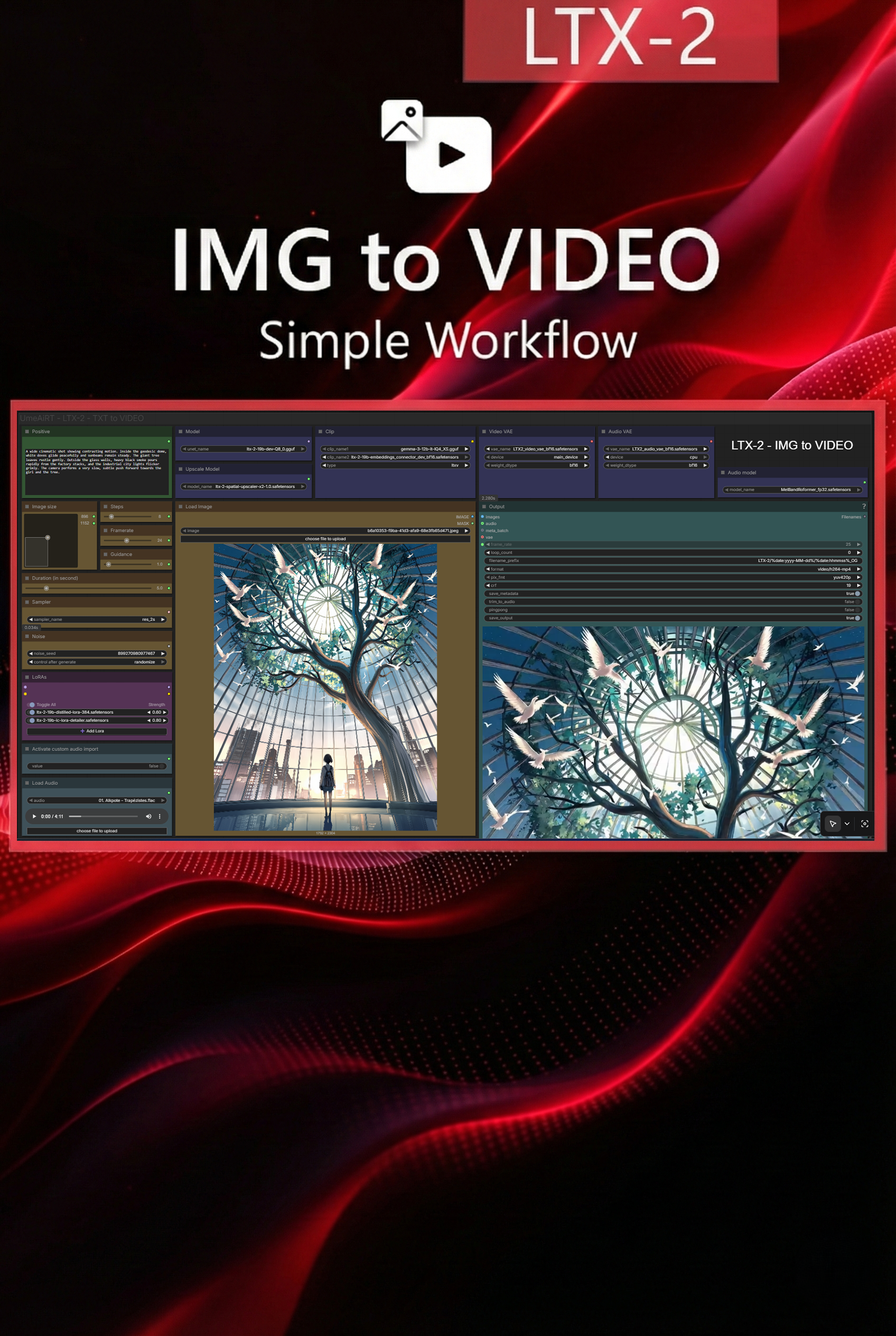
【LTX2】IMG to VIDEO
Hello, just a quick note to let you know that I created this workflow under complex conditions. I don't have my usual system and am forced to rent runpods for my tests. I haven't been able to perform as many checks and tests as usual, so please don't hesitate to send me a message if you encounter any problems.Description:This workflow allows you to generate video a base image and a text.Resources you need:📂Files :LTX2 Quant Model: Q8, Q6, Q5, Q4, Q3 (i recommend Q5) In models/unetMelBandRoFormer : MelBandRoformer_fp32.safetensorsin models/diffusion_modelsGEMMA-3: Q8, Q6, Q5, Q4, Q3 (i recommend Q4)in models/clipTEXT ENCODER: ltx-2-19b-embeddings_connector_dev_bf16.safetensorsin models/clipVIDEO VAE: TX2_video_vae_bf16.safetensorsin models/vaeAUDIO VAE: LTX2_audio_vae_bf16.safetensorsin models/vaeUpscale model: ltx-2-spatial-upscaler-x2-1.0.safetensorsin models/latent_upscale_modelsRecommanded LoRA:ltx-2-19b-distilled-lora-384.safetensorsltx-2-19b-ic-lora-detailer.safetensorsin models/loras📦Custom Nodes :comfyui_controlnet_auxComfyUI-GGUFComfyUI-LTXVideorgthree-comfyComfyUI-Easy-UseComfyUI-KJNodesComfyUI-CrystoolsComfyUI-VideoHelperSuiteComfyUI_UltimateSDUpscaleComfyUI_essentialsRES4LYFDerfuu_ComfyUI_ModdedNodesComfyUI-mxToolkitComfyUI Image Saverwlsh_nodesComfyUI-MelBandRoFormerComfyLiteralsComfyUI-LogicComfyUI-Custom-ScriptsVRGameDevGirl Video Enhancement NodesYaser-nodes for ComfyUI

【LTX2】TXT to VIDEO
Hello, just a quick note to let you know that I created this workflow under complex conditions. I don't have my usual system and am forced to rent runpods for my tests. I haven't been able to perform as many checks and tests as usual, so please don't hesitate to send me a message if you encounter any problems.Description:This workflow allows you to generate video from text.Resources you need:📂Files :LTX2 Quant Model: Q8, Q6, Q5, Q4, Q3 (i recommend Q5) In models/unetMelBandRoFormer : MelBandRoformer_fp32.safetensorsin models/diffusion_modelsGEMMA-3: Q8, Q6, Q5, Q4, Q3 (i recommend Q4)in models/clipTEXT ENCODER: ltx-2-19b-embeddings_connector_dev_bf16.safetensorsin models/clipVIDEO VAE: TX2_video_vae_bf16.safetensorsin models/vaeAUDIO VAE: LTX2_audio_vae_bf16.safetensorsin models/vaeUpscale model: ltx-2-spatial-upscaler-x2-1.0.safetensorsin models/latent_upscale_modelsRecommanded LoRA:ltx-2-19b-distilled-lora-384.safetensorsltx-2-19b-ic-lora-detailer.safetensorsin models/loras📦Custom Nodes :comfyui_controlnet_auxComfyUI-GGUFComfyUI-LTXVideorgthree-comfyComfyUI-Easy-UseComfyUI-KJNodesComfyUI-CrystoolsComfyUI-VideoHelperSuiteComfyUI_UltimateSDUpscaleComfyUI_essentialsRES4LYFDerfuu_ComfyUI_ModdedNodesComfyUI-mxToolkitComfyUI Image Saverwlsh_nodesComfyUI-MelBandRoFormerComfyLiteralsComfyUI-LogicComfyUI-Custom-ScriptsVRGameDevGirl Video Enhancement NodesYaser-nodes for ComfyUI

LTX-2+ Audio-Visual Synchronization Training: LORA Multi-Deployment Workflow (Preventing Audio Overfitting)
You can click on the link below and try it out directly. If the effect is good, you can deploy it locally https://www.runninghub.cn/post/2012140284192235522/?inviteCode=rh-v1121Fan benefits, register to get 1000 points, daily login 100 points, play 4090! Experience the super power of 48G!B-site video: https://www.bilibili.com/video/BV11Lr4BHEXr/Knowledge Planet: https://t.zsxq.com/7F90AGraphic tutorial: https://t.zsxq.com/lNK8vThe workflow is very simple to use, and I have uploaded a tutorial on how to use it on YouTube. You can try it out and follow the tutorial and Civitai's workflow to easily reproduce the results. Thank you. If you have any other questions, please leave a comment in the comment sectionThis tutorial is very important, not watching it will surely lead to a lot of problems! Watch the video tutorial before trying !!!! Very important! Especially a key point at the end!
LTX 2 For Low & High V-RAM GGUF + T2V + I2V with Lip Sync Using Comfy UI (1080p, 4K Videos) #ltx
18.01.2026 v 1.1 -- Audio quality increased via audio normalization.11.01.2026 v 1.0 -- initial release IMPORTANT: Fix for "Missing Node: MonnkySamplerLTXV"You cannot install this node via the standard ComfyUI Manager search.Step 1: Clean Up If you have installed other versions , "ComfyUI-PainterLTXV" trying to fix this, please uninstall them first to avoid conflicts.Step 2: Open CMD in ComfyUI/custom_nodes/git clone https://github.com/monnky/ComfyUI-Monnky-LTXV2Close the console and restart ComfyUI.All Model links check youtube description.youtu.be/caOcU-k9_A4Before opening the workflow, please update/download following Nodeshttps://github.com/monnky/ComfyUI-Monnky-LTXV2https://github.com/kijai/ComfyUI-KJNodeshttps://github.com/Lightricks/ComfyUI-LTXVideoComfyUI-GGUF File Replacementhttps://github.com/city96/ComfyUI-GGUF/pull/399https://github.com/city96/ComfyUI-GGUFGuidance on writing a prompthttps://ltx.video/blog/how-to-prompt-for-ltx-200:00 Demo00:47 Loading LTX Safetensor Model.01:16 Loading LTX GGUF Model.01:59 Text to Video (LTXV Audio) : FP8 distilled model.06:27 Image to Video (LTXV Audio) : FP8 distilled model.07:27 Image to Video (Custom Audio) : Q4 GGUF model.09:10 Text to Video (Custom Audio) : FP8 distilled model.09:51 How make LTX GGUF file work in ComfyUI.11:11 4K Video test.
LTX2.0_First and last frames_I2V_Automatic prompt
LTX-2 is here, and it might just be the "Final Form" of open-source AI video we've been waiting for! 🤯Not only does it generate cinematic video with director-level camera control, but it also generates SYNCHRONIZED AUDIO. In this video, I break down the 3 core workflows you need to master: Text-to-Video, Image-to-Video, and Start/End Frame Control. I've optimized everything for ComfyUI so you can run it smoothly.- - - - - - - - - - - - - - - - - - - - - - - - - -🔽 GET THE FREE WORKFLOWS & 1000 BONUS COINS 🔽✨ Register on RunningHub through my link to get 1000 FREE RH Coins!💰 Plus, claim 100 extra coins every single day just by logging in.1️⃣AI APP:LTX2.0_T2V_Automatic prompt:https://www.runninghub.ai/ai-detail/2010782128040054786/?inviteCode=rh-v12912️⃣AI APP: LTX2.0_I2V_Automatic prompt:https://www.runninghub.ai/ai-detail/2011488484875309058/?inviteCode=rh-v12913️⃣AI APP: LTX2.0_First and last frames_I2V_Automatic prompt:https://www.runninghub.ai/ai-detail/2011490689430851586/?inviteCode=rh-v1291🔽Free download workflow and models/Loras 🔽Model&Lora&Plugin1️⃣Download link for Ltx2.0 Model&Lora(Github): https://github.com/Lightricks/LTX-2?tab=readme-ov-file2️⃣Download link for Ltx2.0 (Online storage) : https://pan.quark.cn/s/3ebcef7de1593️⃣Comfyui_TTP_Toolset:https://github.com/TTPlanetPig/Comfyui_TTP_Toolset4️⃣ComfyUI-ReservedVRAM: https://github.com/Windecay/ComfyUI-ReservedVRAM5️⃣Prompting Guide for LTX-2 : https://ltx.io/model/model-blog/prompting-guide-for-ltx-2- - - - - - - - - - - - - - - - - - - - - - - - - -💡 Key Features of LTX-2: Native Audio Generation: Creates sound effects that match the video. Camera Control LoRA: Precise control over pans, zooms, and crane shots. * Start/End Frame: Perfect for morphing two images into a video. If this guide helps you create amazing AI videos, please SMASH that LIKE button and SUBSCRIBE for more advanced ComfyUI tutorials! #LTX2 #ComfyUI #AIVideo #TextToVideo #ImageToVideo #GenerativeAI #RunningHub #StableDiffusion #OpenSourceAI
LTX2.0_I2V_Automatic prompt
LTX-2 is here, and it might just be the "Final Form" of open-source AI video we've been waiting for! 🤯Not only does it generate cinematic video with director-level camera control, but it also generates SYNCHRONIZED AUDIO. In this video, I break down the 3 core workflows you need to master: Text-to-Video, Image-to-Video, and Start/End Frame Control. I've optimized everything for ComfyUI so you can run it smoothly.- - - - - - - - - - - - - - - - - - - - - - - - - -🔽 GET THE FREE WORKFLOWS & 1000 BONUS COINS 🔽✨ Register on RunningHub through my link to get 1000 FREE RH Coins!💰 Plus, claim 100 extra coins every single day just by logging in.1️⃣AI APP:LTX2.0_T2V_Automatic prompt:https://www.runninghub.ai/ai-detail/2010782128040054786/?inviteCode=rh-v12912️⃣AI APP: LTX2.0_I2V_Automatic prompt:https://www.runninghub.ai/ai-detail/2011488484875309058/?inviteCode=rh-v12913️⃣AI APP: LTX2.0_First and last frames_I2V_Automatic prompt:https://www.runninghub.ai/ai-detail/2011490689430851586/?inviteCode=rh-v1291🔽Free download workflow and models/Loras 🔽Model&Lora&Plugin1️⃣Download link for Ltx2.0 Model&Lora(Github): https://github.com/Lightricks/LTX-2?tab=readme-ov-file2️⃣Download link for Ltx2.0 (Online storage) : https://pan.quark.cn/s/3ebcef7de1593️⃣Comfyui_TTP_Toolset:https://github.com/TTPlanetPig/Comfyui_TTP_Toolset4️⃣ComfyUI-ReservedVRAM: https://github.com/Windecay/ComfyUI-ReservedVRAM5️⃣Prompting Guide for LTX-2 : https://ltx.io/model/model-blog/prompting-guide-for-ltx-2- - - - - - - - - - - - - - - - - - - - - - - - - -💡 Key Features of LTX-2: Native Audio Generation: Creates sound effects that match the video. Camera Control LoRA: Precise control over pans, zooms, and crane shots. * Start/End Frame: Perfect for morphing two images into a video. If this guide helps you create amazing AI videos, please SMASH that LIKE button and SUBSCRIBE for more advanced ComfyUI tutorials! #LTX2 #ComfyUI #AIVideo #TextToVideo #ImageToVideo #GenerativeAI #RunningHub #StableDiffusion #OpenSourceAI
LTX2.0_T2V_Automatic prompt
LTX-2 is here, and it might just be the "Final Form" of open-source AI video we've been waiting for! 🤯Not only does it generate cinematic video with director-level camera control, but it also generates SYNCHRONIZED AUDIO. In this video, I break down the 3 core workflows you need to master: Text-to-Video, Image-to-Video, and Start/End Frame Control. I've optimized everything for ComfyUI so you can run it smoothly.- - - - - - - - - - - - - - - - - - - - - - - - - -🔽 GET THE FREE WORKFLOWS & 1000 BONUS COINS 🔽✨ Register on RunningHub through my link to get 1000 FREE RH Coins!💰 Plus, claim 100 extra coins every single day just by logging in.1️⃣AI APP:LTX2.0_T2V_Automatic prompt: https://www.runninghub.ai/ai-detail/2010782128040054786/?inviteCode=rh-v12912️⃣AI APP: LTX2.0_I2V_Automatic prompt: https://www.runninghub.ai/ai-detail/2011488484875309058/?inviteCode=rh-v12913️⃣AI APP: LTX2.0_First and last frames_I2V_Automatic prompt: https://www.runninghub.ai/ai-detail/2011490689430851586/?inviteCode=rh-v1291🔽Free download workflow and models/Loras 🔽Model&Lora&Plugin1️⃣Download link for Ltx2.0 Model&Lora(Github): https://github.com/Lightricks/LTX-2?tab=readme-ov-file2️⃣Download link for Ltx2.0 (Online storage) : https://pan.quark.cn/s/3ebcef7de1593️⃣Comfyui_TTP_Toolset:https://github.com/TTPlanetPig/Comfyui_TTP_Toolset4️⃣ComfyUI-ReservedVRAM: https://github.com/Windecay/ComfyUI-ReservedVRAM5️⃣Prompting Guide for LTX-2 : https://ltx.io/model/model-blog/prompting-guide-for-ltx-2- - - - - - - - - - - - - - - - - - - - - - - - - -💡 Key Features of LTX-2: * Native Audio Generation: Creates sound effects that match the video. * Camera Control LoRA: Precise control over pans, zooms, and crane shots. * Start/End Frame: Perfect for morphing two images into a video. If this guide helps you create amazing AI videos, please SMASH that LIKE button and SUBSCRIBE for more advanced ComfyUI tutorials! #LTX2 #ComfyUI #AIVideo #TextToVideo #ImageToVideo #GenerativeAI #RunningHub #StableDiffusion #OpenSourceAI
LTX-2 GGUF I2V image-to-video workflow with power lora loaders, good quality outputs
LTX-2 GGUF I2V image-to-video workflow with power lora loaders and tiled vae decode, I modified this workflow to produce better quality output and used KJNodes to load the VAE and GGUF. detailer lora can be turned off or on in stage 2 depending if you want itLoad your camera loras on the subgraph and any sfw/nsfw loras you wish to use.You can also try changing stage 1 scheduler from 20 to 40 steps to see how it changes video output quality
GGUF LTX2.0 Workflow (I2V,T2V)
plz force update kjnode, ltxv(comfyui), ggufv1.3ltx2 new samepler node update,The overall sound has been significantly improved. Image quality doesn't seem to have changed much.Also, the new sampler requires more image strength in i2v.plz force update kjnode, ltxv(comfyui), ggufv1.2some fix.The gguf model used has changed. If possible, please use "ltx-2-19b-dev-Q8_0.gguf" by unslothv1.1We've heard that Kijai's video_vae has been changed due to an som issues. The vae loader has also changed. The link remains the same, so please download it again.And you also need to force update kjnode.This is the workflow I personally use.All necessary information is noted within the workflow.Both T2V and I2V are possible.It runs with similar specs to Wan2.2 in the same computer environment, same video resolution and video length.In my computer environment,Wan2.2-I2V-A14B-Q8_0 8step 16fps 300secltx-2-19b-Distilled_Q8_0 8step euler 24fps 150secltx-2-19b-Dev_Q8_0 20step euler 24fps 300secltx-2-19b-Dev_Q8_0 20step res_2s 24fps 450secI have 24gb vram, 32gb system ram, but it runs fine with -novram, so it should work fine with 8gb vram.If you run it with -novram, the generation time will be about twice as long.If possible, keep your prompts as long as possible. If they're too short, errors may occur or unintended effects may be added. Be sure to include sufficient scene descriptions and dialogue.
LTX 2 VIDEO DETAILER
Distilled 384 lora :https://huggingface.co/Lightricks/LTX-2/tree/mainDetailer lora :https://huggingface.co/Lightricks/LTX-2-19b-IC-LoRA-Detailer/tree/mainText encoder :https://huggingface.co/GitMylo/LTX-2-comfy_gemma_fp8_e4m3fn/blob/main/gemma_3_12B_it_fp8_e4m3fn.safetensorsModels :https://huggingface.co/Kijai/LTXV2_comfy/tree/mainThis workflow simply works as a detailer, worked for temporal consistency.Video resolution will not change. Works for 1280 x 720 5second and 10 second videos. There is a comparison video on civitai.-Tested on 16GB VRAM.Two workflows attached in zip folder, First one is for 5 second videos.The other is for 10 second.If your ram is good enough (32+), you can make 10 second video on 5 second workflow too.In that case sampling time will decrease.But it is a test workflow, not claiming it to be the best, artifacts still appear.If you get it done and your output video is like black or red grids,(Usually happens after you make like 10 20 videos). That means you need to restart your PC, because of VRAM throttling.If you make video from like 5 sec workflow and shift it to 10 sec workflow and press run, you will get black screen or something like that. It is because different vae encoding method and cache, you need to close and open comfy.Test results (16GB VRAM):1280 x 720, 5 sec video detailing took 7 mins on 5 sec workflow.1280 x 720, 10 sec video video detailing took 23 mins on 10 sec workflow.1280 x 720, 10 sec video detailing took 14 mins on 5 sec workflow. (You need high RAM.)------------------Workflow needs different LTX installation process - Follow the process below :Download the custom nodes from the workflow below, There is also video explanation for the nodes and modelsQuantized models used.Reference video to watch (Not mine) :Models :https://huggingface.co/Kijai/LTXV2_comfy/tree/mainRed Nodes under :https://civitai.com/models/2297090?modelVersionId=2584847-a custom node from VantageWithAI named "Vantage GGUF Unet Loader" nodethis node is experimental but more efficient than the regular unet GGUF nodes. (there is a PR pull missing from the GGUF nodes at the moment and until it is merged fully the node wont work without updating it in your command prompt yourself. i dont suggest as it is highly unusable. trust me, use the Vantage node.)TO GET THE VANTAGE NODES, open a command prompt in your custom nodes folder and copy in this command and hit enter:git clone https://github.com/vantagewithai/Vantage-Nodes.git(i removed the "cd comfyui/custom_nodes" portion from the youtube video tutorial as its not needed)use this command once its finished:cd Vantage-Nodespip install -r requirements.txtthis installs the nodes fully. restart comfyui and you drag in my workflow and you have a fully functioning LTX-2 workflow!I HIGHLY RECOMMEND UPDATING YOUR BAT FILE WITH THESE FLAGS:--lowvram --disable-xformers --use-pytorch-cross-attention --reserve-vram 2 --disable-smart-memorythis workflow is very resource intense. even for the lowest quant my pc struggled until i lowered resolution to 480p. i suggest editing your bat file in notepad and just adding the flags to the code line that contains the "--windows-standalone" code and just save the file as a copy and use that one for LTX-2 ONLY. (rename it that if it helps you remember) instructions on how to do it are in the youtube video if you dont know how!Workflow made by AITold.

Ltx2 Multi-Frame Head-to-Tail Motion Enhancement Edition V1
You can click on the link below and try it out directly. If the effect is good, you can deploy it locally https://www.runninghub.cn/post/2010552640517705729/?inviteCode=rh-v1121Fan benefits, register to get 1000 points, daily login 100 points, play 4090! Experience the super power of 48G!B-site video: https://www.bilibili.com/video/BV1qpidBrE2F/Knowledge Planet: https://t.zsxq.com/7F90AGraphic tutorial: https://t.zsxq.com/lNK8vThe workflow is very simple to use, and I have uploaded a tutorial on how to use it on YouTube. You can try it out and follow the tutorial and Civitai's workflow to easily reproduce the results. Thank you. If you have any other questions, please leave a comment in the comment sectionThis tutorial is very important, not watching it will surely lead to a lot of problems! Watch the video tutorial before trying !!!! Very important! Especially a key point at the end!
LTX2-T2V-Simple UI-FP8
T2V Workflow with a simple UIhttps://ltx.io/Models https://github.com/Lightricks/LTX-2https://huggingface.co/Lightricks/LTX-2User Guide https://docs.ltx.video/open-source-model/integration-tools/comfy-uiAdded Super Power Lora https://github.com/HenkDz/rgthree-comfyPromt Batch LoaderPromt EnhanceWan Ultimate SD UplscalerPromt Styler
LTX2.0 Image to Video Speed Up Version(Auto Prompt)
A workflow uses the latest LTX 2.0 and Qwen VL to generate high-quality image to videos.All the model details are within the workflow.Try the model online for free: https://www.runninghub.ai/post/2009486048203644930Please check the video guide before you start using this workflow:
LTX2.0 Text to Video Speed Up Version(Auto Prompt)
A workflow uses the latest LTX 2.0 and Qwen VL to generate high-quality text to videos.All the model details are within the workflow.Try the model online for free: https://www.runninghub.ai/post/2009485993199542274Please check the video guide before you start using this workflow:

Ltx2 High-Dynamic-Range Video V1 (Streamlined Workflow Edition)
You can click on the link below and try it out directly. If the effect is good, you can deploy it locally https://www.runninghub.cn/post/2009226239936040962/?inviteCode=rh-v1121Fan benefits, register to get 1000 points, daily login 100 points, play 4090! Experience the super power of 48G!B-site video: https://www.bilibili.com/video/BV1qpidBrE2FKnowledge Planet: https://t.zsxq.com/7F90AGraphic tutorial: https://t.zsxq.com/lNK8vThe workflow is very simple to use, and I have uploaded a tutorial on how to use it on YouTube. You can try it out and follow the tutorial and Civitai's workflow to easily reproduce the results. Thank you. If you have any other questions, please leave a comment in the comment sectionThis tutorial is very important, not watching it will surely lead to a lot of problems! Watch the video tutorial before trying !!!! Very important! Especially a key point at the end!

Ltx2 High-Dynamic Intelligent Text-to-Video Generator V1 (Painter Lite Edition)
You can click on the link below and try it out directly. If the effect is good, you can deploy it locally https://www.runninghub.cn/post/2009218927821332481/?inviteCode=rh-v1121Fan benefits, register to get 1000 points, daily login 100 points, play 4090! Experience the super power of 48G!B-site video: https://www.bilibili.com/video/BV1qpidBrE2FKnowledge Planet: https://t.zsxq.com/7F90AGraphic tutorial: https://t.zsxq.com/lNK8vThe workflow is very simple to use, and I have uploaded a tutorial on how to use it on YouTube. You can try it out and follow the tutorial and Civitai's workflow to easily reproduce the results. Thank you. If you have any other questions, please leave a comment in the comment sectionThis tutorial is very important, not watching it will surely lead to a lot of problems! Watch the video tutorial before trying !!!! Very important! Especially a key point at the end!

LTX2+AI2V Audio-to-Video Digital Human V1
You can click on the link below and try it out directly. If the effect is good, you can deploy it locally https://www.runninghub.cn/post/2009218877204471809/?inviteCode=rh-v1121Fan benefits, register to get 1000 points, daily login 100 points, play 4090! Experience the super power of 48G!B-site video: https://www.bilibili.com/video/BV1qpidBrE2FKnowledge Planet: https://t.zsxq.com/7F90AGraphic tutorial: https://t.zsxq.com/lNK8vThe workflow is very simple to use, and I have uploaded a tutorial on how to use it on YouTube. You can try it out and follow the tutorial and Civitai's workflow to easily reproduce the results. Thank you. If you have any other questions, please leave a comment in the comment sectionThis tutorial is very important, not watching it will surely lead to a lot of problems! Watch the video tutorial before trying !!!! Very important! Especially a key point at the end!

LTX2 Modified Edition Auto Frame Capture V1
You can click on the link below and try it out directly. If the effect is good, you can deploy it locally https://www.runninghub.cn/post/2009253788510593026/?inviteCode=rh-v1121Fan benefits, register to get 1000 points, daily login 100 points, play 4090! Experience the super power of 48G!B-site video: https://www.bilibili.com/video/BV1qpidBrE2FKnowledge Planet: https://t.zsxq.com/7F90AGraphic tutorial: https://t.zsxq.com/lNK8vThe workflow is very simple to use, and I have uploaded a tutorial on how to use it on YouTube. You can try it out and follow the tutorial and Civitai's workflow to easily reproduce the results. Thank you. If you have any other questions, please leave a comment in the comment sectionThis tutorial is very important, not watching it will surely lead to a lot of problems! Watch the video tutorial before trying !!!! Very important! Especially a key point at the end!

LTX2+AI2V High-Dynamic Audio-Visual Synthesis Digital Human V1
You can click on the link below and try it out directly. If the effect is good, you can deploy it locally https://www.runninghub.cn/post/2009253788510593026/?inviteCode=rh-v1121Fan benefits, register to get 1000 points, daily login 100 points, play 4090! Experience the super power of 48G!B-site video: https://www.bilibili.com/video/BV1qpidBrE2FKnowledge Planet: https://t.zsxq.com/7F90AGraphic tutorial: https://t.zsxq.com/lNK8vThe workflow is very simple to use, and I have uploaded a tutorial on how to use it on YouTube. You can try it out and follow the tutorial and Civitai's workflow to easily reproduce the results. Thank you. If you have any other questions, please leave a comment in the comment sectionThis tutorial is very important, not watching it will surely lead to a lot of problems! Watch the video tutorial before trying !!!! Very important! Especially a key point at the end!

LTX 2.0 Smart Prompt Dynamic Enhancement with Accelerated Camera Movement for Low-VRAM Version Text-to-Video V1
You can click on the link below and try it out directly. If the effect is good, you can deploy it locallyhttps://www.runninghub.cn/post/2009271528722010113/?inviteCode=rh-v1121Fan benefits, register to get 1000 points, daily login 100 points, play 4090! Experience the super power of 48G!B-site video: https://www.bilibili.com/video/BV1qpidBrE2FKnowledge Planet: https://t.zsxq.com/7F90AGraphic tutorial: https://t.zsxq.com/lNK8vThe workflow is very simple to use, and I have uploaded a tutorial on how to use it on YouTube. You can try it out and follow the tutorial and Civitai's workflow to easily reproduce the results. Thank you. If you have any other questions, please leave a comment in the comment sectionThis tutorial is very important, not watching it will surely lead to a lot of problems! Watch the video tutorial before trying !!!! Very important! Especially a key point at the end!
EKKIVOK - LTX2 TXT2IMG
Official LTX2 Workflow Reforged by me.✍️ 5. Text-to-Video WorkflowsLTX-2 Text-to-Video WorkflowGenerate full videos directly from text prompts.Best for:StorytellingConcept visualizationCreative explorationFeatures:Prompt-driven scene creationSmooth camera movementConsistent motion over timeAudio generated automaticallyCreator tip:Use descriptive prompts with mood, motion, and atmosphere for best results.
LTX 2 Workflow ( Text-To-Video & Image-To-Video )
This is the video that i made for ltx 2 . Check it out and want models links and all check out my discord - https://discord.com/channels/1350055016987365436/1457085486056214598/1458455052871143434
LTX-Video-ICLoRA
🎥 YouTube Video TutorialWant to know what this workflow actually does and how to start fast?This video explains what the tool is, how to launch the workflow instantly, and shares my core design logic — no local setup, no complicated environment.Everything starts directly on RunningHub, so you can experience it in action first.👉 YouTube Tutorial: https://youtu.be/IATbL5PWKkwBefore you begin, I recommend watching the video thoroughly — getting the full context helps you understand the tool faster and avoid common detours.⚙️ RunningHub WorkflowTry the workflow online right now — no installation required.👉 Workflow: https://www.runninghub.ai/post/1944031275911090177/?inviteCode=rh-v1111If the results meet your expectations, you can later deploy it locally for customization.🎁 Fan Benefits:Register to get 1000 points + daily login 100 points — enjoy 4090 performance and 48 GB super power!📺 Bilibili Updates (Mainland China & Asia-Pacific)If you’re in the Asia-Pacific region, you can watch the video below to see the workflow demonstration and creative breakdown.📺 Bilibili Video: https://www.bilibili.com/video/BV15puqzvEQ5/☕ Support Me on Ko-fiIf you find my content helpful and want to support future creations, you can buy me a coffee ☕.Every bit of support helps me keep creating — just like a spark that can ignite a blazing flame.👉 Ko-fi: https://ko-fi.com/aiksk💼 Business ContactFor collaboration or inquiries, please contact aiksk95 on WeChat.🎥 YouTube 视频教程想了解这个工作流到底是怎样的工具,以及如何快速启动?视频主要介绍 工具定位、快速启动方法 和 我的构筑思路。我们会直接在 RunningHub 上进行演示,让你第一时间看到实际效果。👉 YouTube 教程: https://youtu.be/IATbL5PWKkw开始前建议尽量完整地观看视频 —— 把握整体思路会更快上手,也能少走常见弯路。⚙️ 在线体验工作流现在就可以在线体验,无需安装。👉 工作流: https://www.runninghub.ai/post/1944031275911090177/?inviteCode=rh-v1111打开上方链接即可直接运行该工作流,实时查看生成效果。如果觉得效果理想,你也可以在本地进行自定义部署。🎁 粉丝福利:注册即送 1000 积分,每日登录 100 积分,畅玩 4090 体验 48 G 超级性能!📺 Bilibili 更新(中国大陆及南亚太地区)如果你在中国大陆或南亚太地区,可以通过下方视频查看该工作流的实测效果与构思讲解。📺 B站视频: https://www.bilibili.com/video/BV15puqzvEQ5/我会在 夸克网盘 持续更新模型资源:👉 https://pan.quark.cn/s/20c6f6f8d87b这些资源主要面向本地用户,方便进行创作与学习。
4-Image First-and-Last-Frame + Spatial or Temporal Upscaling (LTXVideo 13B 0.9.7)
🎥 YouTube Video TutorialWant to know what this workflow actually does and how to start fast?This video explains what the tool is, how to launch the workflow instantly, and shares my core design logic — no local setup, no complicated environment.Everything starts directly on RunningHub, so you can experience it in action first.👉 YouTube Tutorial: https://www.youtube.com/watch?v=-ogtwPJlx-kBefore you begin, I recommend watching the video thoroughly — getting the full context helps you understand the tool faster and avoid common detours.⚙️ RunningHub WorkflowTry the workflow online right now — no installation required.👉 Workflow: https://www.runninghub.ai/post/1921473560848826369/?inviteCode=rh-v1111If the results meet your expectations, you can later deploy it locally for customization.🎁 Fan Benefits: Register to get 1000 points + daily login 100 points — enjoy 4090 performance and 48 GB super power!📺 Bilibili Updates (Mainland China & Asia-Pacific)If you’re in the Asia-Pacific region, you can watch the video below to see the workflow demonstration and creative breakdown.📺 Bilibili Video: https://www.bilibili.com/video/BV16f7fzfEMF/☕ Support Me on Ko-fiIf you find my content helpful and want to support future creations, you can buy me a coffee ☕.Every bit of support helps me keep creating — just like a spark that can ignite a blazing flame.👉 Ko-fi: https://ko-fi.com/aiksk💼 Business ContactFor collaboration or inquiries, please contact aiksk95 on WeChat.🎥 YouTube 视频教程想了解这个工作流到底是怎样的工具,以及如何快速启动?视频主要介绍 工具定位、快速启动方法 和 我的构筑思路。我们会直接在 RunningHub 上进行演示,让你第一时间看到实际效果。👉 YouTube 教程: https://www.youtube.com/watch?v=-ogtwPJlx-k开始前建议尽量完整地观看视频 —— 把握整体思路会更快上手,也能少走常见弯路。⚙️ 在线体验工作流现在就可以在线体验,无需安装。👉 工作流: https://www.runninghub.ai/post/1921473560848826369/?inviteCode=rh-v1111打开上方链接即可直接运行该工作流,实时查看生成效果。如果觉得效果理想,你也可以在本地进行自定义部署。🎁 粉丝福利: 注册即送 1000 积分,每日登录 100 积分,畅玩 4090 体验 48 G 超级性能!📺 Bilibili 更新(中国大陆及南亚太地区)如果你在中国大陆或南亚太地区,可以通过下方视频查看该工作流的实测效果与构思讲解。📺 B站视频: https://www.bilibili.com/video/BV16f7fzfEMF/我会在 夸克网盘 持续更新模型资源:👉 https://pan.quark.cn/s/20c6f6f8d87b这些资源主要面向本地用户,方便进行创作与学习。
3-Image First-and-Last-Frame + Spatial or Temporal Upscaling (LTXVideo 13B 0.9.7)
🎥 YouTube Video TutorialWant to know what this workflow actually does and how to start fast?This video explains what the tool is, how to launch the workflow instantly, and shares my core design logic — no local setup, no complicated environment.Everything starts directly on RunningHub, so you can experience it in action first.👉 YouTube Tutorial: https://www.youtube.com/watch?v=-ogtwPJlx-kBefore you begin, I recommend watching the video thoroughly — getting the full context helps you understand the tool faster and avoid common detours.⚙️ RunningHub WorkflowTry the workflow online right now — no installation required.👉 Workflow: https://www.runninghub.ai/post/1921462278720520193/?inviteCode=rh-v1111If the results meet your expectations, you can later deploy it locally for customization.🎁 Fan Benefits: Register to get 1000 points + daily login 100 points — enjoy 4090 performance and 48 GB super power!📺 Bilibili Updates (Mainland China & Asia-Pacific)If you’re in the Asia-Pacific region, you can watch the video below to see the workflow demonstration and creative breakdown.📺 Bilibili Video: https://www.bilibili.com/video/BV16f7fzfEMF/☕ Support Me on Ko-fiIf you find my content helpful and want to support future creations, you can buy me a coffee ☕.Every bit of support helps me keep creating — just like a spark that can ignite a blazing flame.👉 Ko-fi: https://ko-fi.com/aiksk💼 Business ContactFor collaboration or inquiries, please contact aiksk95 on WeChat.🎥 YouTube 视频教程想了解这个工作流到底是怎样的工具,以及如何快速启动?视频主要介绍 工具定位、快速启动方法 和 我的构筑思路。我们会直接在 RunningHub 上进行演示,让你第一时间看到实际效果。👉 YouTube 教程: https://www.youtube.com/watch?v=-ogtwPJlx-k开始前建议尽量完整地观看视频 —— 把握整体思路会更快上手,也能少走常见弯路。⚙️ 在线体验工作流现在就可以在线体验,无需安装。👉 工作流: https://www.runninghub.ai/post/1921462278720520193/?inviteCode=rh-v1111打开上方链接即可直接运行该工作流,实时查看生成效果。如果觉得效果理想,你也可以在本地进行自定义部署。🎁 粉丝福利: 注册即送 1000 积分,每日登录 100 积分,畅玩 4090 体验 48 G 超级性能!📺 Bilibili 更新(中国大陆及南亚太地区)如果你在中国大陆或南亚太地区,可以通过下方视频查看该工作流的实测效果与构思讲解。📺 B站视频: https://www.bilibili.com/video/BV16f7fzfEMF/我会在 夸克网盘 持续更新模型资源:👉 https://pan.quark.cn/s/20c6f6f8d87b这些资源主要面向本地用户,方便进行创作与学习。
2-Image First-and-Last-Frame + Spatial or Temporal Upscaling (LTXVideo 13B 0.9.7)
🎥 YouTube Video TutorialWant to know what this workflow actually does and how to start fast?This video explains what the tool is, how to launch the workflow instantly, and shares my core design logic — no local setup, no complicated environment.Everything starts directly on RunningHub, so you can experience it in action first.👉 YouTube Tutorial: https://www.youtube.com/watch?v=-ogtwPJlx-kBefore you begin, I recommend watching the video thoroughly — getting the full context helps you understand the tool faster and avoid common detours.⚙️ RunningHub WorkflowTry the workflow online right now — no installation required.👉 Workflow: https://www.runninghub.ai/post/1921088284032712705/?inviteCode=rh-v1111If the results meet your expectations, you can later deploy it locally for customization.🎁 Fan Benefits: Register to get 1000 points + daily login 100 points — enjoy 4090 performance and 48 GB super power!📺 Bilibili Updates (Mainland China & Asia-Pacific)If you’re in the Asia-Pacific region, you can watch the video below to see the workflow demonstration and creative breakdown.📺 Bilibili Video: https://www.bilibili.com/video/BV16f7fzfEMF/☕ Support Me on Ko-fiIf you find my content helpful and want to support future creations, you can buy me a coffee ☕.Every bit of support helps me keep creating — just like a spark that can ignite a blazing flame.👉 Ko-fi: https://ko-fi.com/aiksk💼 Business ContactFor collaboration or inquiries, please contact aiksk95 on WeChat.🎥 YouTube 视频教程想了解这个工作流到底是怎样的工具,以及如何快速启动?视频主要介绍 工具定位、快速启动方法 和 我的构筑思路。我们会直接在 RunningHub 上进行演示,让你第一时间看到实际效果。👉 YouTube 教程: https://www.youtube.com/watch?v=-ogtwPJlx-k开始前建议尽量完整地观看视频 —— 把握整体思路会更快上手,也能少走常见弯路。⚙️ 在线体验工作流现在就可以在线体验,无需安装。👉 工作流: https://www.runninghub.ai/post/1921088284032712705/?inviteCode=rh-v1111打开上方链接即可直接运行该工作流,实时查看生成效果。如果觉得效果理想,你也可以在本地进行自定义部署。🎁 粉丝福利: 注册即送 1000 积分,每日登录 100 积分,畅玩 4090 体验 48 G 超级性能!📺 Bilibili 更新(中国大陆及南亚太地区)如果你在中国大陆或南亚太地区,可以通过下方视频查看该工作流的实测效果与构思讲解。📺 B站视频: https://www.bilibili.com/video/BV16f7fzfEMF/我会在 夸克网盘 持续更新模型资源:👉 https://pan.quark.cn/s/20c6f6f8d87b这些资源主要面向本地用户,方便进行创作与学习。
Image-to-Video + Spatial or Temporal Upscaling (LTXVideo 13B 0.9.7)
🎥 YouTube Video TutorialWant to know what this workflow actually does and how to start fast?This video explains what the tool is, how to launch the workflow instantly, and shares my core design logic — no local setup, no complicated environment.Everything starts directly on RunningHub, so you can experience it in action first.👉 YouTube Tutorial: https://www.youtube.com/watch?v=-ogtwPJlx-kBefore you begin, I recommend watching the video thoroughly — getting the full context helps you understand the tool faster and avoid common detours.⚙️ RunningHub WorkflowTry the workflow online right now — no installation required.👉 Workflow: https://www.runninghub.ai/post/1920645310174138370/?inviteCode=rh-v1111If the results meet your expectations, you can later deploy it locally for customization.🎁 Fan Benefits: Register to get 1000 points + daily login 100 points — enjoy 4090 performance and 48 GB super power!📺 Bilibili Updates (Mainland China & Asia-Pacific)If you’re in the Asia-Pacific region, you can watch the video below to see the workflow demonstration and creative breakdown.📺 Bilibili Video: https://www.bilibili.com/video/BV16f7fzfEMF/☕ Support Me on Ko-fiIf you find my content helpful and want to support future creations, you can buy me a coffee ☕.Every bit of support helps me keep creating — just like a spark that can ignite a blazing flame.👉 Ko-fi: https://ko-fi.com/aiksk💼 Business ContactFor collaboration or inquiries, please contact aiksk95 on WeChat.🎥 YouTube 视频教程想了解这个工作流到底是怎样的工具,以及如何快速启动?视频主要介绍 工具定位、快速启动方法 和 我的构筑思路。我们会直接在 RunningHub 上进行演示,让你第一时间看到实际效果。👉 YouTube 教程: https://www.youtube.com/watch?v=-ogtwPJlx-k开始前建议尽量完整地观看视频 —— 把握整体思路会更快上手,也能少走常见弯路。⚙️ 在线体验工作流现在就可以在线体验,无需安装。👉 工作流: https://www.runninghub.ai/post/1920645310174138370/?inviteCode=rh-v1111打开上方链接即可直接运行该工作流,实时查看生成效果。如果觉得效果理想,你也可以在本地进行自定义部署。🎁 粉丝福利: 注册即送 1000 积分,每日登录 100 积分,畅玩 4090 体验 48 G 超级性能!📺 Bilibili 更新(中国大陆及南亚太地区)如果你在中国大陆或南亚太地区,可以通过下方视频查看该工作流的实测效果与构思讲解。📺 B站视频: https://www.bilibili.com/video/BV16f7fzfEMF/我会在 夸克网盘 持续更新模型资源:👉 https://pan.quark.cn/s/20c6f6f8d87b这些资源主要面向本地用户,方便进行创作与学习。
LTX Video RTX3060 12GB VRAM
I'm uploading this workflow for using with Stability Matrix app. Youtube video:I have zero knowledge about how this model works, it's not SDXL, it's DIT Flux. I'm currently with only 12GB of RAM so can't show better results yet, more steps and higher resolution may fix.I know have 28GB, but LTX is really bad, you can try asking gemini for describing prompts. I've attempted with this prompt: Your task is to imagine and describe a natural visual action or camera movement that could realistically unfold from the still moment, as if capturing the next 3 seconds of a scene. Focus exclusively on visual storytelling—do not include sound, music, inner thoughts, or dialogue.Infer a logical and expressive action or gesture based on the visual pose, gaze, posture, hand positioning, and facial expression of characters. For instance:- If a subject's hands are near their face, imagine them removing or revealing something- If two people are close and facing each other, imagine a gesture of connection like touching, smiling, or leaning in.- If a character looks focused or searching, imagine a glance upward, a head turn, or them interacting with an object just out of frame.Describe these inferred movements with precision and clarity, as a cinematographer would. Always write in a single cinematic paragraph.Be as descriptive as possible, focusing on details of the subject's appearance and intricate details on the scene or setting.Follow this structure:- Start with the first clear motion or camera cue.- Build with gestures, body language, expressions, and any physical interaction.- Detail environment, framing, and ambiance.If any additional user instructions are added after this sentence, use them as reference for your prompt. Example: The woman shifts her weight back, a slow, controlled motion that begins with a gentle flexion of her knees. She doesn't fully stand, but rather her body lowers a few inches, her weight settling onto her heels. Her torso remains straight, maintaining a poised posture as she descends. As she reaches the lowest point of the movement, her body settles, the soft curve of her lower back coming into sharper focus. She holds this low-to-the-ground position for a brief moment before she begins a new, fluid transition into a kneeling pose, her body unfolding with grace as she brings her knees to the floor. The camera stays in its medium shot, capturing the full motion and emphasizing the graceful control she has over her body.Otherwise, focus only on the input image analysis. Which is sent with the image as attachment, then you can shortly describe how you want it to perform the action and how it should end. Otherwise be precise, short and use natural language supported by SDXL or Flux.It sucked less with 10 steps = CRF of 18 = 20 Frames and between seed 45-52
LTXvideo Image to Video refined
This is version 4 for LTX Video 0.9.8.Two workflows for the LTX Video 0.9.8 release. It comes with nice new features. Long shot generation in LTXV-13B! LTX-Video now supports up to 60 seconds of video. And is compatible with the official IC-LoRAs.There are also new distilled models. 13B distilled model ltxv-13b-0.9.8-distilled. And 2B distilled model ltxv-2b-0.9.8-distilledBoth models are distilled from the same base model ltxv-13b-0.9.8-dev and are compatible for use together in the same multiscale pipeline.Improved prompt understanding and detail generationIncludes corresponding FP8 weights and workflows.Release of a new detailer model LTX-Video-ICLoRA-detailer-13B-0.9.8Lightrix LTX Video repository: https://github.com/Lightricks/LTX-VideoHowtoDrag an image into the image nodes, adjust the prompt, and press queue. The rest should fit.DescriptionAn image to video ComfyUI workflow with LTX Video. Better said, two of it. A pimped version that is based at the keyframe workflow that comes with the LTX Video node. It can be found in the examples folder of the node. This version is more compact though, better readable, with comments and downloadlinks.And the official Multiprompt workflow from the LTX Video repository page in a humanized form. More compact, better readable, with comments and downloadlinks.Both workflows contains an internal upscaling with LTX nodes. Means you first generate a 480p video, or something similar, and then you upscale it to 720p.TimeThe example video from the keyframe workflow rendered in around 4 minutes for the low version. Upscaling it took around 20 minutes. Which is not bad for a 720p video with lots of details then.The example video with the multiprompt took around as double as long. And i was not able to let the upscaling finish. I ran into an OOM after an hour or so. LTX Video has become a bit slower.RequirementsThis workflow was generated with 16 gb vram. Minimum requirement is 12 gb vram. And you should not have fewer than 32 gb system ram.NoteLTX Video quality has dramatically increased with this version. And the new features are great. However, it has also become very picky with the input image. It can work. But it does not have to. I tried one image for twenty times, and got 19 useless results.Second note, the adress for the other workflows has changed. They are now here:https://haizytiles.reinerstilesets.de/index.php/ai-workflows/Youtube VideoThere is also a youtube explanation video available for this workflows.
LTXV+0.98+IC+LORA Deep Control Video Generation Video
B-site video: https://www.bilibili.com/video/BV18D8FzVEkF/Knowledge Planet: https://t.zsxq.com/7F90AGraphic tutorial: https://t.zsxq.com/lNK8vThe workflow is very simple to use, and I have uploaded a tutorial on how to use it on YouTube. You can try it out and follow the tutorial and Civitai's workflow to easily reproduce the results. Thank you. If you have any other questions, please leave a comment in the comment sectionThis tutorial is very important, not watching it will surely lead to a lot of problems! Watch the video tutorial before trying !!!! Very important! Especially a key point at the end!
LTXV+0.98+Prompt Word Scheduling (Multiple Groups) Image-to-Video V1 (Supports 60 Seconds)
B-site video: https://www.bilibili.com/video/BV18D8FzVEkF/Knowledge Planet: https://t.zsxq.com/7F90AGraphic tutorial: https://t.zsxq.com/lNK8vThe workflow is very simple to use, and I have uploaded a tutorial on how to use it on YouTube. You can try it out and follow the tutorial and Civitai's workflow to easily reproduce the results. Thank you. If you have any other questions, please leave a comment in the comment sectionThis tutorial is very important, not watching it will surely lead to a lot of problems! Watch the video tutorial before trying !!!! Very important! Especially a key point at the end!
LTXV+0.98 High Dynamic First and Last Frame Optimized Version
B-site video: https://www.bilibili.com/video/BV18D8FzVEkF/Knowledge Planet: https://t.zsxq.com/7F90AGraphic tutorial: https://t.zsxq.com/lNK8vThe workflow is very simple to use, and I have uploaded a tutorial on how to use it on YouTube. You can try it out and follow the tutorial and Civitai's workflow to easily reproduce the results. Thank you. If you have any other questions, please leave a comment in the comment sectionThis tutorial is very important, not watching it will surely lead to a lot of problems! Watch the video tutorial before trying !!!! Very important! Especially a key point at the end!
LTXV+0.98+Balanced Version Live Video Dual Mode
B-site video: https://www.bilibili.com/video/BV18D8FzVEkF/Knowledge Planet: https://t.zsxq.com/7F90AGraphic tutorial: https://t.zsxq.com/lNK8vThe workflow is very simple to use, and I have uploaded a tutorial on how to use it on YouTube. You can try it out and follow the tutorial and Civitai's workflow to easily reproduce the results. Thank you. If you have any other questions, please leave a comment in the comment sectionThis tutorial is very important, not watching it will surely lead to a lot of problems! Watch the video tutorial before trying !!!! Very important! Especially a key point at the end!

LTXV+0.98+ICLORA Line Art Control Video Generation Video
B-site video: https://www.bilibili.com/video/BV18D8FzVEkF/Knowledge Planet: https://t.zsxq.com/7F90AGraphic tutorial: https://t.zsxq.com/lNK8vThe workflow is very simple to use, and I have uploaded a tutorial on how to use it on YouTube. You can try it out and follow the tutorial and Civitai's workflow to easily reproduce the results. Thank you. If you have any other questions, please leave a comment in the comment sectionThis tutorial is very important, not watching it will surely lead to a lot of problems! Watch the video tutorial before trying !!!! Very important! Especially a key point at the end!
LTXV+0.98+IC+LORA posture control video generation video
B-site video: https://www.bilibili.com/video/BV18D8FzVEkF/Knowledge Planet: https://t.zsxq.com/7F90AGraphic tutorial: https://t.zsxq.com/lNK8vThe workflow is very simple to use, and I have uploaded a tutorial on how to use it on YouTube. You can try it out and follow the tutorial and Civitai's workflow to easily reproduce the results. Thank you. If you have any other questions, please leave a comment in the comment sectionThis tutorial is very important, not watching it will surely lead to a lot of problems! Watch the video tutorial before trying !!!! Very important! Especially a key point at the end!
LTXV+0.98+Deep Video Conversion Long Video
B-site video: https://www.bilibili.com/video/BV18D8FzVEkF/Knowledge Planet: https://t.zsxq.com/7F90AGraphic tutorial: https://t.zsxq.com/lNK8vThe workflow is very simple to use, and I have uploaded a tutorial on how to use it on YouTube. You can try it out and follow the tutorial and Civitai's workflow to easily reproduce the results. Thank you. If you have any other questions, please leave a comment in the comment sectionThis tutorial is very important, not watching it will surely lead to a lot of problems! Watch the video tutorial before trying !!!! Very important! Especially a key point at the end!
LTXV Distilled 8 steps
LTXV 13B Distilled + Upscale:This ComfyUI workflow uses the LTXV 13B 0.9.7 Distilled model for image-to-video (i2v) generation, with support for both base and tiled samplers, and includes an integrated latent upscaling pipeline for enhanced quality.Key Features:LTXV Base Sampler with STG Guider Advanced, supporting precise control via sigma/cfg/stg tuning.Optional Image Conditioning, allowing i2v prompts with visual input anchors.Latent Upscaler using the official spatial upscaler model (0.9.7), with optional AdaIN blending from reference latents.Tiled Sampler Branch for higher resolutions and extended generation scenarios.Integrated VAE decode (standard and tiled) and VHS Video Combine for direct video output.Optional Film Grain & Resize stage for cinematic finishing.This setup is suitable for users aiming to generate higher-quality outputs with the distilled LTXV model, using either low-res base output or tiled+upscaled paths, and is fully compatible with LoRA and conditioning workflows.
LTX video 0.9.7 13B
Youtube:
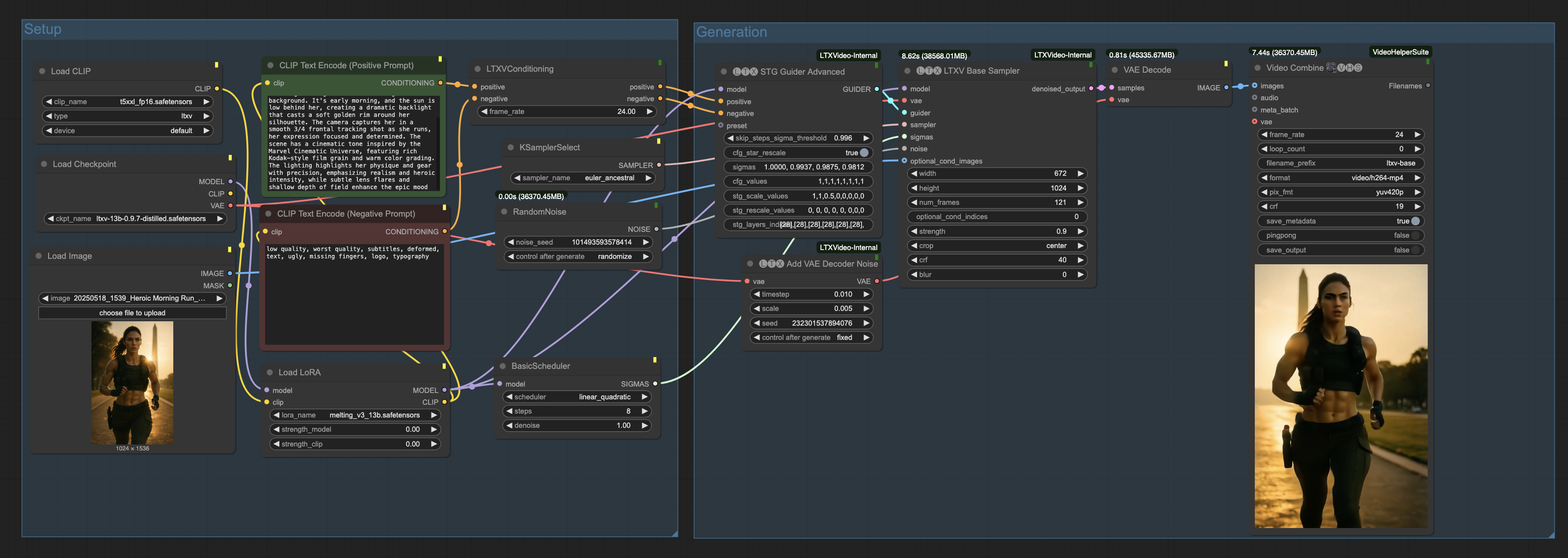
LTXV 13b Distilled - Super Simple Workflow
OverviewThis is a straightforward workflow for the LTXV 13b Distilled model, designed for quick and easy video generation. The distilled model runs much faster than the full version, but still delivers impressive quality-making it a great choice for rapid prototyping or when you want to generate a lot of videos quickly.How It WorksScheduler Steps:You can set the scheduler to use anywhere from 4 to 12 steps.For image-to-video (i2v) tasks, using 12 steps usually helps retain more detail from your input image.8 steps is a good general-purpose setting-fast and still pretty accurate.If you go lower (e.g., 4-6 steps), the workflow is even faster, but with complex images, the output might drift visually or change style.LoRA Support:There’s a Load LoRA node included. Enable it if you want to add a LoRA for extra effects or style-otherwise, just leave it off for standard generation.Speed:On an H100 GPU, this workflow generates a 5-second video (8 steps) in about 11 seconds.Combining Models:For the best results, you can combine the distilled model with the full LTXV 13b model-use the distilled version for speed, and the full model for final, high-quality renders if needed. But honestly, the distilled model alone is already pretty solid for most use cases.
LTXVideo 13B 0.9.7 Distilled Workflow - T2V or I2V with optional captioning/LLM/audio gen
New V2.1, for LTXV 13B 0.9.7 Distilled!I updated this to work with 0.9.7. I also added all the optimization nodes that help it go faster. I fixed the Add Details, and added an extend section and cleaned a lot up. Also added a MMAudio group to generate sounds based on the video. All have easy toggle switches and lots of notes.I've played around with some samplers and schedulers.I found a combination of these tend to work well:STG Advanced presets: CustomSamplers: Euler, Euler_a, LCMSchedulers: Beta, SimpleI recently noticed the Simple scheduler smoothed out jumpiness a lotNote: On the upscale, you kind of need to play with the sigmas manually. Because they stay high most of the time with 8 steps, taking the last 3 doesn't work well. You need to pick 3 values between 0.90 and 0.75 to get it working well.Please add comments if you find really good combinations.V1Someone shared this on reddit:https://civitai.com/articles/13699/ltxvideo-096-distilled-workflow-with-llm-promptAnd I looked at it and liked most of it, but it wasn't using the latest nodes for some things and there were some LLM issues. So I cleaned it up and added a captioner. Then I added some super easy toggles to you can disable anything you don't want to use and go strictly with T2V with or without a LLM or even just the captioned text of another image. Or full I2V and passing the image caption to the LLM, or just I2V with no caption or LLM.It uses florence-2 for captioning with this fine tune I found that is very good at captioning NSFW: https://huggingface.co/MiaoshouAI/Florence-2-large-PromptGen-v2.0I just added TeaCache too. It doesn't seem to make much of a difference on the Distilled model with 9 steps, but it saved about 40% or more on the base model at 30 steps.There's also notes on what Scheduler/Sampler settings to change if you want to use the distilled or base model, it's set up for base model by default.I also found that the T5xxl FP8 works fine, I ran some comparisons between the FP16 and FP8 and I preferred the FP8 actually.No clue why it didn't wrap the text on the export screen capture?:
LTXV 0.9.6 Ultra Stable Super Accelerated High Consistency Tucson Video V2
B-site video: https://www.bilibili.com/video/BV1dWcpeUE4v/Knowledge Planet: https://t.zsxq.com/7F90AGraphic tutorial: https://t.zsxq.com/lNK8vThe workflow is very simple to use, and I have uploaded a tutorial on how to use it on YouTube. You can try it out and follow the tutorial and Civitai's workflow to easily reproduce the results. Thank you. If you have any other questions, please leave a comment in the comment sectionThis tutorial is very important, not watching it will surely lead to a lot of problems! Watch the video tutorial before trying !!!! Very important! Especially a key point at the end!
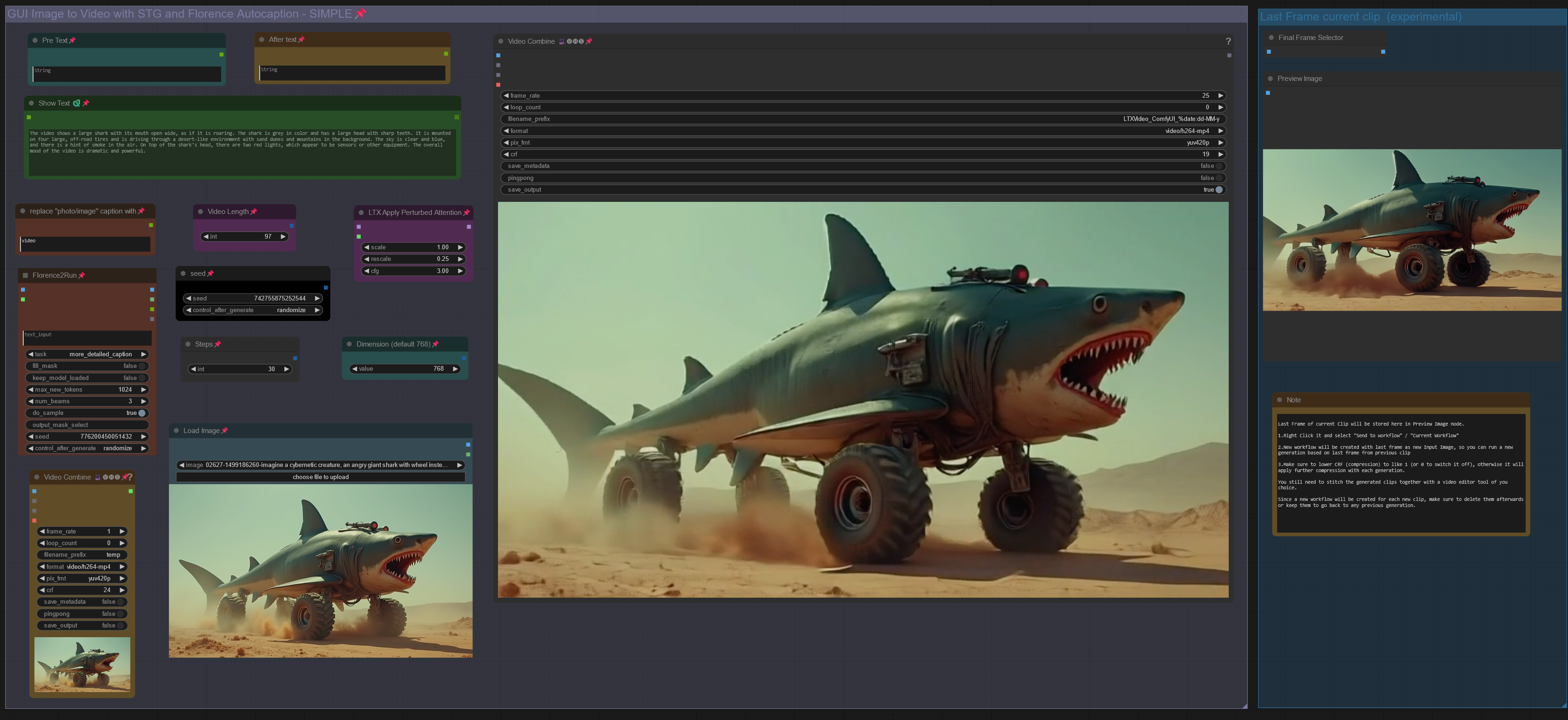
LTX IMAGE to VIDEO with STG, CAPTION & CLIP EXTEND workflow
NEW LTX-2 Workflows here: https://civitai.com/models/2318870Workflow: Image -> Autocaption (Prompt) -> LTX Image to VideoLTX Prompt Enhancer (LTXPE) might have issues with latest Comfy and Lightricks updateUpdate July 20th 2025: GGUF Models for LTX 0.9.8:Distilled model, works with V9.5: https://huggingface.co/QuantStack/LTXV-13B-0.9.8-distilled-GGUF/tree/mainDev model, works with V9.0: https://huggingface.co/QuantStack/LTXV-13B-0.9.8-dev-GGUF/tree/main(see "Model Card" in above links for LTX 0.9.8 VAE and textencoder downloads)V9.5: LTX 0.9.7 Distilled Workflow supporting LTX 0.9.7 Distilled GGUF Model.There is a workflow with Florence and another one with LTX Prompt Enhancer (LTXPE)GGUF Model can be downloaded here:https://huggingface.co/wsbagnsv1/ltxv-13b-0.9.7-distilled-GGUF/tree/mainVAE and Textencoder are identical to previous LTX 0.9.6 model (see V8.0 below)LTX 0.9.7 Distilled is using only 8 steps and is very fast.V9.0: LTX 0.9.7 Workflow supporting LTX 0.9.7 GGUF Model.There is a workflow with Florence and another one with LTX Prompt Enhancer (LTXPE)GGUF Model can be downloaded here:https://huggingface.co/wsbagnsv1/ltxv-13b-0.9.7-dev-GGUF/tree/mainVAE and Textencoder are identical to previous LTX 0.9.6 model (see V8.0 below)LTX 0.9.7 is a 13billion parameter model, previous versions only had 2b parameters, therefore it is more heavy on Vram usage and requires longer process time. Try V8.0 below with model 0.9.6 or V9.5 for very fast rendering.V8.0: LTX 0.9.6 Workflow (dev and distilled GGUF model in same workflow)there is a version with Florence2 Caption and a version with LTX Prompt Enhancer (LTXPE)GGUF Models (Dev & Distilled) can be downloaded here:https://huggingface.co/calcuis/ltxv0.9.6-gguf/tree/mainvae: pig_video_enhanced_vae_fp32-f16.ggufTextencoder: t5xxl_fp32-q4_0.ggufV7.0: LTX 0.9.5 Model Version GGUF with Wavespeed/Teacache.LTX 0.9.5 GGUF Model and VAE: https://huggingface.co/calcuis/ltxv-gguf/tree/main(vae_ltxv0.9.5_fp8_e4m3fn.safetensors)Clip Textencoder: https://huggingface.co/city96/t5-v1_1-xxl-encoder-gguf/tree/mainThere are 2 worklfows, a main workflow with florence caption only and additional one with florence and LTX prompt enhancer. Setup with Wavespeed (bypassed by default, Strg+B to activate)workflow works with all GGUF models: 0.9 / 0.9.1 / 0.9.5uncensored LLM for Prompt enhancer: https://huggingface.co/skshmjn/unsloth_llama-3.2-3B-instruct-uncenssored-Outdated (march 2025)- V6.0: GGUF/TiledVAE Version & Masked Motion Blur VersionUpdated the workflow with GGUF Models, which save Vram and run faster.There is a Standard Version, which uses just the GGUF Models and a GGUF+TiledVae+Clear Vram Version, that reduces Vram requirements even further. Tested the larger GGUF model (Q8) with resolution of 1024, 161 frames and 32 steps , the GGUF Version peaked Vram usage at 14gb, while the TiledVae+ClearVram Version peaked at 7gb. Smaller GGUF Models might reduce requirements further.GGUF Model, VAE and Textencoder can be downloaded here:(Model&VAE): https://huggingface.co/calcuis/ltxv-gguf/tree/main(anti Checkerboard Vae): https://huggingface.co/spacepxl/ltx-video-0.9-vae-finetune/tree/main(Clip Textencoder): https://huggingface.co/city96/t5-v1_1-xxl-encoder-gguf/tree/mainYou can go for the GGUF Version with 16gb+ and the TiledVae+ClearVram with less than 16gb Vram.Masked Motion Blur Version: Since LTX is prone to motion blur, added an extra group to the workflow which allows to set a mask on input image, apply motion blur to mask, to trigger specific motion. (sounds better than it actually works, useful tho in some cases). GGUF and GGUF+TiledVAE+ClearVram version included.V5.0: Support for new LTX Model 0.9.1.included an additional workflow for LowVram (Clears Vram before VAE)added a workflow to compare LTX Model 0.9.1 vs LTX Model 0.9(V4 did not work with 0.9.1 when the model was released (hence v5 was created), this has changed as comfy & nodes were updated in the meantime, now you can use both Models (0.9 & 0.9.1) with V4, also with V5. Both have different custom nodes to manage the model, other than that, both versions are the same. If you run into memory issues/long process time, see tips at the end)-Outdated (march 2025)- V4.0: Introducing Video/Clip extension :Extend a clip based on last frame from previous clip. You can extend a clip about 2-3 times before quality starts to degenerate, see more details in the notes of the worflow.Added a feature to use your own prompt and bypass florence caption.V3.0: Introducing STG (Spatiotemporal Skip Guidance for Enhanced Video Diffusion Sampling).Included a SIMPLE and an ENHANCED workflow. Enhanced Version has additional features to upscale the Input Image, that can help in some cases. Recommend to use the SIMPLE Version.replaced the height/width Node with a "Dimension" node that drives the Videosize (default = 768. increase to 1024 will improve resolution, but might reduce motion, also uses more VRAM and time). Unlike previous Versions, Image will not be cropped.Included new node "LTX Apply Perturbed Attention" representing the STG settings (for more details on values/limits see the note within the workflow) .Enhanced Version has an additional switch to upscale Input Image (true) or not (false). Plus a scale value (use 1 or 2) to define the size of the image before being injected, which can work a bit like supersampling. As said, not required in most cases.Pro Tip: Beside using the CRF value at around 24 to drive movement, increase the frame rate in the yellow Video Combine node from 1 to 4+ to trigger further motion when outcome is too static.Node "Modify LTX Model" will change the model within a session, if you switch to another worklfow, make sure to hit "Free model and node cache" in comfyui to avoid interferences. If you bypass this node (strg-B) , you can do Text2Video.V2.0 ComfyUI Workflow for Image-to-Video with Florence2 Autocaption (v2.0)This updated workflow integrates Florence2 for autocaptioning, replacing BLIP from version 1.0, and includes improved controls for tailoring prompts towards video-specific outputs.New Features in v2.0Florence2 Node IntegrationCaption CustomizationA new text node allows replacing terms like "photo" or "image" in captions with "video" to align prompts more closely with video generation.V1.0: Enhanced Motion with CompressionTo mitigate "no-motion" artifacts in the LTX Video model:Pass input images through FFmpeg using H.264 compression with a CRF of 20–30.This step introduces subtle artifacts, helping the model latch onto the input as video-like content.CRF values can be adjusted in the yellow "Video Combine" node (lower-left GUI).Higher values (25–30) increase motion effects; lower values (~20) retain more visual fidelity.Autocaption EnhancementText nodes for Pre-Text and After-Text allow manual additions to captions.Use these to describe desired effects, such as camera movements.Adjustable Input SettingsWidth/Height & Scale: Define image resolution for the sampler (e.g., 768×512). A scale factor of 2 enables supersampling for higher-quality outputs. Use a scale value of 1 or 2. (changed to dimension node in V3)Pro TipsMotion Optimization: If outputs feel static, incrementally increase the CRF & frame rate value or adjust Pre-/After-Text nodes to emphasize motion-related prompts.Fine-Tuning Captions: Experiment with Florence2’s caption detail levels for nuanced video prompts.If you run into memory issues (OOM or extreme process time) try the following:use the LowVram version of V5use a GGUF Versionpress "free model and node cache" in comfyuiset starting arguments for comfyui to --lowvram --disable-smart-memorysee the file in your comfyui folder: "run_nvidia_gpu.bat" edit the line: python.exe -s ComfyUI\main.py --lowvram --disable-smart-memoryswitch off hardware acceleration in your browserCredits go to Lightricks for their incredible model and nodes:https://www.lightricks.com/https://github.com/Lightricks/ComfyUI-LTXVideohttps://github.com/logtd/ComfyUI-LTXTricks

LTXV 13b distilled 0.9.7 fp8 img2video improved workflow
I was getting terrible results with the basic workflow for LTXV distilled fp8, so I added florence caption and image resize.
LTX0.95 Optimized Text-to-Graphics Raw, First and Last Frame Keyframe Video Control Workflow
B-site video: https://www.bilibili.com/video/BV1dWcpeUE4v/Knowledge Planet: https://t.zsxq.com/7F90AGraphic tutorial: https://t.zsxq.com/lNK8vThe workflow is very simple to use, and I have uploaded a tutorial on how to use it on YouTube. You can try it out and follow the tutorial and Civitai's workflow to easily reproduce the results. Thank you. If you have any other questions, please leave a comment in the comment sectionThis tutorial is very important, not watching it will surely lead to a lot of problems! Watch the video tutorial before trying !!!! Very important! Especially a key point at the end!

LTx Tucson Video Workflow
B-site video: https://www.bilibili.com/video/BV1dWcpeUE4v/Knowledge Planet: https://t.zsxq.com/7F90AGraphic tutorial: https://t.zsxq.com/lNK8vThe workflow is very simple to use, and I have uploaded a tutorial on how to use it on YouTube. You can try it out and follow the tutorial and Civitai's workflow to easily reproduce the results. Thank you. If you have any other questions, please leave a comment in the comment sectionThis tutorial is very important, not watching it will surely lead to a lot of problems! Watch the video tutorial before trying !!!! Very important! Especially a key point at the end!

LTXV+13B High Dynamic Frame Optimization Version V1
LTXV+13B High Dynamic Frame Optimization Version V1The workflow is very simple to use, and I have uploaded a tutorial on how to use it on YouTube. You can try it out and follow the tutorial and Civitai's workflow to easily reproduce the results. Thank you. If you have any other questions, please leave a comment in the comment section