QWEN Image Edit - Ultimate 2509 edit
About this model
Init
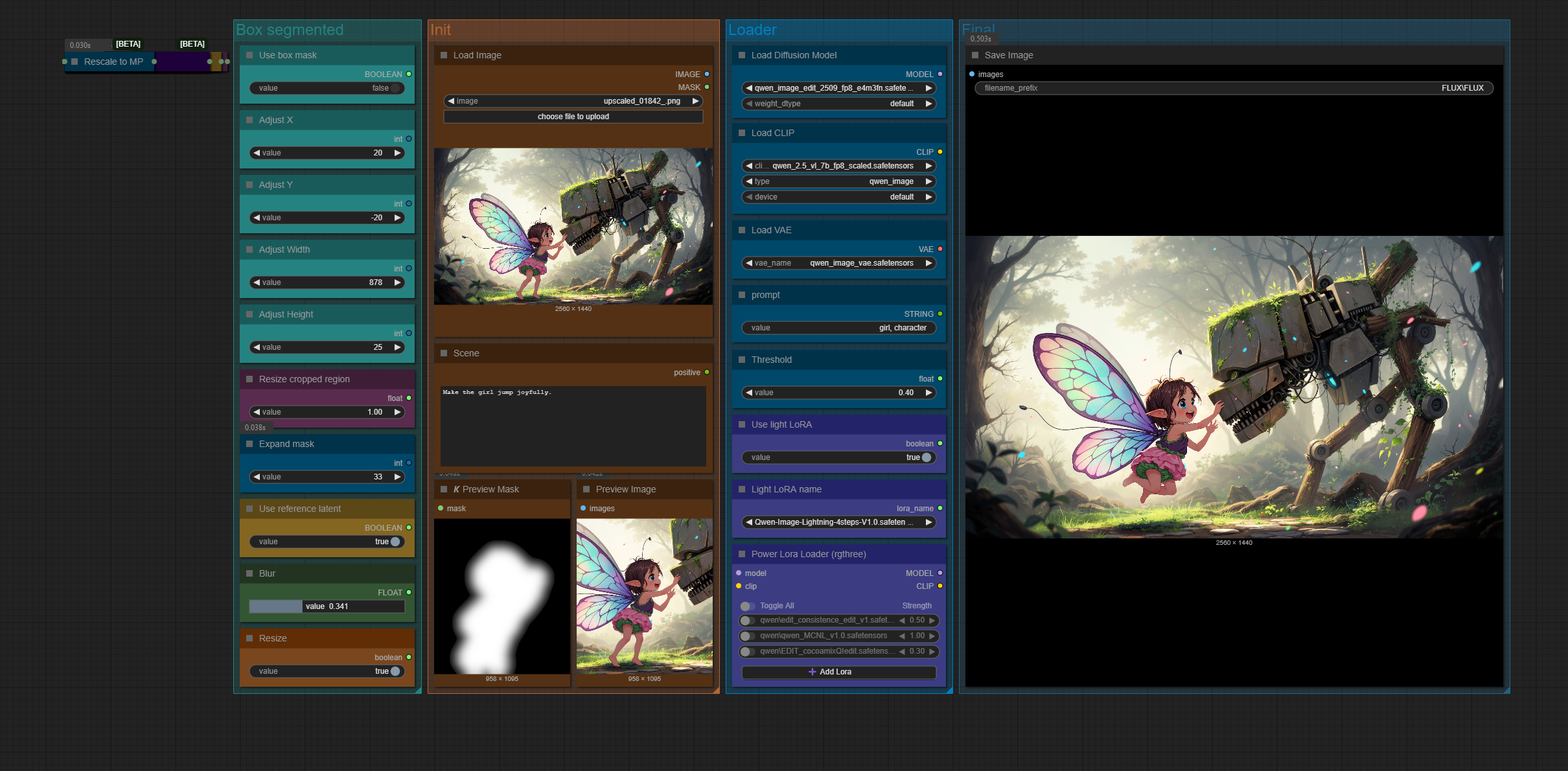
Load image and make prompt here.
Box controls
If you enable box mask, you will have a box around the segmented character. You can use the sliders to adjust the box's X and Y position, Width and Height.
Resize cropped region
You can set a total megapixel for the cropped region the sampler is going to work with. You can disable resizing by setting the Resize node to False.
Expand mask
You can set manual grow to the segmented region.
Use reference latent
Use the reference latent node from old Flux / image edit workflows. It works well sometimes depending on the model / light LoRA / and cropped are used, sometimes it produces worse results. Experiment with it.
Blur
You can grow the masked are with blur, much like feather. It can help keeping the borders of the changes more consistent, I recommend using at least some blur.
Loader nodes
Load the models, CLIP and VAE.
Prompt and threshold
This is where you set what to segment (eg. Character, girl, car), higher threshold means higher confidence of the segmented region.
LoRA nodes
Decide to use light LoRA or not. Set the light LoRA and add addition ones if you want.
Tags
Related Models
Similar AI models you may like
ON-THE-FLY 实时生成!Wan-AI 万相/ Wan2.1 Video Model (multi-specs) - CausVid&Comfy&Kijai - workflow included

【WAN2.1】IMG to VIDEO

ComfyUI Image Workflows
WAN 2.2 Workflow T2V-I2V-T2I (Kijai Wrapper)
![[Lah] Mysterious | Qwen update](https://image.civitai.com/xG1nkqKTMzGDvpLrqFT7WA/b8311d6a-6426-4b4c-9c2d-92cc150d29bb/original=true/109006828.jpeg)
[Lah] Mysterious | Qwen update

Hunyuan 🌻 AllInOne

Moody Simple Zimage Turbo/Distilled Workflow
