Prompt Extractor

About this model
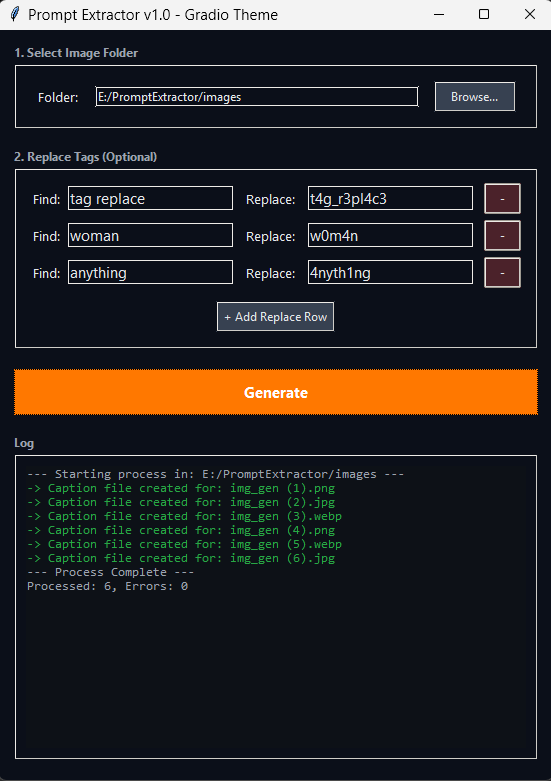
Simplify the work of creating datasets made with generated images, extracting the original prompt from each image and saving them in txt files with the same name in the same folder. With automatic tag replacement option.
1-Click Prompt Extractor for Datasets
This tool extracts the original generation prompt from all your AI images and instantly creates a corresponding .txt file with the same name, turning a folder of generated images into a training-ready dataset with a single click.
Supported Formats: .png, .jpg, .jpeg, and .webp
Compatible Metadata: AUTOMATIC1111, ComfyUI, ForgeUi, and more.
Core Features
1-Click Extraction: Processes an entire folder of mixed-format images, creating a clean .txt caption for each one.
Dynamic Find & Replace: A simple interface allows for multiple, simultaneous text replacements. Perfect for adding trigger words or cleaning up tags across your entire dataset in one pass.
Intelligent Cleaning:
A1111/ForgeUi: Automatically removes negative prompts and generation settings.
ComfyUI: Parses the complex workflow data to isolate and save only the main positive prompt.
Robust Metadata Reading: Built with a powerful backend (ExifTool) to correctly read and decode prompts from all file types, avoiding garbled text errors.
Simple GUI: A clean, standalone application. No command-line or coding knowledge is needed.
How to Use
Download the PromptExtractor_v1.zip
Unzip the folder to any location on your computer.
Double-click the Run Extractor shortcut to launch the application.
That's it. The tool is fully portable and ready to go.
Related Models
Similar AI models you may like

Hand Detailer/Segmentation - ADetailer
CLIP-L & CLIP-G Full FP32 (Zer0Int & Simulacrum)

【TOOL】ComfyUI Installer

ComfyUI inpaint workflow | Updated for anima
ComfyUI Multi-Subject Workflows

GTM ComfyUI workflows including Upscaler, Detailer, Cascade, SDXL and SD1.5
SingularUnity Super Simple Workflows - Wan I2V 60FPS + Upscale / Hunyuan V2V 48FPS + Upscale.
