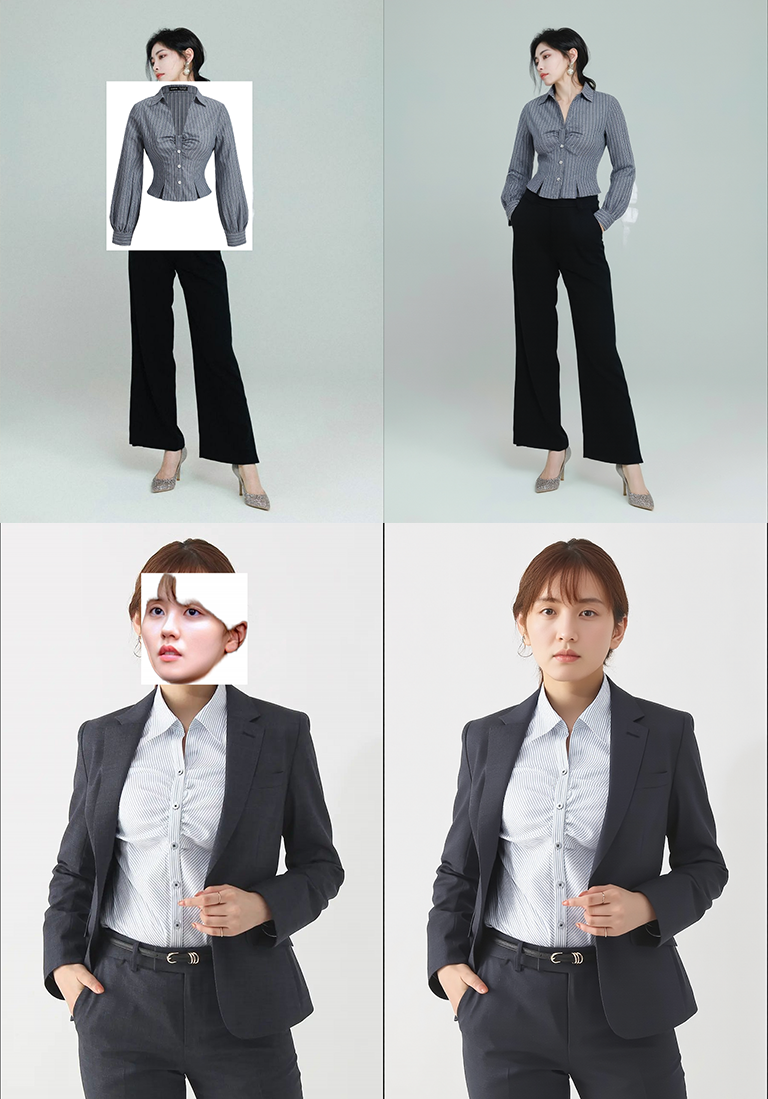
Place & Composite(Kontext)
About this model
Hey friends, great news 🎉 If you sign up on RunningHub with Gmail, you’ll get 1000 free credits and can run this workflow right away! All nodes and models are already integrated, so you don’t have to worry about missing files or errors — super fast and convenient.
Workflow Link: workflow leverages KONTEXT to plausibly place and blend objects into people or scenes. Its key strength is the CANVAS node, which lets you intuitively position and resize the object directly on the image. Limitation (outfit replacement): the inserted garment must fully occlude the clothing on the base subject. Because coverage depends on pose, many poses won’t allow a perfect clothing swap.
First, use “加載” in the FastCanvas node to place the product onto the background image. Adjust its size and position with the mouse and scroll wheel.
When ready, click the blue-green “Run” button in the top-right corner to execute the workflow. The system will automatically blend the product into the background, matching lighting and shadows for a natural and harmonious result.
I’ve highlighted some important points in the notes—please take a look.
The LoRAs needed for this workflow are as follows:
place it:
it here:
Tags
Related Models
Similar AI models you may like
ON-THE-FLY 实时生成!Wan-AI 万相/ Wan2.1 Video Model (multi-specs) - CausVid&Comfy&Kijai - workflow included

【WAN2.1】IMG to VIDEO

ComfyUI Image Workflows
WAN 2.2 Workflow T2V-I2V-T2I (Kijai Wrapper)

Hunyuan 🌻 AllInOne

Moody Simple Zimage Turbo/Distilled Workflow
