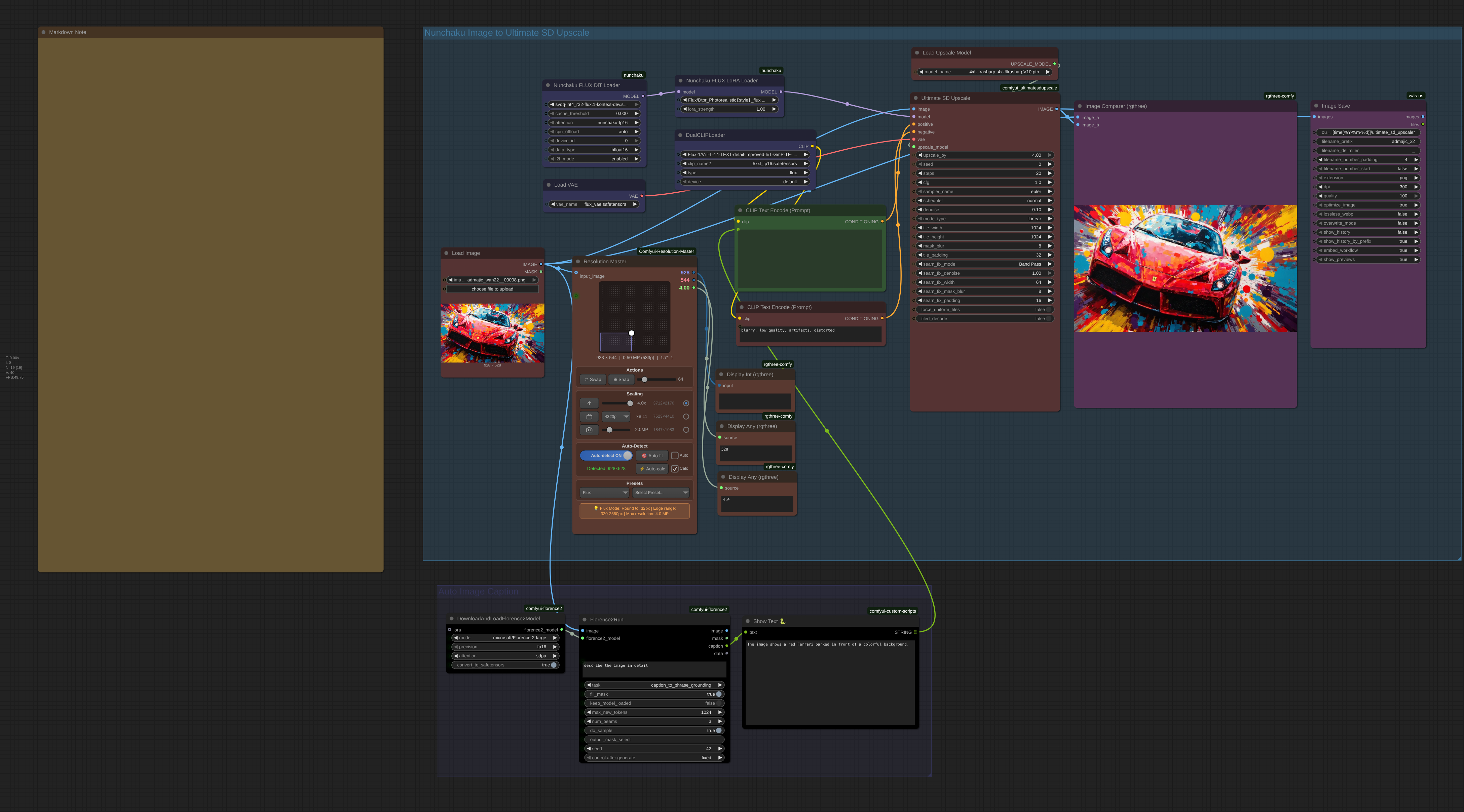
Flux Nunchaku Ultimate SD Upscale Workflow

About this model
# 🚀 SD Ultimate Upscaler with Nunchaku Setup Guide
This guide covers the complete setup for the enhanced SD Ultimate Upscaler workflow with Nunchaku, including Florence2 automatic captioning for optimal results.
## 🔧 Prerequisites
- ComfyUI installed and working
- NVIDIA GPU with 8GB+ VRAM (12GB+ recommended)
- CUDA 12.6+ (12.9 recommended)
## 📦 Custom Nodes Installation
### Required Nodes
- [ComfyUI_UltimateSDUpscale](
Enables tiled upscaling for high-resolution images
- [ComfyUI-nunchaku](
Quantized Flux models for blazing speed
- [ComfyUI-Florence2](
Automatic image captioning for better upscaling prompts
- [rgthree-comfy](
Image comparison tools
- [was-node-suite-comfyui](
Advanced save options
### Installation
- Clone all repositories into ComfyUI/custom_nodes/
- Restart ComfyUI after installation
## 📁 File Structure & Model Downloads
### Directory Layout
```
ComfyUI/
├── models/
│ ├── checkpoints/ # Nunchaku models
│ ├── clip/ # Text encoders
│ ├── vae/ # VAE models
│ ├── upscale_models/ # AI upscalers
│ └── loras/ # LoRA models (optional)
```
### 🤖 Nunchaku Models
Source: mit-han-lab/nunchaku-flux.1-dev
- RTX 20s/30s/40s: svdq-int4_r32-flux.1-kontext-dev.safetensors
- RTX 50 series: svdq-fp4_r32-flux.1-kontext-dev.safetensors
- Place in: models/checkpoints/
### 📝 Text Encoders
Source: comfyanonymous/flux_text_encoders
- t5xxl_fp16.safetensors (~9.79GB)
- ViT-L-14-TEXT-detail-improved-hiT-GmP-TE-only-HF.safetensors (~246MB)
- Place in: models/clip/
### 🎨 VAE Model
Source: black-forest-labs/FLUX.1-schnell
- flux_vae.safetensors (~335MB)
- Place in: models/vae/
### 🔍 Upscaler Models
Recommended Options:
- 4x_NMKD-Siax_200k.pth
- 4x-UltraSharp.pth
- RealESRGAN_x4plus.pth
- Place in: models/upscale_models/
### 🎯 LoRA Models (Optional)
- Photorealistic LoRAs for enhanced quality
- Place in: models/loras/Flux/
## 🧠 Florence2 Setup
### Model Download
Florence2 will auto-download the first time you run the workflow:
- Model: microsoft/Florence-2-large
- Size: ~1.5GB
- Purpose: Automatic image analysis and prompt generation
## 📋 Complete Workflow Features
### 🎨 Workflow Components
| Node | Purpose | Key Settings |
|------|---------|--------------|
| LoadImage | Input your image | Support for various formats |
| Florence2 | Auto-generate prompts | Analyzes image content automatically |
| NunchakuFluxDiTLoader | Load quantized model | INT4/FP4 variants available |
| NunchakuFluxLoraLoader | Apply LoRA enhancements | Optional for style improvement |
| UltimateSDUpscale | Main upscaling engine | Tiled processing with seam fixing |
| Image Comparer | Before/after comparison | Side-by-side visual comparison |
## ⚙️ Ultimate SD Upscaler Settings (From Actual Workflow)
### 🎯 Current Workflow Settings
| Parameter | Current Value | Purpose | Alternative Options |
|-----------|---------------|---------|-------------------|
| upscale_by | 2.0 | Upscaling factor | 4.0, 6.0, 8.0 for higher scaling |
| steps | 20 | Quality steps | 12-16 (faster), 26+ (max quality) |
| cfg | 1.0 | Must stay 1.0 | Never change for Flux models |
| denoise | 0.1 | Conservative enhancement | 0.15-0.30 for more changes |
| sampler | "euler" | Sampling method | dpmpp_2m, dpmpp_sde alternatives |
| scheduler | "normal" | Noise scheduling | karras, exponential options |
### 🧩 Tile Processing Settings
| Parameter | Current Value | Purpose | VRAM Optimization |
|-----------|---------------|---------|-------------------|
| tile_width/height | 1024 | Processing chunks | 768 (8-10GB), 512 (6-8GB) |
| mask_blur | 8 | Blend tile edges | 12-16 for softer blending |
| tile_padding | 32 | Tile overlap | 48-64 for better seams |
### 🔧 Seam Fixing Settings
| Parameter | Current Value | Purpose | When to Adjust |
|-----------|---------------|---------|----------------|
| seam_fix_mode | "Band Pass" | Fix tile boundaries | "None" for speed, "Half Tile" alternative |
| seam_fix_denoise | 1.0 | Seam blending strength | Lower if artifacts appear |
| seam_fix_width | 64 | Seam processing width | 32-128 based on image complexity |
| seam_fix_padding | 16 | Seam overlap area | Increase for complex images |
## 🎨 Florence2 Auto-Prompting
### How It Works
1. Automatic Analysis: Florence2 analyzes your input image
2. Caption Generation: Creates detailed description
3. Prompt Enhancement: Uses description for better upscaling
4. Manual Override: You can still edit the generated prompt
### Benefits
- Better Results: AI understands your image content
- Consistency: Maintains image characteristics during upscaling
- Time Saving: No need to manually describe images
- Accuracy: Preserves important visual elements
## 🚦 Optimization Presets
### ⚡ Speed Preset (Quick Preview)
```json
{
"upscale_by": 2.0,
"steps": 12,
"denoise": 0.1,
"seam_fix_mode": "None"
}
```
### ⚖️ Balanced Preset (Current Workflow)
```json
{
"upscale_by": 2.0,
"steps": 20,
"denoise": 0.1,
"seam_fix_mode": "Band Pass"
}
```
### 💎 Quality Preset (Maximum Detail)
```json
{
"upscale_by": 4.0,
"steps": 26,
"denoise": 0.2,
"seam_fix_mode": "Band Pass"
}
```
### 🔋 Low VRAM Preset (8GB GPUs)
```json
{
"tile_width": 768,
"tile_height": 768,
"steps": 16,
"seam_fix_mode": "None"
}
```
## 📱 Using the Workflow
### Step-by-Step Process
1. Load Image: Drop your image into the LoadImage node
2. Auto-Analysis: Florence2 automatically describes the image
3. Review Prompt: Check the generated caption in ShowText node
4. Adjust Settings: Modify upscaling parameters if needed
5. Run Workflow: Execute the complete pipeline
6. Compare Results: Use Image Comparer to see before/after
7. Save Output: Images automatically saved with timestamps
### 🎯 Prompt Customization
The workflow uses automatic prompting, but you can enhance it:
For Photos:
```
[Florence2 caption] + highly detailed, sharp focus, professional photography, enhanced details
```
For Art:
```
[Florence2 caption] + vibrant colors, sharp lines, professional quality, enhanced details
```
## 🔧 Troubleshooting
### 💥 Memory Issues
- Reduce tile size to 768 or 512
- Lower steps to 12-16
- Disable seam fixing temporarily
- Use smaller upscale factor (2x instead of 4x)
### 🧩 Visible Seams
- Keep "Band Pass" seam fixing enabled
- Increase tile_padding to 48-64
- Increase mask_blur to 12-16
- Check seam_fix_width is adequate (64-128)
### 🐌 Slow Performance
- Reduce steps to 12-16
- Set seam_fix_mode to "None"
- Use 2x upscaling instead of 4x+
- Increase tile size if VRAM allows
### 🎭 Florence2 Issues
- First run takes longer (model download)
- Restart ComfyUI if Florence2 fails to load
- Check internet connection for initial download
## ⏱️ Performance Benchmarks
| GPU | VRAM | Settings | Processing Time |
|-----|------|----------|-----------------|
| RTX 4090 | 24GB | 2x upscale, 1024px tiles, 20 steps | 15-30s |
| RTX 4080 | 16GB | 2x upscale, 1024px tiles, 16 steps | 25-45s |
| RTX 3080 | 10GB | 2x upscale, 768px tiles, 16 steps | 45-75s |
| RTX 3070 | 8GB | 2x upscale, 768px tiles, 12 steps | 60-90s |
## 🎁 Workflow Advantages
### 🚀 Speed Benefits
- Nunchaku quantization: 3-5x faster than standard Flux
- Smart tiling: Efficient memory usage
- LoRA integration: Enhanced quality without speed loss
### 🎯 Quality Features
- Florence2 analysis: Intelligent prompt generation
- Seam fixing: Professional tile blending
- Comparison tools: Easy before/after evaluation
- Flexible scaling: 2x to 8x upscaling options
### 🛠️ User Experience
- Automatic workflow: Minimal manual input required
- Visual feedback: Image comparison built-in
- Organized output: Timestamp-based file naming
- Memory efficient: Works on consumer GPUs
***
🎯 This enhanced workflow combines Nunchaku's speed, Florence2's intelligence, and Ultimate SD Upscaler's quality for professional results with minimal setup
Related Models
Similar AI models you may like
ON-THE-FLY 实时生成!Wan-AI 万相/ Wan2.1 Video Model (multi-specs) - CausVid&Comfy&Kijai - workflow included

【WAN2.1】IMG to VIDEO

ComfyUI Image Workflows
WAN 2.2 Workflow T2V-I2V-T2I (Kijai Wrapper)

Hunyuan 🌻 AllInOne

Moody Simple Zimage Turbo/Distilled Workflow
