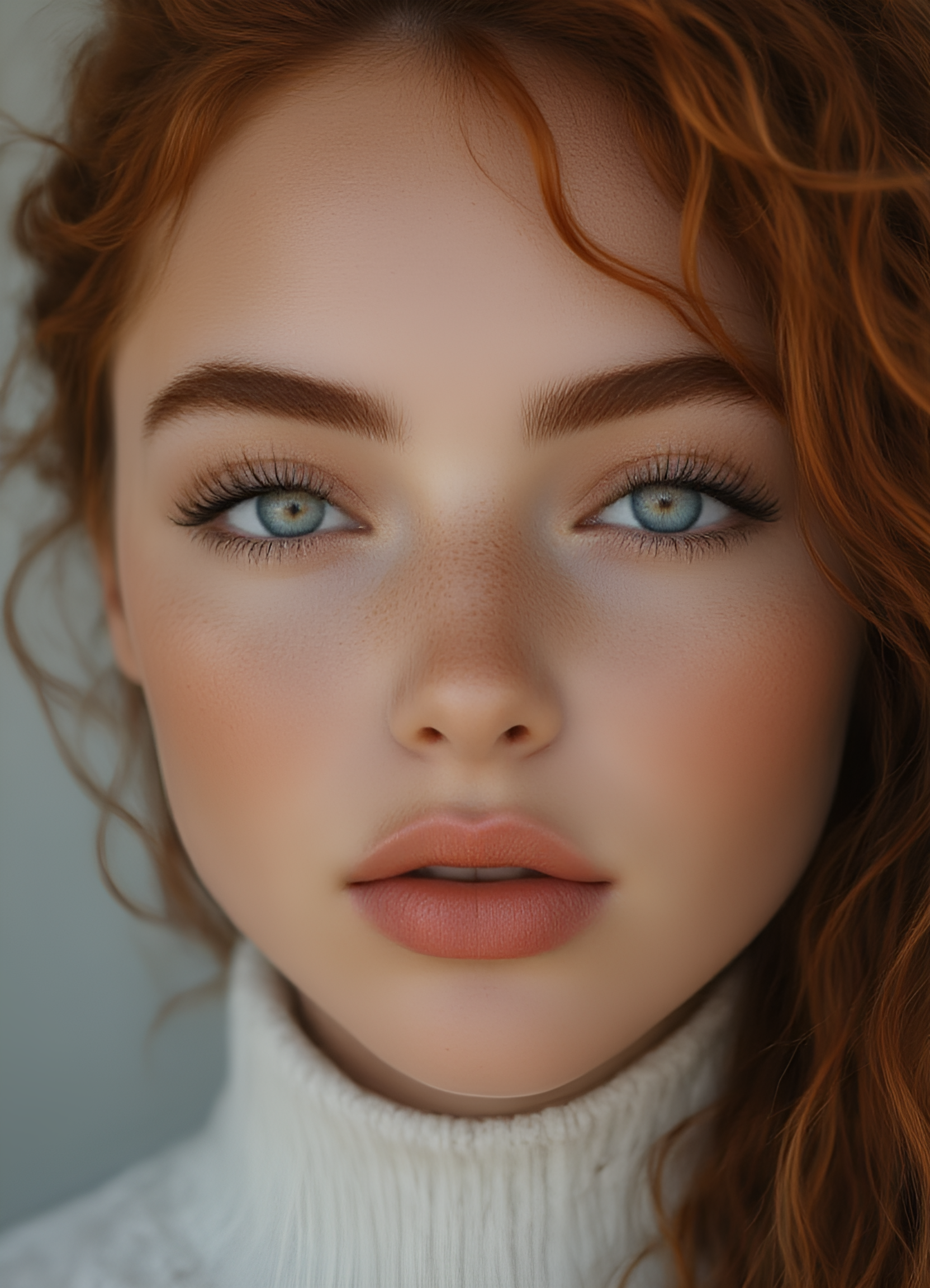
eye concept for Flux v1
Trained Words
About this model
Eye Concept Flux LoRA | Hyper-Realistic Iris Detail
The definitive eye-detail LoRA for Flux models (requires a Style LoRA in most cases).
Eye Concept is a detail specialist that injects ultra-high-resolution, photorealistic iris structure into human eyes: crisp limbal rings, internal fiber detail, and natural specular reflections/catchlights.
This LoRA is not a style LoRA. For consistent photoreal output, it should usually be paired with a style-defining realism/cinematic LoRA.
Key Features
Universal Flux Compatibility: Works with Flux and Flux-compatible checkpoints.
Detail Specialist: Focused on iris texture, reflections, and internal fiber structure.
Style Control via Pairing: Pair with a realism/cinematic style LoRA to avoid comic/stylized drift.
Bonus Micro-Detail (optional): Can enhance skin micro-detail (freckles / sun-kissed look) when prompted.
Usage (Recommended Setup)
Base Model: Flux or any compatible checkpoint
Trigger Word: eye_concept
Recommended Weights
Eye Concept Weight: 0.5 – 0.7 (start at 0.6)
Realism/Style LoRA (optional but recommended): 0.6 – 0.85
Practical Presets (how I use it)
Preset A — General Photoreal (recommended)
Use a realism/style LoRA to control the overall look.
<lora:flux_realism_or_style:0.7><lora:eye_concept:0.55–0.65>
Example:photorealistic portrait, <lora:flux_realism_or_style:0.7>, <lora:eye_concept:0.6>, cinematic lighting, sharp iris texture, natural catchlight
Preset B — Character LoRA Mode (often works without realism LoRA)
When using a strong character LoRA, I often skip the realism LoRA.
<lora:CHARACTER:0.7–1.0><lora:eye_concept:0.35–0.55>
Example:photorealistic portrait, <lora:CHARACTER:0.85>, <lora:eye_concept:0.45>, natural lighting, sharp iris texture, natural catchlight
Preset C — Hero Close-Up
For macro/close-ups where you want maximum iris detail.
<lora:flux_realism_or_style:0.65><lora:eye_concept:0.65–0.75>
Example:macro close-up portrait, <lora:flux_realism_or_style:0.65>, <lora:eye_concept:0.7>, shallow depth of field, sharp iris texture, natural catchlight
Bonus Features Mini Prompt (Sun-kissed Skin + Freckles)
Use this when you want the extra micro-skin detail effect:
close-up portrait, <lora:flux_realism_or_style:0.7>, <lora:eye_concept:0.55>, sun-kissed skin, natural freckles, realistic skin texture, soft daylight, sharp iris texture
Tip: Trigger it as plain text: sun-kissed skin (no markdown/asterisks).
Important Notes (style + skin LoRAs)
Why a style LoRA is recommended: Eye Concept is a detail LoRA. Without a style/realism LoRA, Flux may drift toward comic/stylized output depending on your base checkpoint and prompt.
About “realistic skin” LoRAs: I generally avoid stacking heavy realistic-skin LoRAs with
eye_concept, because both enhance high-frequency detail and can become overly sharp when combined. If you do stack them, lower one of the weights (e.g., reduceeye_conceptby ~0.1).
Related Models
Similar AI models you may like
Not Artists Styles for Pony Diffusion V6 XL

Hands XL + SD 1.5 + F1D + Pony + Illustrious + zit

Velvet's Mythic Fantasy Styles | Flux + Pony + illustrious

NSFW MASTER

Realistic Skin Texture style (Detailed Skin) XL + SD1.5 + F1D + Pony + Illu + ZIT + ZIB

Stabilizer IL/NAI/CK

Aesthetic Quality Modifiers - Masterpiece
