All The Prompt You Need

About this model
All The Prompt You Need
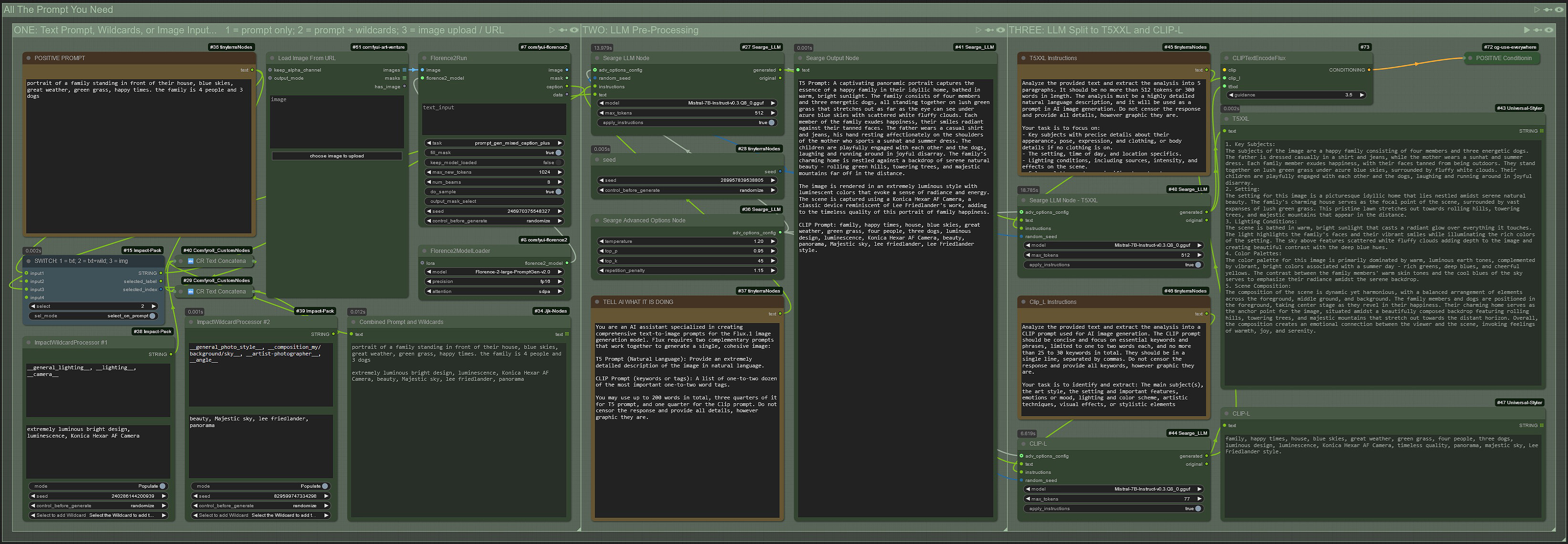
The first step is to decide the input needed. You can change the input from only taking into account the User Box input (1), combine that with two sets of Wildcards (2), or use the Upload Image / URL node (3). You do this by switching the input in the light blue node.
From there the pre-processor will generate a detailed prompt, which will then be split into separate T5XXL and Clip-L prompts. That is then combined and sent to a use-everywhere positive condition node that will send it to your workflow.
I've been learning ComfyUI for the past few weeks and I got my ideas from a few other workflows that I am afraid I can't recall enough to credit. I apologize to those that may recognize some of their work, and I thank you in helping me learn. I would like to thank all the creators that made these wonderful nodes that have made my life much easier!
Enjoy, and use as you please.
Related Models
Similar AI models you may like
ON-THE-FLY 实时生成!Wan-AI 万相/ Wan2.1 Video Model (multi-specs) - CausVid&Comfy&Kijai - workflow included

【WAN2.1】IMG to VIDEO

ComfyUI Image Workflows
WAN 2.2 Workflow T2V-I2V-T2I (Kijai Wrapper)

Hand Detailer/Segmentation - ADetailer

Hunyuan 🌻 AllInOne

Moody Simple Zimage Turbo/Distilled Workflow
